
WordPress plugin · uploads audit & safe size retirement
Every image you upload writes seven files. Nobody shows you the other six.
That is stock WordPress, before your theme registers a single size. Every registered size writes another derivative on every upload, forever, whether anything renders it or not, and there is no screen in wp-admin that shows you the result. X-Ray is that screen: what your uploads folder is made of, who registered each size, whether anything on your site references it, and a reversible way to retire the ones nothing does.
GPL-2.0 · WordPress 6.0+ · PHP 7.4+ · WooCommerce not required · Read-only audit until you arm it · No API, no account, no credits, nothing leaves your server.

- Read-only until armed
- Retires by moving, not deleting
- One Undo per operation
- Survives logout mid-run
- No API, no credits
- No banners, no nags
The problem
This is not another image compressor.
Compression is solved. There are mature, well-rated, free options, some of which run entirely on your own server. X-Ray does not compress a single byte and never will. The unsolved problem is image sizes, not image bytes. A stock install registers six sub-sizes, so one JPEG upload writes seven files. Cross the big-image threshold and core writes a scaled proxy that becomes the “full” size while keeping your true original, which makes eight. Then a theme registers four, then a gallery plugin registers three and their retina variants.
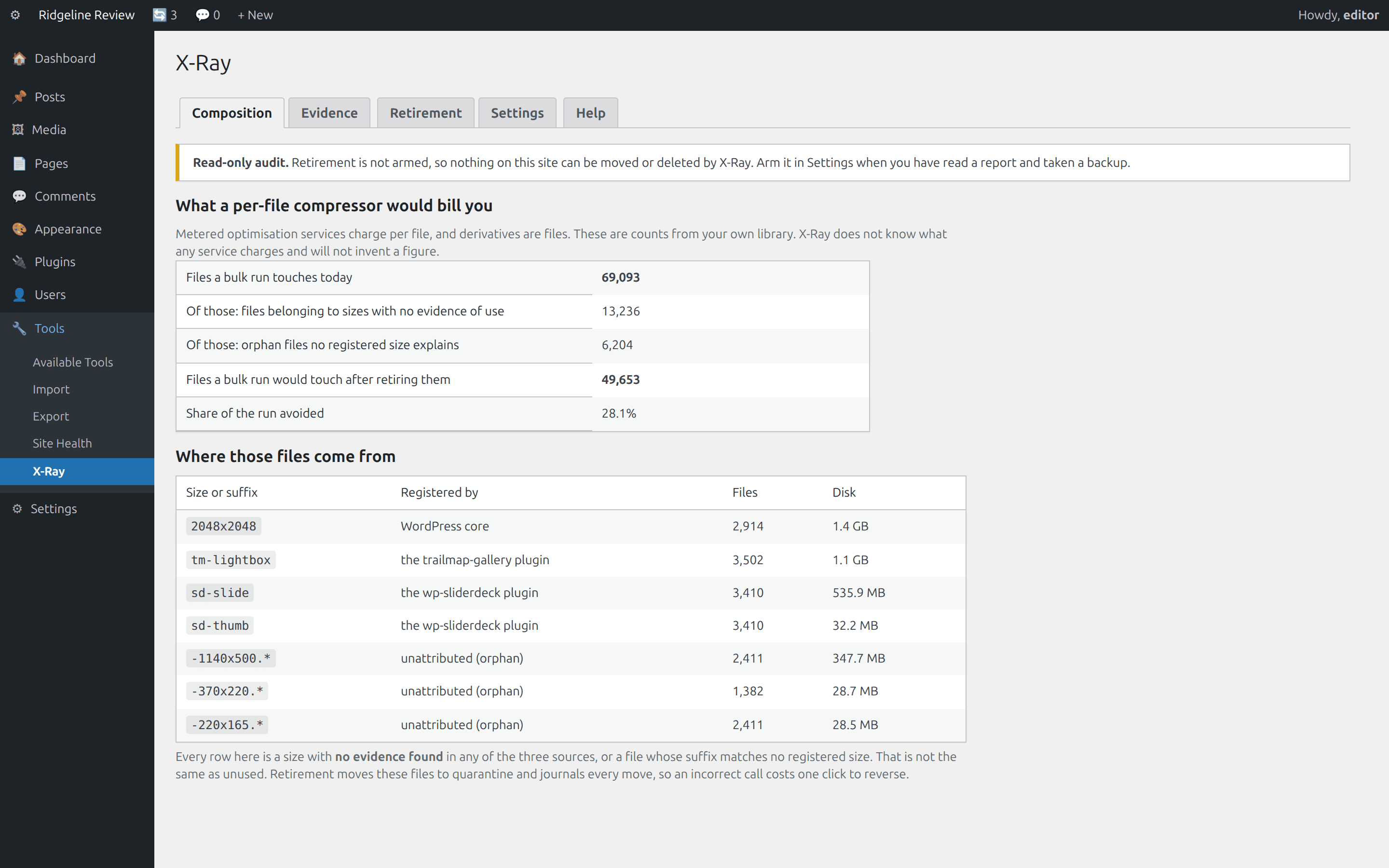
And nothing tells you. The Media Library counts attachments, not files. Disk visualisers break down by folder, and your uploads folder is organised by date while the problem is organised by size name. There is a second consequence nobody sells against: metered image-optimisation services charge per file, and each thumbnail is a file, so your optimisation bill is a function of how many sizes you have registered rather than how many photographs you uploaded.
Starts safe
Read-only until armed
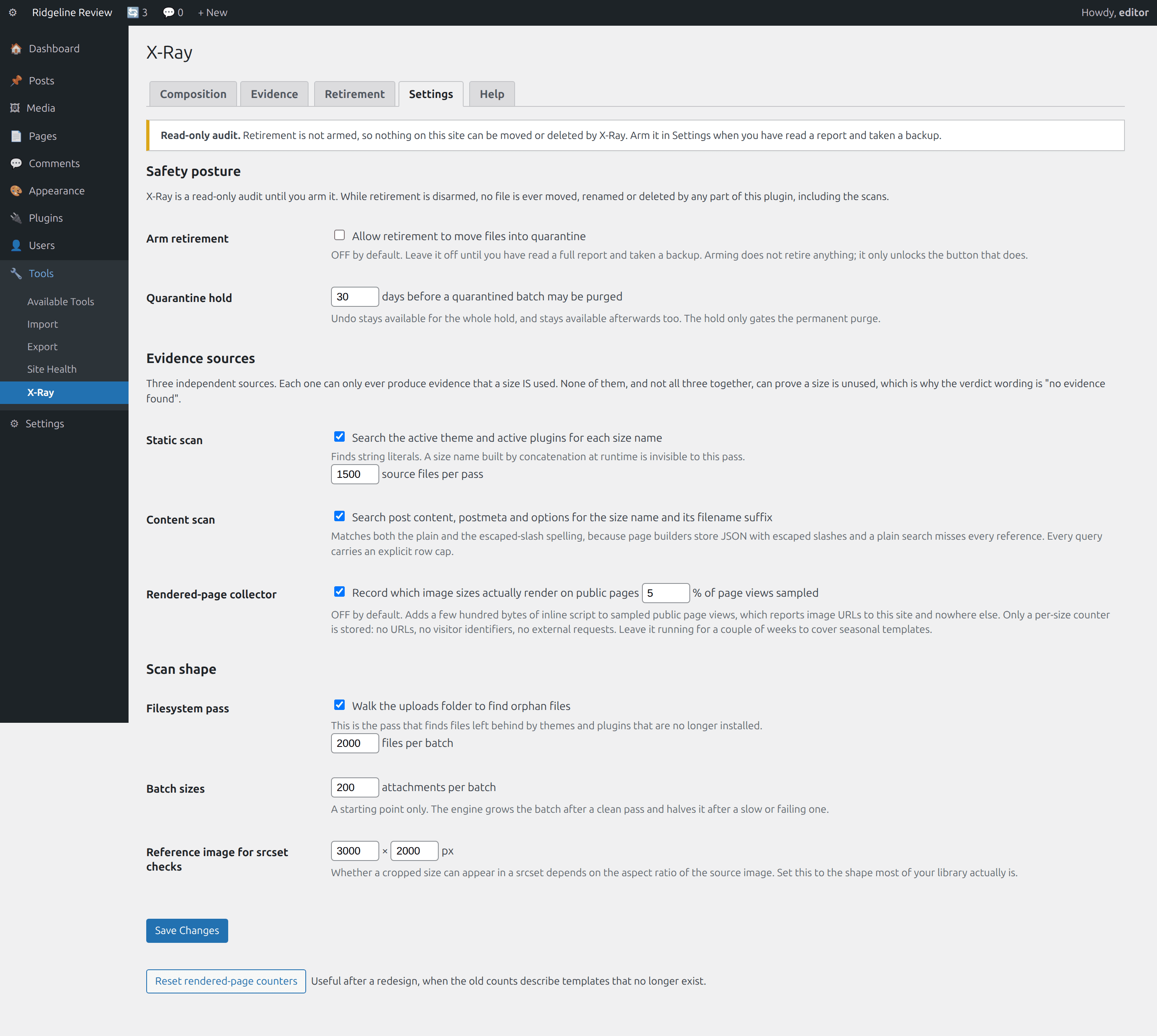
The audit never moves a file, in any mode, armed or not. Retirement is disarmed on activation and stays disarmed until you change it, thumbnail and full are permanently protected in code, and every operation has one Undo button that does not expire.
What it does
X-Ray, feature by feature.
Composition report
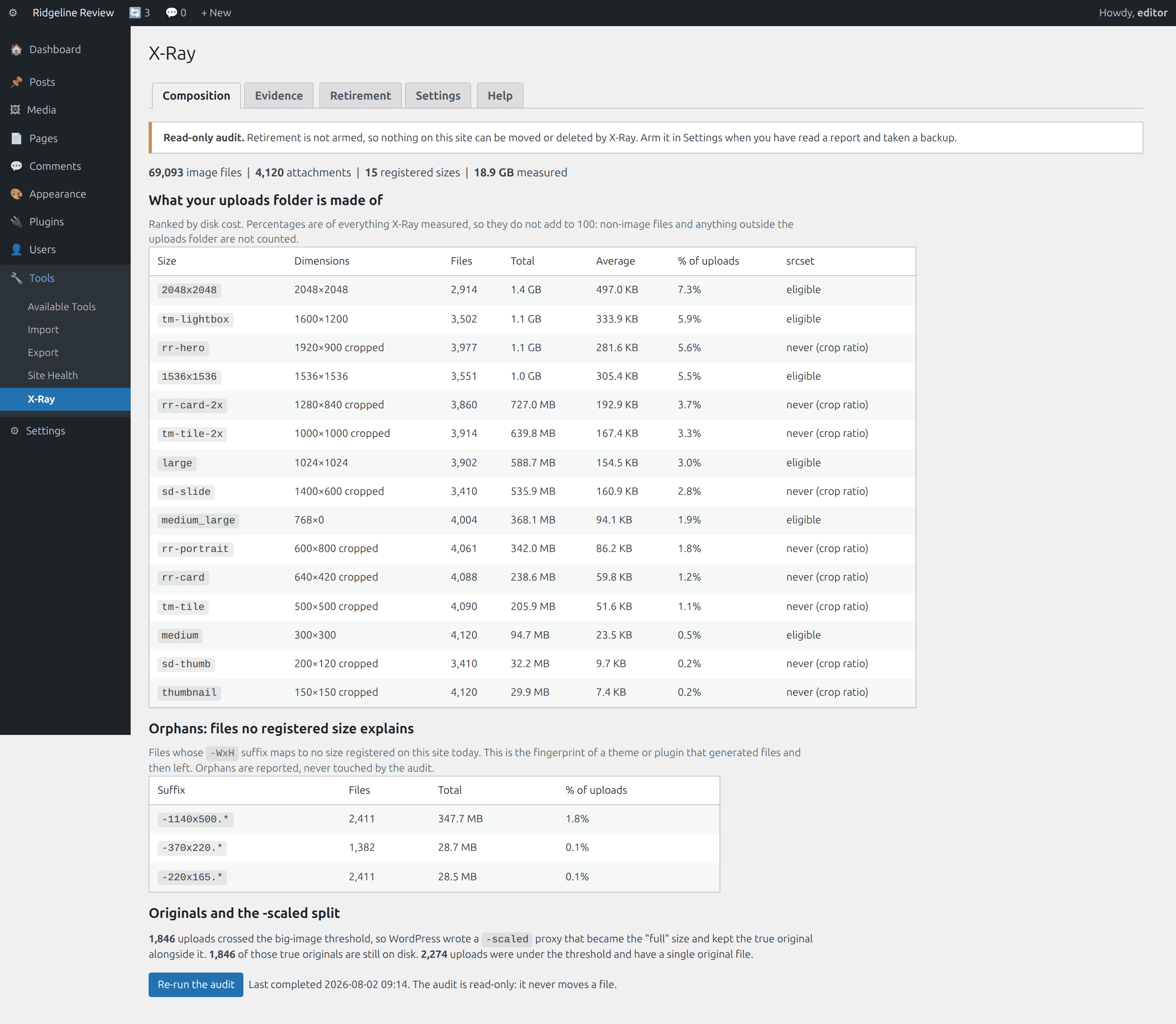
Every registered size with file count, total bytes, average bytes and share of the uploads folder, ranked by disk cost. Plus orphan files whose -WxH suffix matches no size registered today, the -scaled versus true-original split, and a flag for sizes that can never appear in a srcset.
Evidence, three sources
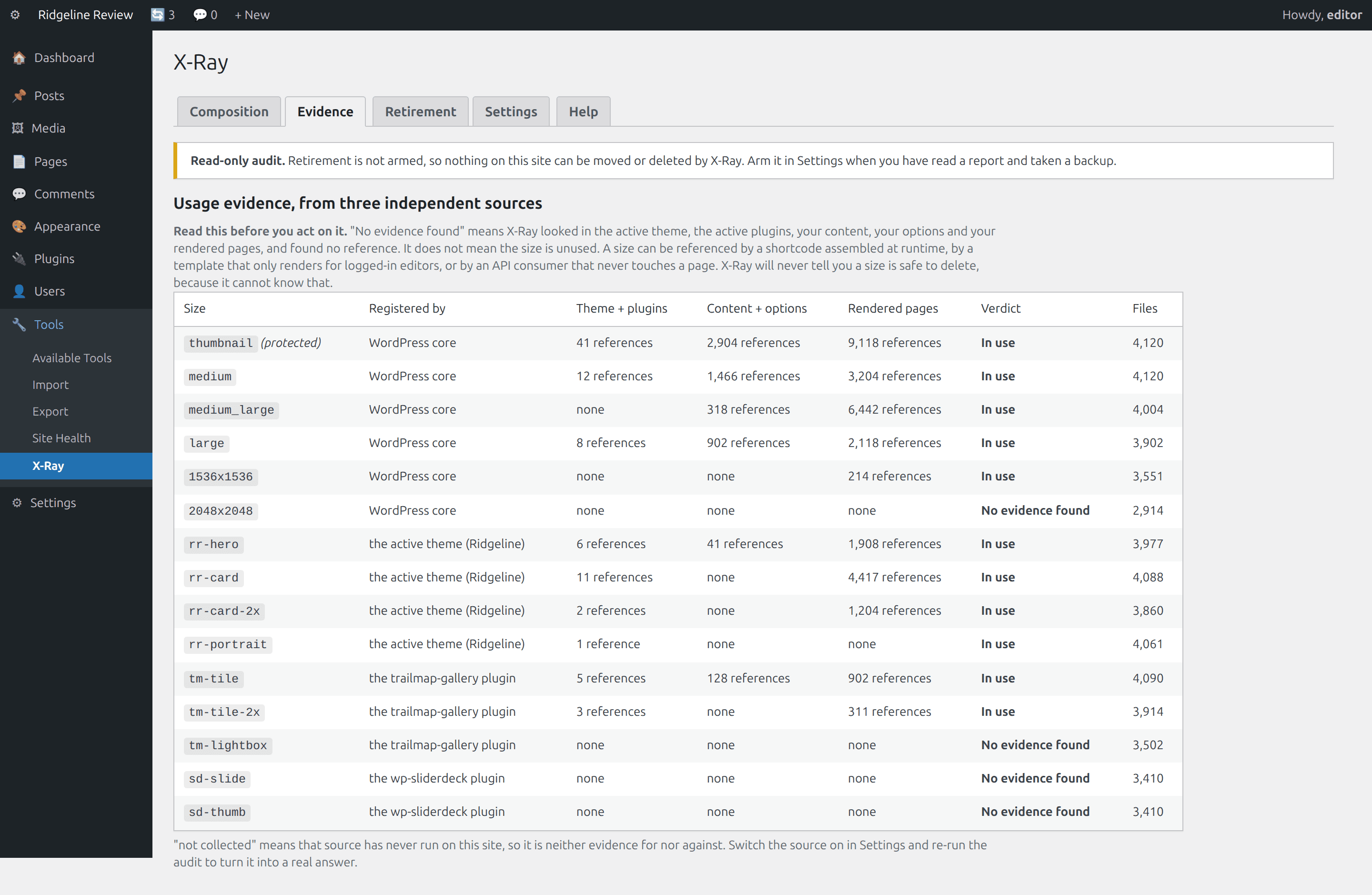
A scan of the active theme and active plugins for the size name. A scan of content, postmeta and options, matching the escaped-slash spelling page builders store as well as the plain one. And an optional sampled collector that records which images your pages actually rendered.
Provenance
Who registered each size, from a live snapshot of the load sequence plus a static scan for add_image_size() attributed by file path. No exec, no external process. A size neither mechanism explains is reported as unattributed, never guessed.
Retire, don't delete
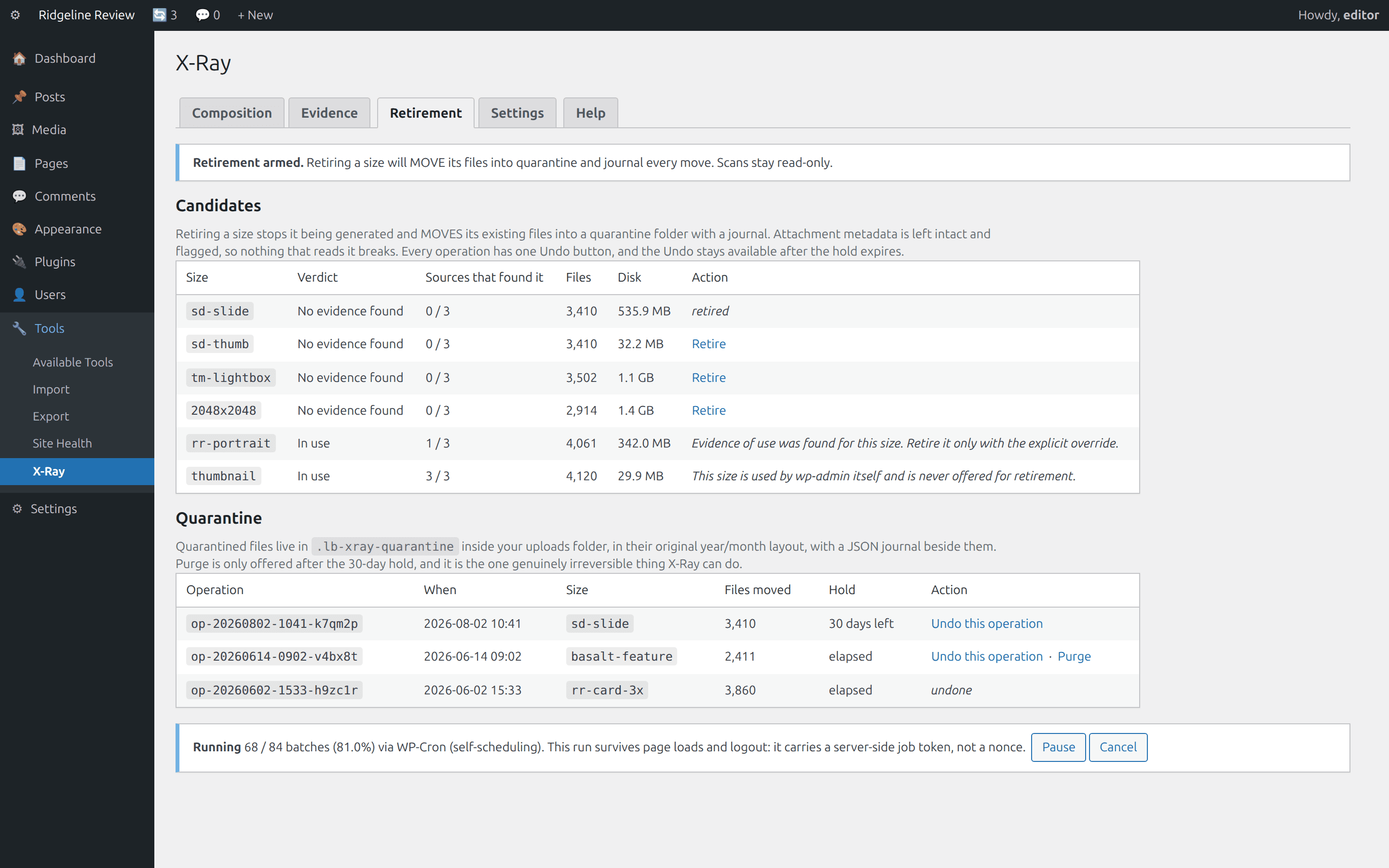
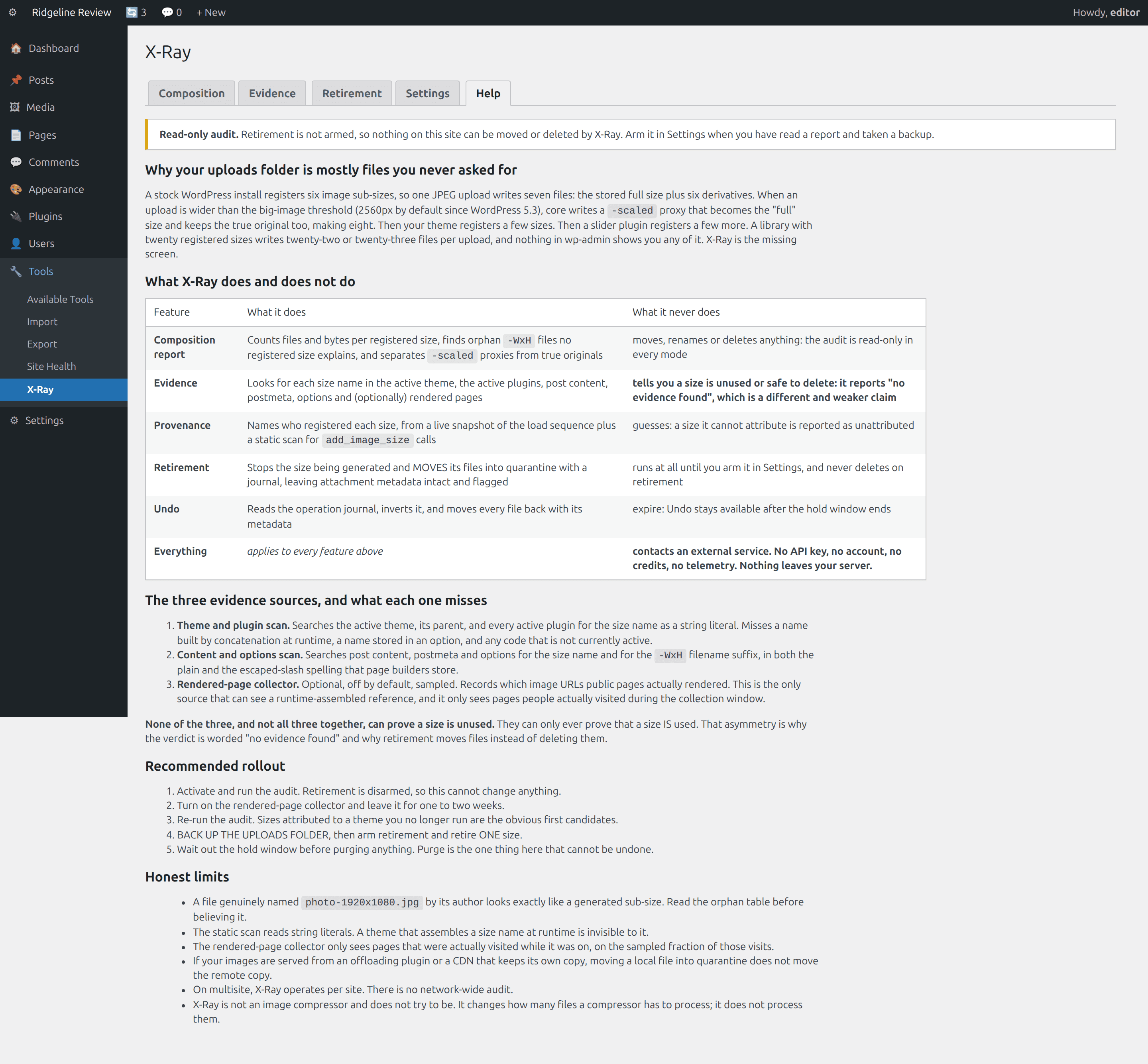
Retiring stops a size being generated and moves its files into a quarantine folder inside uploads, keeping the year/month layout. Attachment metadata stays intact and flagged, so nothing that reads it breaks. Purge is a separate action behind a hold window.
Reversible by construction
Every operation writes a JSON journal: attachment ID, size name, old path, new path, metadata delta. One Undo this operation button, which inverts the journal and moves everything back with its metadata. Undo does not expire.
A batch engine that finishes
Continuations carry a server-side job token, not a nonce, so a run survives a page reload, a logout and an overnight gap. Wall-clock and memory budgets per batch, per-item isolation, a real pause button, exponential back-off. Uses Action Scheduler if your site has it; never bundles it. No WP-CLI needed.
The specification
Two columns on purpose: what it does, and the things it is not allowed to do.
| Capability | What X-Ray does | What it never does |
|---|---|---|
| Composition | Files, bytes, average and share per registered size; orphan suffixes; the -scaled split; srcset eligibility | Move, rename or delete anything during a scan, in any mode |
| Evidence | Theme and plugin literals, content/postmeta/options in both slash spellings and row-capped, optional sampled rendered-page collector | Say “unused” or “safe to delete”, or count an unrun source as clean |
| Provenance | Live load-sequence snapshot, plus static add_image_size() attribution by file path | Guess: unexplained sizes read unattributed |
| Retirement | Unregisters the size, filters the per-upload size list, moves files to quarantine with a journal | Run at all while disarmed; delete on retirement; touch thumbnail or full |
| Undo | Inverts the journal, moves every file back with its metadata | Expire |
| Purge | Permanent delete of one operation, after the hold window, confirmed | Happen automatically, on a schedule, or on uninstall |
| Batch engine | Server-side job token, time and memory budget, per-item isolation, pause, back-off, Action Scheduler when present | Require WP-CLI, shell access, or a browser tab left open |
| Storage | Non-autoloaded options plus JSON journal files beside the quarantined files | Create a custom table, or autoload anything |
| Network | Nothing | Call an external service, require an API key, meter you, or send telemetry |
| Attention | Lives at Tools, X-Ray | Put notices on other admin pages, or ask for a review |
See it in wp-admin
Real screens, no mockup gloss.
Rendered straight from the plugin's own admin UI in a local environment, what you install is what you see.
Inside wp-admin
Composition
Every registered size ranked by disk cost, plus orphans and the -scaled split.
Inside wp-admin
Evidence
Three independent sources, the verdict, and who registered each size.
Where it fits
Honest comparisons, category by category.
No named-competitor trash talk, just what each category of tool is good at, and where this plugin earns its keep.
vs. metered compressors
Not competitors. They change bytes per file; X-Ray changes how many files there are. Run the audit, retire what nothing references, then run your bulk optimisation, and it touches fewer files.
- Credit-metered services commonly count each thumbnail as a separate billable item, which their own documentation states.
- X-Ray states the arithmetic in file counts only: it does not know what any service charges and prints no currency figure.
- Doing it the other way round means paying to compress files you are about to retire.
vs. regenerators and size pickers
A picker stops future generation but leaves every existing file on disk. A regenerator can delete unregistered sizes but cannot tell you which to unregister. No single tool in that category spans detection, provenance, reversible removal and a batch engine that finishes.
- The classic failure is a long run dying on nonce expiry with no resume; X-Ray continues on a server-side job token instead.
- Deleting “unregistered” sizes is the right operation with the wrong safety model, because the size list changes when you switch theme or deactivate a plugin.
- X-Ray moves and journals instead, with one Undo button per operation.
vs. unused-media finders
Different noun. They ask whether an image is referenced; X-Ray asks whether a size is. A photograph on your home page is very much in use while eighteen of its twenty-three files are dead weight from a theme you replaced.
- A finder's false positive removes a photograph from a live page; X-Ray's removes one derivative until you click Undo.
- Only X-Ray sees files left behind by a theme that is gone, in the orphan table.
- Run both, media finder first, so X-Ray's counts describe the library you are actually keeping.
Pricing
One price, everything included.
No tiers of crippled features, the single-site license is the whole plugin.
X-Ray, single site
One year of updates and support. Keeps working if you don't renew.
- Composition report
- Evidence, three sources
- Provenance
- Retire, don't delete
- Read-only until armed
- Manual + help tab inside wp-admin
The Nest Kit
Ledger, Holdback, X-Ray, Molt, save $67 vs. buying separately.
- All 4 paid WordPress plugins, one license
- Every WordPress plugin we ship next, included
- Same 60-day no-quibble guarantee
- Priority answers from the developers
How buying works today: secure online checkout is coming soon. Until it lands, click Buy and tell us which plugin you want, we deliver the plugin zip and an invoice by email within one business day, covered by the same 60-day guarantee.
60-day money-back guarantee
Full refund within 60 days of purchase. No questions, no forms, no hard feelings. If a plugin isn’t the right fit for your store, you shouldn’t pay for it.
The manual lives inside the plugin.
Every install ships a full Help tab in wp-admin, plus these guides in the package:
- Install
- Configuration
- Usage
- How image sizes work
- Evidence & verdicts
- Troubleshooting
- FAQ
- Changelog
- Version
- 1.0.0
- Requires
- WordPress 6.0+ · PHP 7.4+ · WooCommerce not required
- Tested up to
- WordPress 6.7 · no WooCommerce needed
- License
- GPL-2.0-or-later · your data stays on your site
Security posture: we build defensive tools, so we hold ourselves to the same bar, no external calls, capability and nonce checks on every admin action, and a direct line for reports at security@lightningbyrd.com. Reports get a human answer within one business day.
FAQ
Straight answers.
Will this delete my images?
Retirement moves files into a quarantine folder inside your uploads directory and journals every move. Purge deletes, and Purge is a separate action, gated behind a hold window (30 days by default), offered only after it elapses, and confirmed. Nothing can be moved at all until you arm retirement in Settings, and the audit is read-only even after you have.
Why does it say “no evidence found” instead of “unused”?
Because “unused” is a claim it cannot support. WordPress lets a template build a size name at runtime, so no scan can prove a size is unreferenced. Every source X-Ray has can prove a size is used; none can prove the opposite. The verdict is worded as what it is: a statement about the search. X-Ray will never tell you a size is unused or safe to delete.
Is this an image compressor?
No, and deliberately not. That space is solved and saturated. X-Ray changes how many files a compressor has to process rather than competing with it. It does not compress, convert, or serve a single byte.
Does it phone home?
No. No API, no account, no key, no credits, no telemetry, no outbound request of any kind. The optional rendered-page collector posts to a REST route on your own site and nowhere else, and stores only a per-size counter: no URLs, no visitor identifiers.
Why do long runs in other tools time out, and why does this one not?
The documented cause in this category is nonce expiry on a browser-driven loop: nonces expire, and a run longer than their lifetime dies with no resume. X-Ray continues a run with a server-side job token instead, so it survives a page reload, a logout and an overnight gap. Each batch also stops at a wall-clock budget or a memory ceiling, isolates each item so one bad file cannot end the run, and backs off after failures.
Do I need WP-CLI, shell access or WooCommerce?
None of the three. The engine is built for shared hosting with nothing but WordPress. It uses Action Scheduler when your site already has it and falls back to a self-scheduling WordPress-Cron queue when it does not. X-Ray never bundles Action Scheduler itself.
It found thousands of orphans. Are they real?
Usually, and they are usually from a theme you replaced. But read the table before acting: a photograph an author genuinely named sunset-1920x1080.jpg looks exactly like a generated sub-size by filename alone. X-Ray reconciles against attachment metadata first and only falls back to the filename shape, so on a library of hand-named files the count can be inflated. Orphans are only ever reported; the audit never touches them.
Does it work with an offloading plugin or a CDN?
The audit does and reads your local files. Retirement needs care: moving a local file into quarantine does not move a copy that lives in object storage or on a CDN origin. Check how your offloader behaves before arming retirement. This caveat is in the Help tab too.
What does it cost to run?
Nothing on the visitor path. Scans run on cron or on an explicit click, in batches with a wall-clock budget and a memory ceiling. X-Ray creates no tables, autoloads nothing, and adds only a few hundred bytes of inline script to public pages, and only if you switch the collector on.
More from the flock
The rest of the suite.
Each plugin stands alone, together they cover detection, response, prevention, and upkeep.
 $59/yr
Pulse
Store monitoring
Know the minute your store stops selling. Order-flow anomaly alerts, checkout and Store API health probes, gateway, cron, and mail watchdogs, inside WordPress, no external service.
Learn more → $49/yr
IP Shield
Fraud & abuse defense
Ban abusive customer IPs before they burn out your payment gateway, one-click bans from the order screen, automatic velocity bans, and a full audit trail.
Learn more → $49/yr
Coupon Fence
Fraud & abuse defense
A firewall for your coupon codes: stop brute-forcing, try-every-code auto-apply behavior, and first-order abuse, with leak-proof signed influencer links.
Learn more →X-Ray
Sleep better by tonight.
Install X-Ray, watch it in read-only until armed against your real traffic, and arm it when you've seen the receipts.