
WordPress plugin · WooCommerce-aware maintenance
Your store is hauling gigabytes it will never use again.
Every WooCommerce store runs a background queue that logs everything and keeps failed jobs forever. Add expired sessions, dead transients and megabytes of options loaded on every page view, and stores get slower every month while backups balloon. Featherweight scans it, shows you the weight, and cleans only what is provably dead.
GPL-2.0 · WordPress 6.0+ · PHP 7.4+ · WooCommerce recommended, not required · Dry-run by default · Orders, products & customers never touched.

- Dry-run default
- Retention-gated deletes
- Batched with time budget
- Full run history
- Autoload undo list
- Adds zero tables itself
The problem
The bloat nobody budgeted for.
Public GitHub issues document WooCommerce background-queue tables reaching tens of gigabytes, tens of millions of completed and failed rows plus logs, on ordinary stores. Documented reports show admin pages going from 8 seconds to under 2 after clearing autoload bloat.
None of this is misconfiguration; it's the default behavior of a busy store. Generic cleaners do revisions and transients well, and miss the specifically-WooCommerce weight: queue tables whose failed rows core never purges, expired sessions, and the options loaded into memory on every single page view.
Starts safe
Dry-run by default
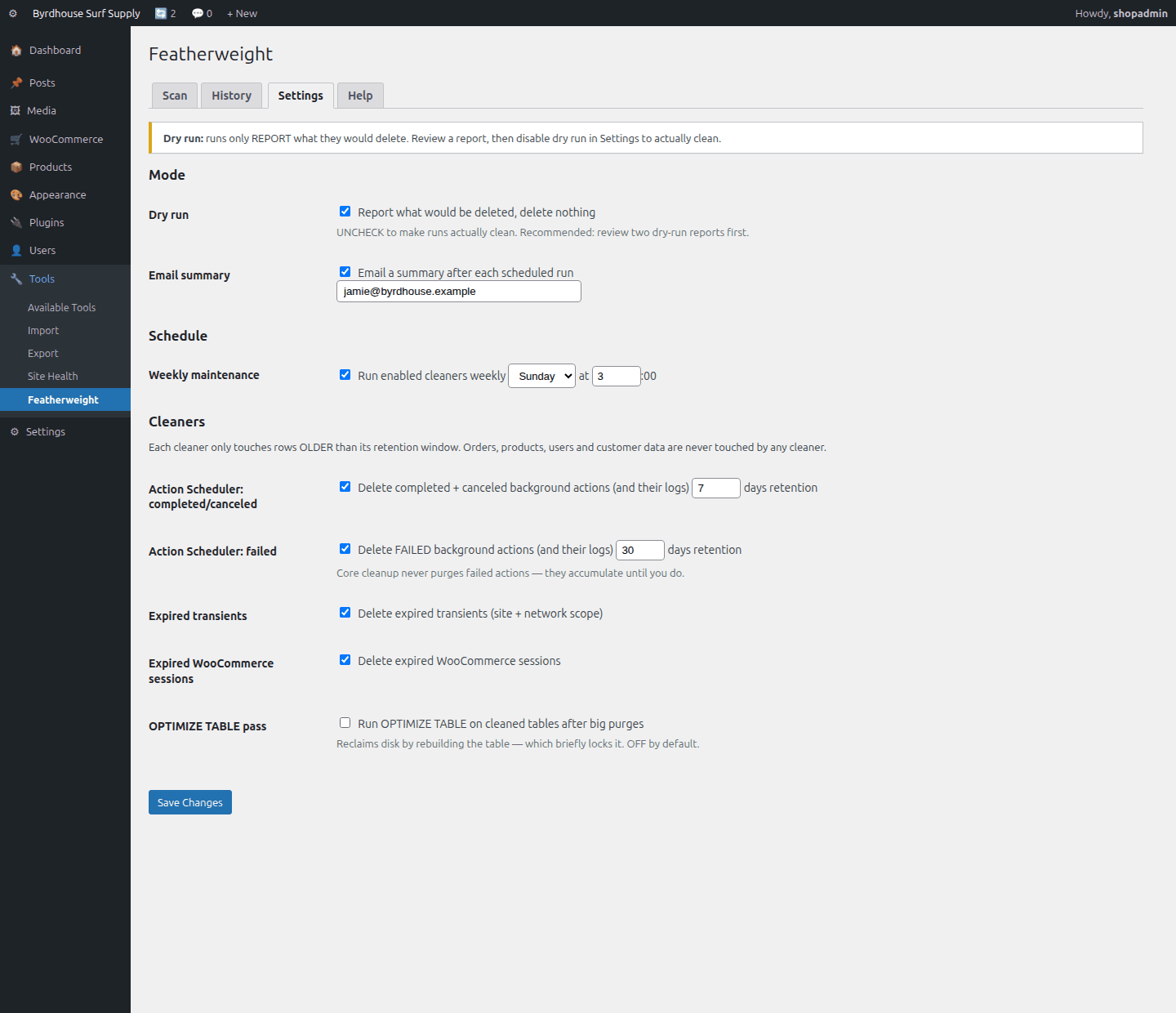
Every cleanup only reports what it would delete until you untick dry-run. Plus hard-coded guarantees: nothing younger than its retention, pending jobs sacred, and orders, products, customers and users never touched at all.
What it does
Featherweight, feature by feature.
The scan
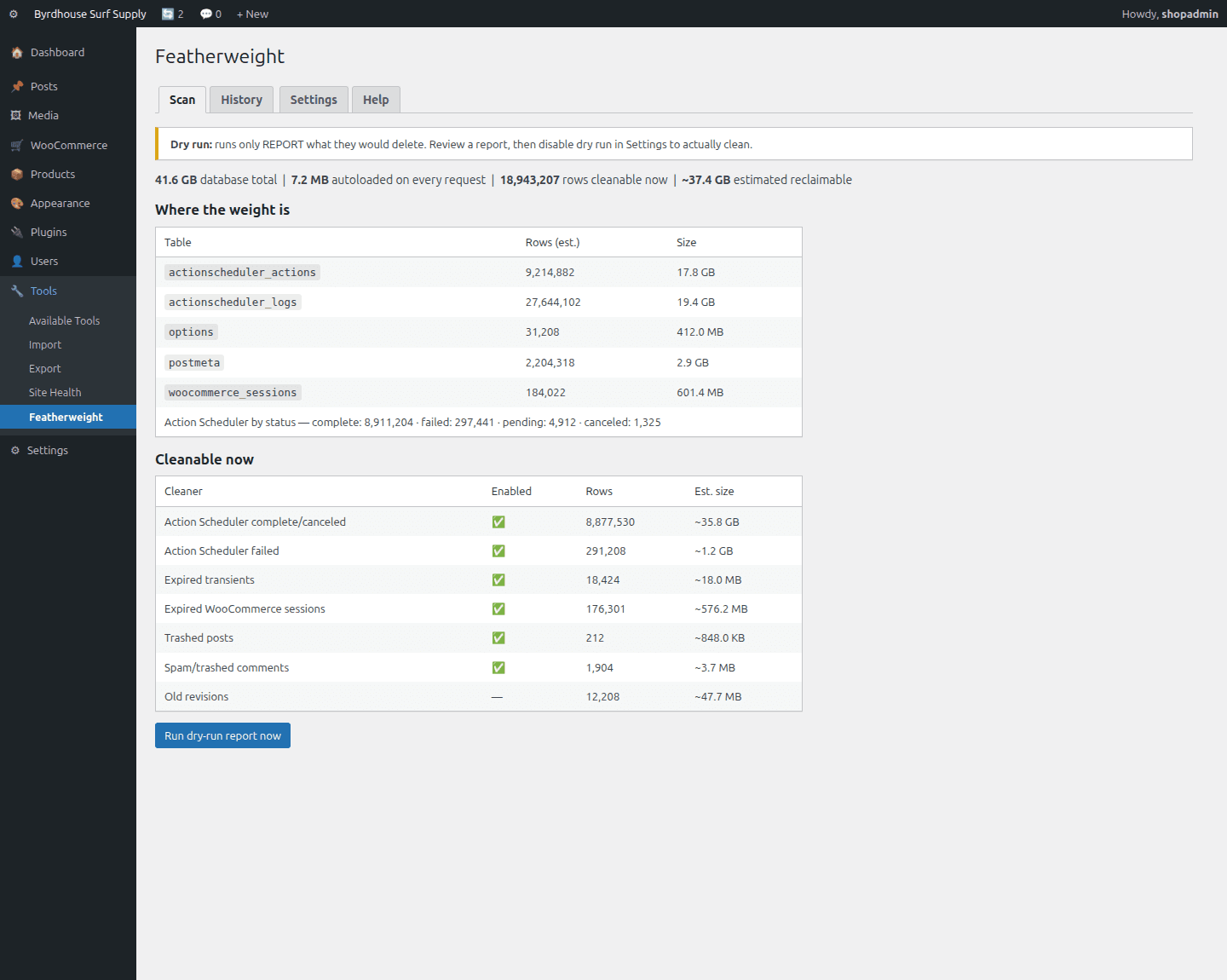
One click: table sizes, queue rows by status (failed called out), total autoload weight, expired transients and sessions, trash and spam, and an honest “estimated reclaimable” figure.
Seven cleaners
Queue complete/canceled, queue failed, expired transients, expired sessions, trash, spam, old revisions, each independently toggleable with its own retention window.
Autoload advisor
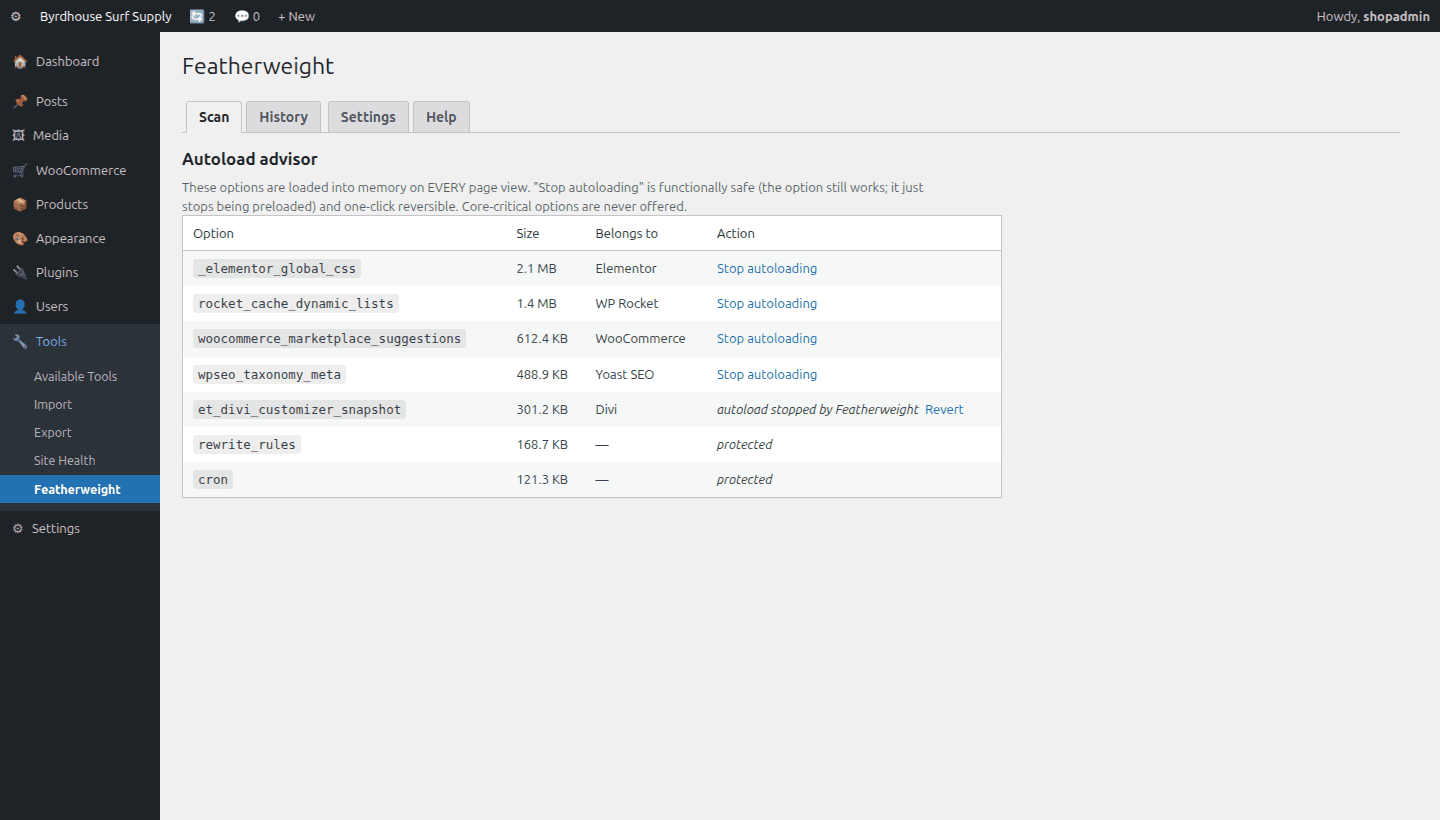
The options loaded into memory on every page view, sorted by weight and identified by plugin where possible, with a functionally-safe “stop autoloading” that's one-click reversible. Core-critical options never offered.
Hard safety rules
Dry-run default. Nothing younger than its retention. Pending and in-process jobs sacred. And regardless of any setting: orders, products, customers and users are never touched.
Never hangs your site
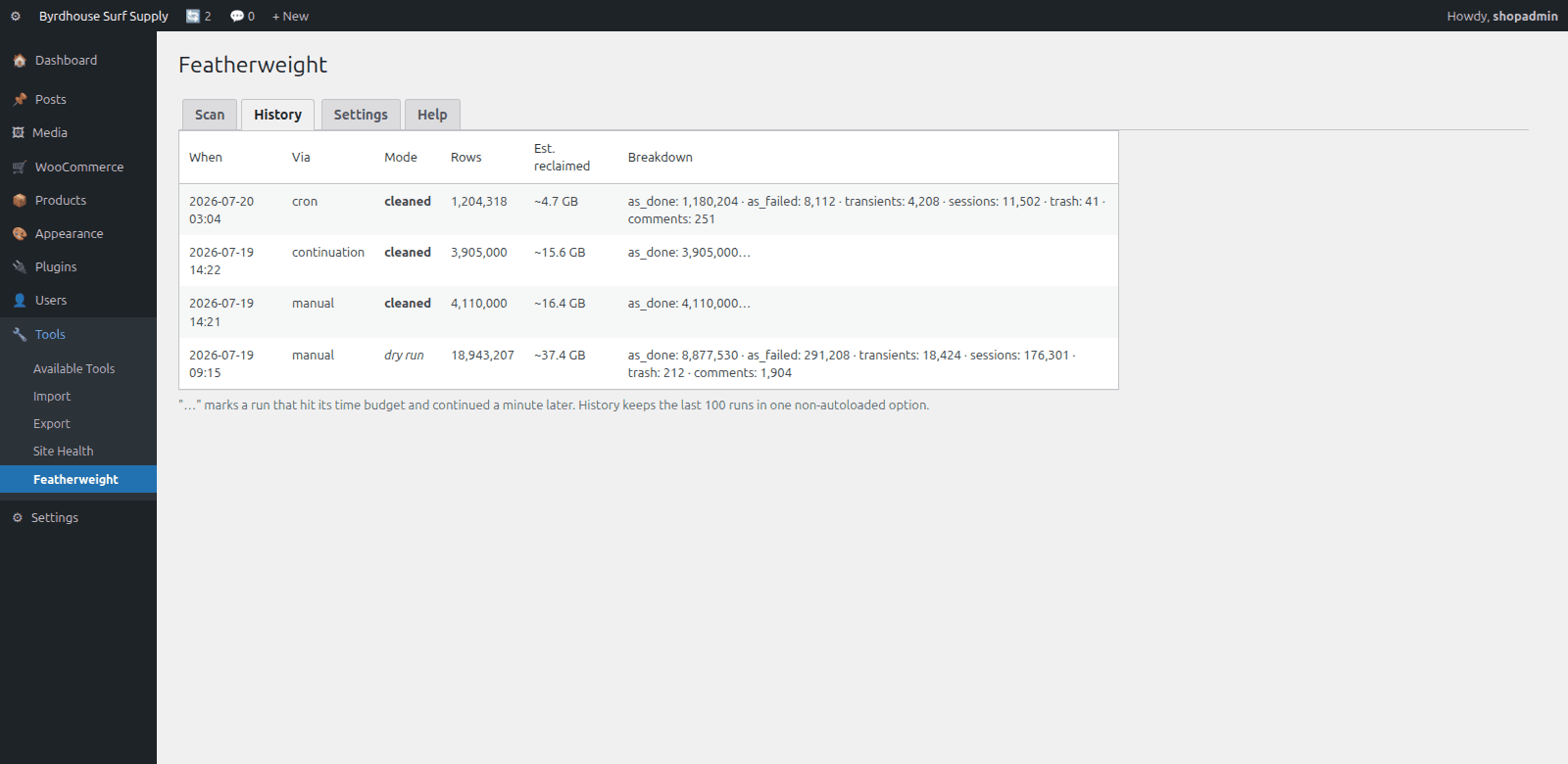
Deletes run in bounded batches inside a 15-second budget; anything left schedules its own continuation a minute later. Big cleanups happen in polite slices.
Set-and-forget weekly
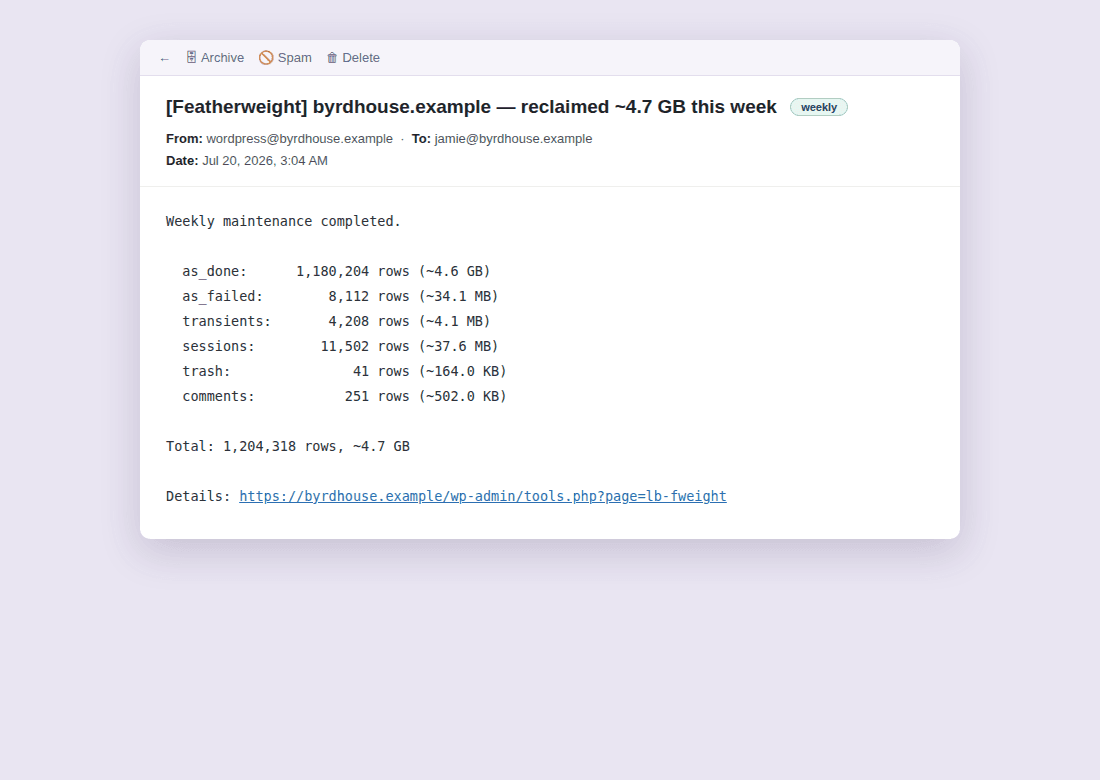
Pick a quiet hour; Featherweight runs the enabled cleaners weekly and (if you want) emails a “reclaimed X this week” summary. Full history of every run, kept in one non-autoloaded option.
Seven cleaners, each with a never-touch list
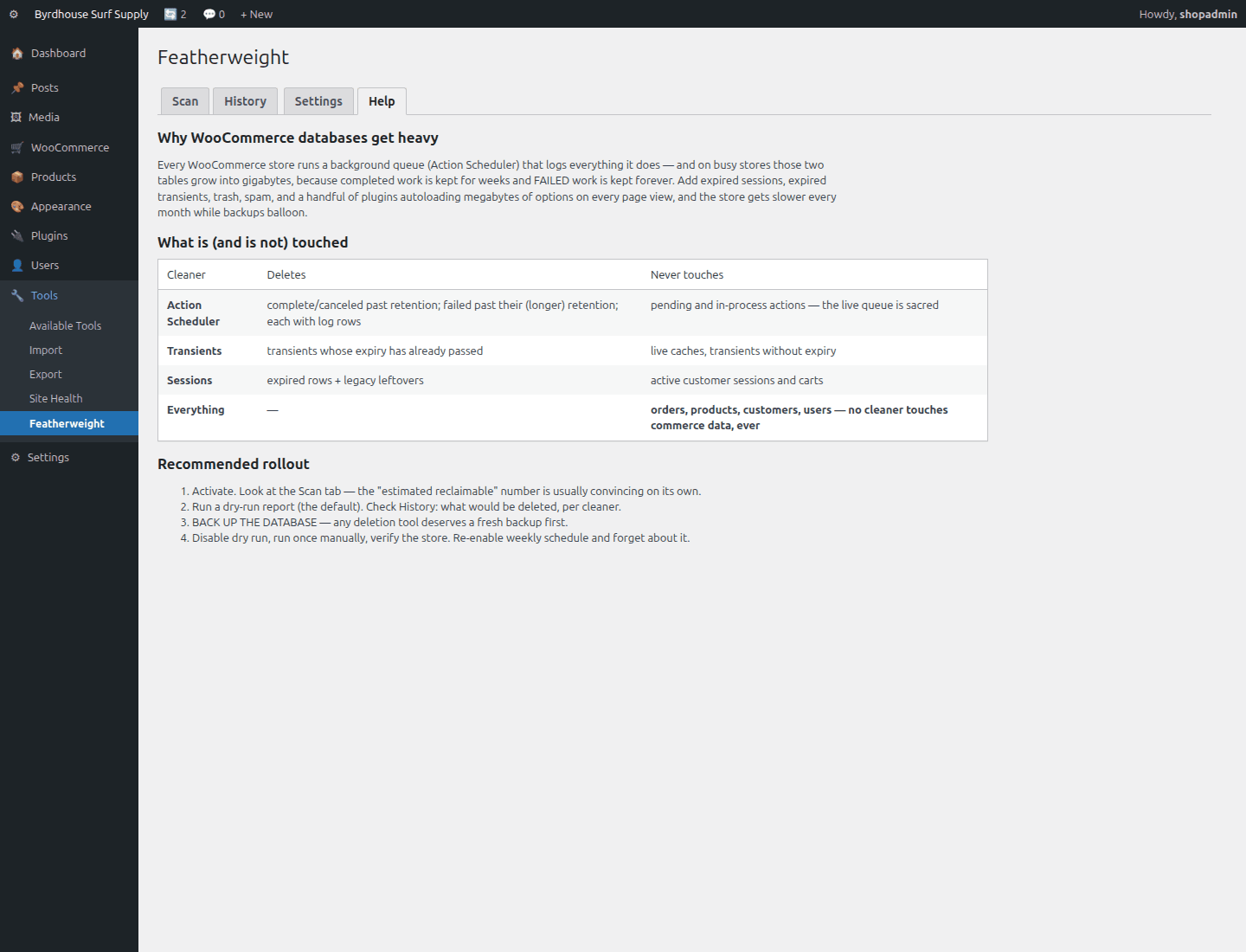
Every cleaner deletes only what is provably dead, and each has hard-coded rows it will never touch, regardless of settings.
| Cleaner | Deletes | Never touches | Default |
|---|---|---|---|
| Queue: done | Complete/canceled background actions + their logs | Pending & in-process jobs | On · 7-day retention |
| Queue: failed | Failed actions + logs, the rows core keeps forever | Recent failures (kept for debugging) | On · 30-day retention |
| Transients | Expired only (site + network scope) | Live caches, no-expiry transients | On |
| Sessions | Expired WooCommerce sessions + legacy leftovers | Active carts & sessions | On |
| Trash / spam | Already-trashed posts, spam comments past retention | Anything published or pending | On · 30-day retention |
| Revisions | Revisions past retention | Recent revisions | Off · 60-day retention |
| OPTIMIZE pass | Rebuilds cleaned tables to reclaim disk | — (briefly locks tables) | Off |
See it in wp-admin
Real screens, no mockup gloss.
Rendered straight from the plugin's own admin UI in a local environment, what you install is what you see.
Inside wp-admin
Scan
Table weights, queue status counts, cleanable-now previews, estimated reclaimable.
Inside wp-admin
Autoload advisor
Heaviest always-loaded options, identified, with reversible stop-autoloading.
Where it fits
Honest comparisons, category by category.
No named-competitor trash talk, just what each category of tool is good at, and where this plugin earns its keep.
vs. generic DB cleaners
Generic cleaners do the classic checklist well, revisions, drafts, trash, spam, expired transients, and Featherweight covers that same ground. The gap is the WooCommerce quartet.
- Status-aware Action Scheduler retention, including failed actions core never purges (one public report: 55 GB, 137M rows).
- Expired WooCommerce sessions and the WC transients core's own tool misses.
- Autoload advisory with safe, reversible undo. Running both cleaners is safe, dead rows delete once.
vs. manual SQL
Hand-run DELETEs work, and risk orphaned log rows, truncated live-queue tables, transient ghosts under object caches, and one enormous locking DELETE. Featherweight's cleaners are those lessons, written down as code.
- Dry-run is the preview from the same code that deletes.
- 5,000-row batches inside a ~15-second budget, with scheduled continuation.
- Manual SQL is still right for one-off emergencies, schema work, and forensics.
vs. hosting optimizers
Hosts optimize infrastructure, PHP, caches, CDN, MySQL config. Featherweight optimizes the application's data: which rows are dead is an application-level judgment a host can't make.
- Good hosting masks data bloat, a strong server delivers a bloated database quickly.
- The bloat still bites: backups stretch, migrations crawl, restores take hours.
- Complementary in both directions, keep the good host, clean the data.
Pricing
Free. Actually free.
Featherweight is how the suite says hello, no account, no email wall, no crippled features.
Featherweight, single site
Free forever. No account, no email wall, no upsell nags.
- The scan
- Seven cleaners
- Autoload advisor
- Hard safety rules
- Dry-run by default
- Manual + help tab inside wp-admin
The Storm Kit
Pulse + IP Shield + Coupon Fence, save $38 vs. buying separately.
- All three paid plugins, one license
- Every WooCommerce plugin we ship next, included
- Same 60-day no-quibble guarantee
- Priority answers from the developers
60-day money-back guarantee
Full refund within 60 days of purchase. No questions, no forms, no hard feelings. If a plugin isn’t the right fit for your store, you shouldn’t pay for it.
The manual lives inside the plugin.
Every install ships a full Help tab in wp-admin, plus these guides in the package:
- Install
- Configuration
- Usage
- The seven cleaners
- Troubleshooting
- FAQ
- Changelog
- Version
- 1.0.0
- Requires
- WordPress 6.0+ · PHP 7.4+ · WooCommerce recommended, not required
- Tested up to
- WooCommerce 8.2 · HPOS compatible
- License
- GPL-2.0-or-later · your data stays on your site
Security posture: we build defensive tools, so we hold ourselves to the same bar, no external calls, capability and nonce checks on every admin action, and a direct line for reports at security@lightningbyrd.com. Reports get a human answer within one business day.
FAQ
Straight answers.
Can this delete my orders or customers?
No, categorically. No cleaner queries those tables. The rules are hard-coded, not settings.
Is deleting background-queue rows actually safe?
Yes, with guards: only complete, canceled, or failed rows past their retention window are touched. Pending and in-process jobs are never touched.
Why keep failed actions longer than completed ones?
Recent failures are diagnostic gold. The default keeps 30 days of them while ending the keep-forever accumulation.
I ran a cleanup and my database files didn't shrink. Bug?
Expected, InnoDB reuses freed space internally. That's what the optional OPTIMIZE pass is for (off by default, because it briefly locks tables).
Is “stop autoloading” going to break a plugin?
Functionally, no: the option still exists and get_option() still works, WordPress just stops preloading it on every page. One-click revert, and core-critical options are never offered.
Do I need WooCommerce?
No. The queue, transient, trash, and autoload cleaners help any WordPress site. The WooCommerce-specific cleaners simply stand down when WC is absent.
How is this different from the cleaner plugin I already run?
Possibly complementary. Check whether yours purges failed queue actions, expired WooCommerce sessions, and offers autoload advisory with undo, that trio is the gap.
My site uses an object cache, do expired transients even matter?
With a persistent object cache the scan will show near-zero there, and queue rows, sessions, and autoload weight remain fully relevant.
What does it cost to run?
A handful of information_schema and COUNT queries on demand; cleanups in 5,000-row batches inside a 15-second budget. It adds no tables and autoloads nothing of its own.
More from the flock
The rest of the suite.
Each plugin stands alone, together they cover detection, response, prevention, and upkeep.
 $59/yr
Pulse
Store monitoring
Know the minute your store stops selling. Order-flow anomaly alerts, checkout and Store API health probes, gateway, cron, and mail watchdogs, inside WordPress, no external service.
Learn more → $49/yr
IP Shield
Fraud & abuse defense
Ban abusive customer IPs before they burn out your payment gateway, one-click bans from the order screen, automatic velocity bans, and a full audit trail.
Learn more → $49/yr
Coupon Fence
Fraud & abuse defense
A firewall for your coupon codes: stop brute-forcing, try-every-code auto-apply behavior, and first-order abuse, with leak-proof signed influencer links.
Learn more →Featherweight
Weigh less by tonight.
Download, install, scan, see the reclaimable weight in your database in the next ten minutes.