
WooCommerce extension · store monitoring
WooCommerce doesn't fail loudly. Pulse makes sure you hear it anyway.
A plugin update empties your checkout form. A gateway stops offering itself. Webhooks die and orders pile up unpaid. Uptime pingers see a healthy homepage through all of it. Pulse watches the signals that actually mean “the store stopped selling”, from inside WordPress, and tells you in minutes.
GPL-2.0 · WordPress 6.0+ · WooCommerce 7.0+ · PHP 7.4+ · No external service, no API keys, no per-month SaaS fee. Your data never leaves your site.

- Observe mode by default
- Alerts on transitions, not timers
- Recovery notices
- Classic + block checkout aware
- HPOS compatible
- Self-pruning event log
The problem
The most expensive outages are the quiet ones.
When checkout breaks loudly, you find out fast. When it breaks quietly, HTTP 200, empty form, right after a routine plugin update, the homepage looks fine, the uptime monitor stays green, and you find out days later from an angry email or a bank statement.
Merchants have documented four- and five-figure losses to exactly this failure shape. The richest signals, last-order age, gateway availability, queue liveness, mail failures, never leave WordPress. Pulse reads them where they live.
Starts safe
Observe mode by default
Activation records events and sends nothing. No email or webhook leaves the site until alerts are explicitly armed, so you calibrate against real traffic before a single notification fires.
What it does
Pulse, feature by feature.
Order-flow watchdog
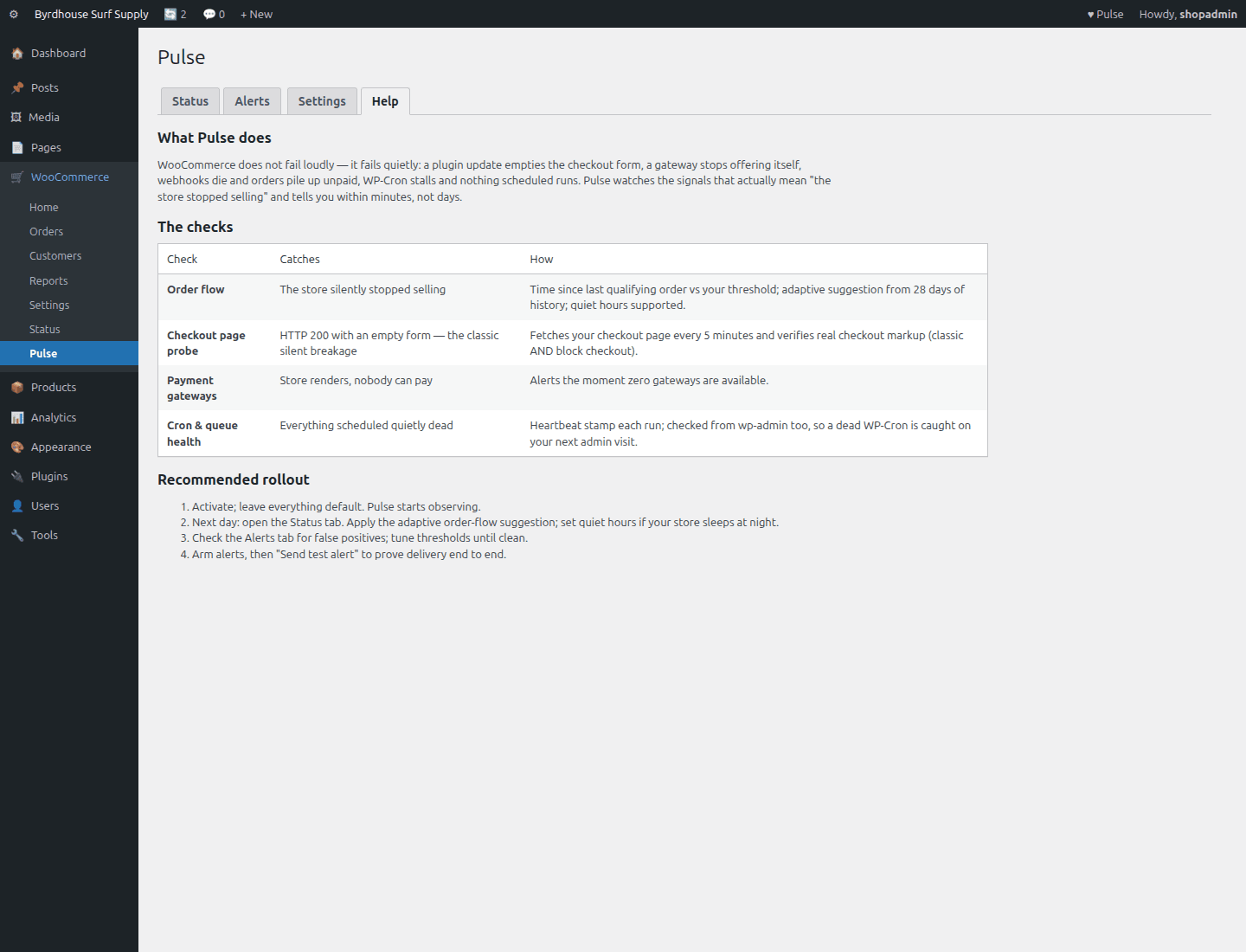
Alerts when the store goes unusually long without an order, with an adaptive threshold suggestion computed from your own last 28 days, quiet hours for overnight lulls, and a recovery notice when orders resume.
Checkout page probe
Every 5 minutes: fetch the checkout page, verify a real checkout actually renders. Catches the classic silent failure, 200 OK, no form. Understands classic and block checkout markup, and legitimate empty-cart states.
Gateway & failure alarms
Zero-gateways-available is a critical alert the moment it happens. Failed-order spikes (broken gateway, or card-testing) and stuck pending/on-hold pileups (dead payment webhooks) each get their own alarm.
Cron & queue watchdog
WP-Cron heartbeat with a trick worth the price alone: if cron itself dies, your next wp-admin visit detects the stale heartbeat and sends the alert from there. Plus Action Scheduler backlog monitoring.
Calm alerting
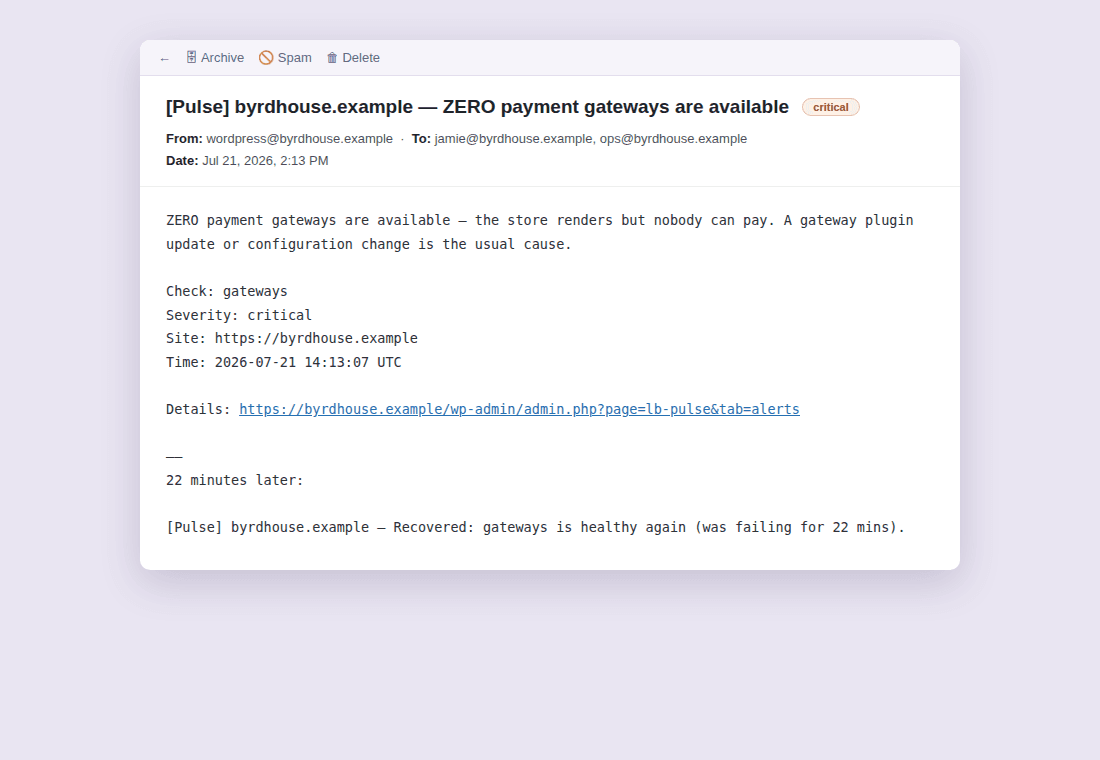
Email + JSON webhook (Slack/Discord-compatible). Alerts fire on state transitions with per-check cooldowns, a broken store alerts once per window, not every 5 minutes, and recovery is always announced.
Runs light, starts safe
Activation starts observe mode: everything is recorded, nothing is sent, until you arm alerts. Events self-prune at 90 days. Orders are read via HPOS-safe APIs only.
Eight checks, one question: is the store selling?
Each check watches a different way WooCommerce stops taking money, with its own threshold, cooldown, and recovery notice.
| Check | What it catches | Default |
|---|---|---|
| Order flow | The store silently stopped selling | Alert after 24h without a qualifying order (adaptive suggestion shown) |
| Failed-order spike | Broken gateway, or a card-testing burst | 5 failed orders in 30 minutes |
| Stuck-order pileup | Dead payment webhooks | 10+ orders pending/on-hold over 6h |
| Checkout page probe | HTTP 200 with an empty checkout form | Every 5 minutes |
| Store API probe | Broken REST layer under block checkout | Every 5 minutes |
| Payment gateways | Store renders, nobody can pay | Critical on zero available |
| Cron & queue health | Everything scheduled quietly dead | Heartbeat + admin-visit fallback; AS backlog at 200 |
| Mail failures | Order emails not going out | Alert on wp_mail failure |
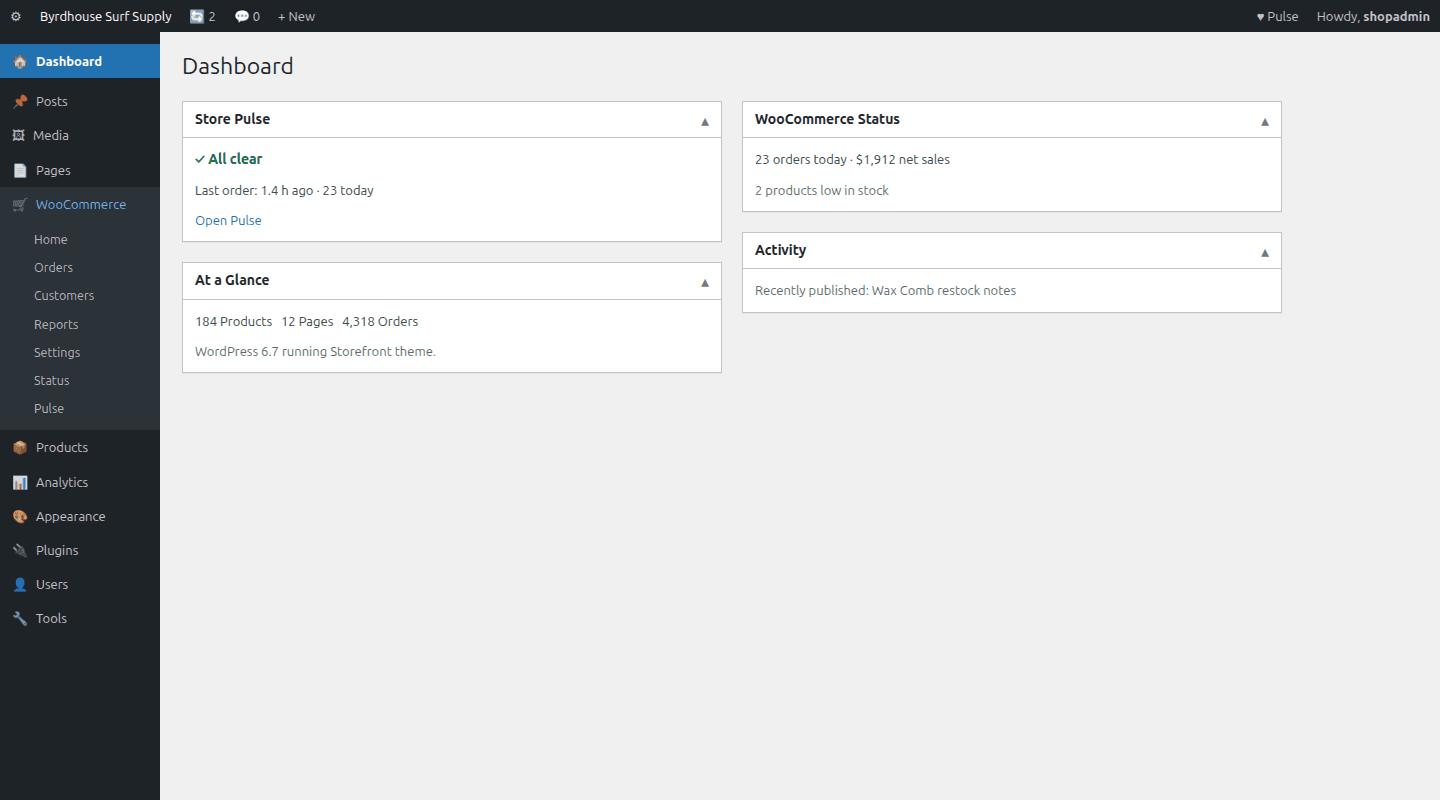
See it in wp-admin
Real screens, no mockup gloss.
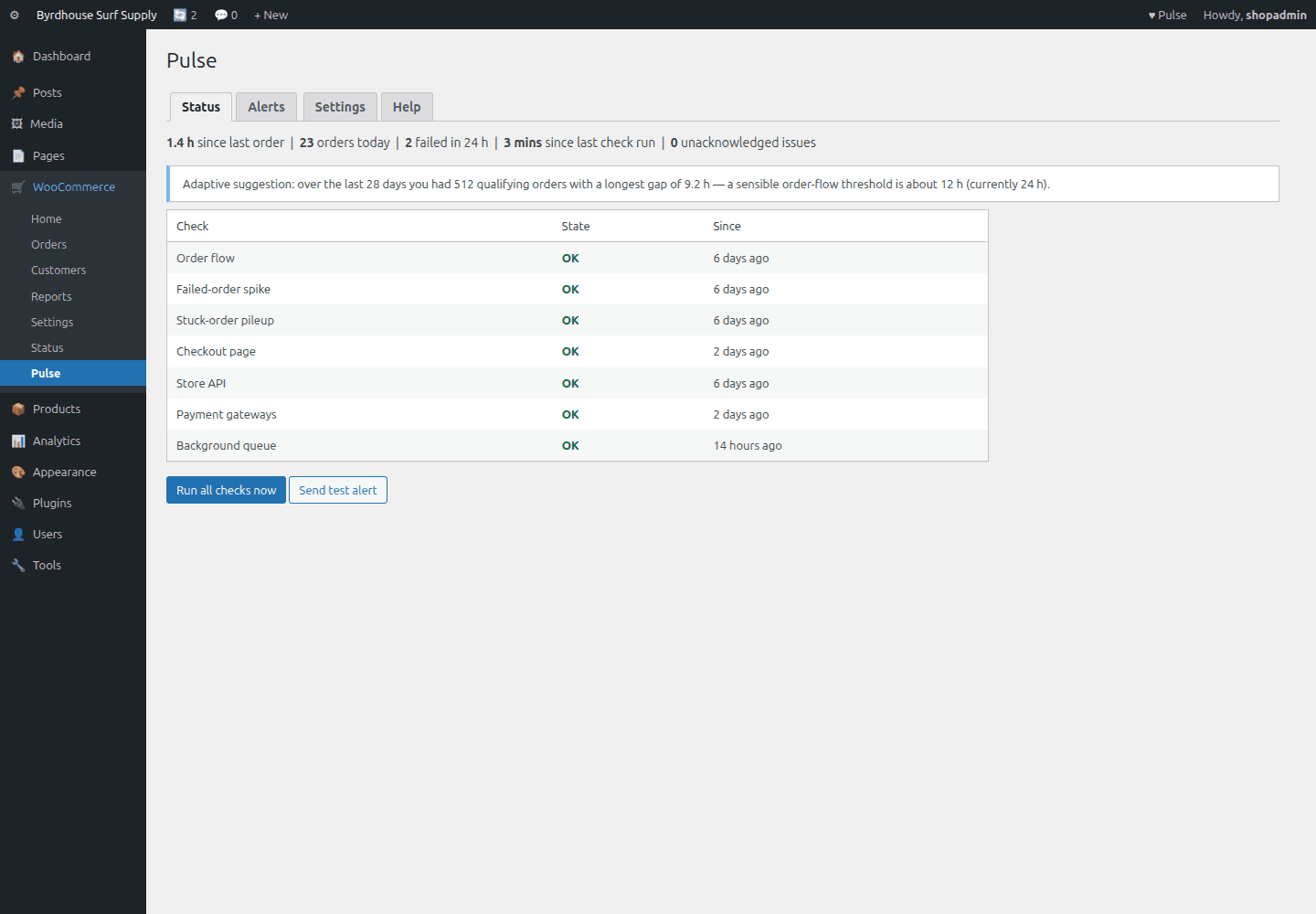
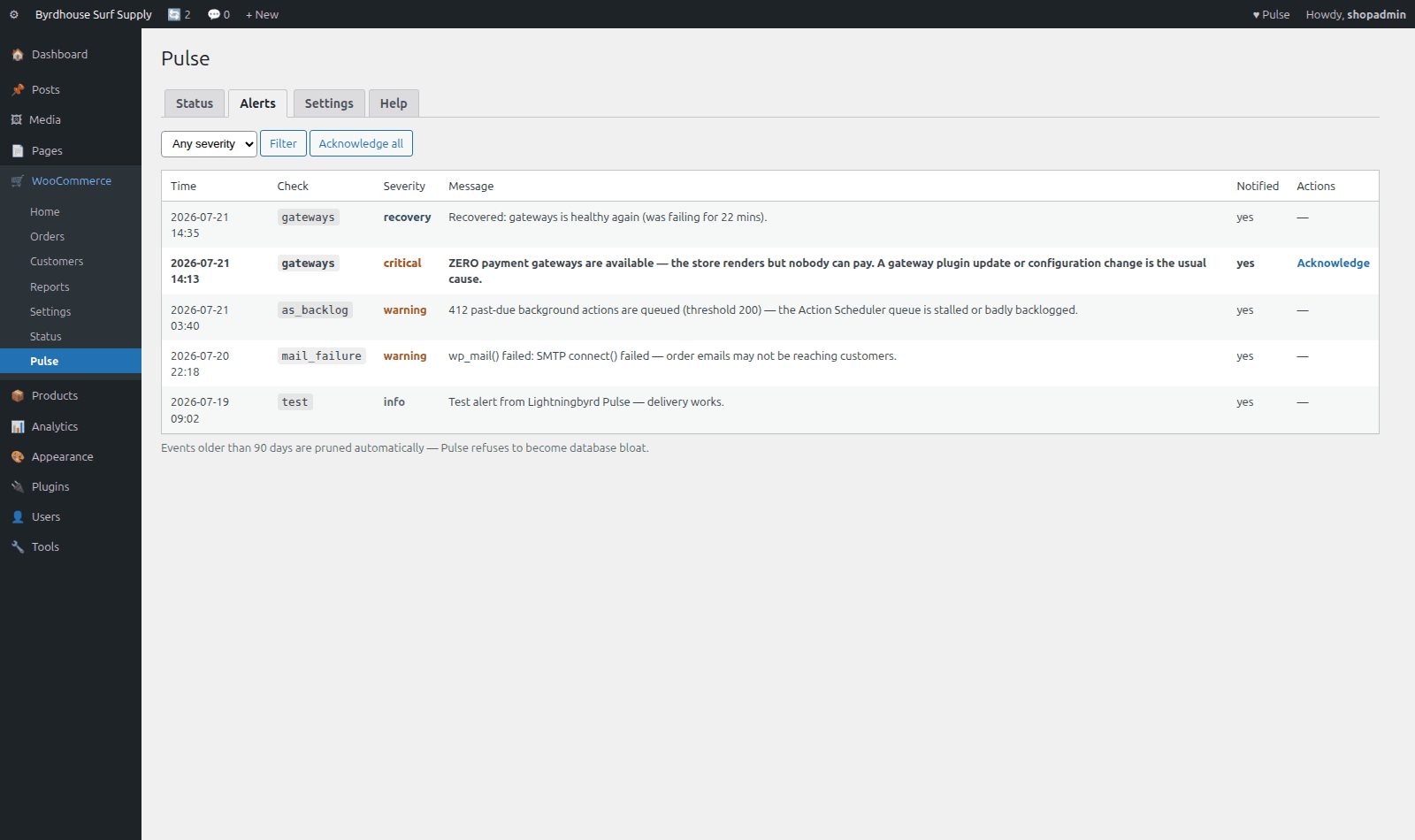
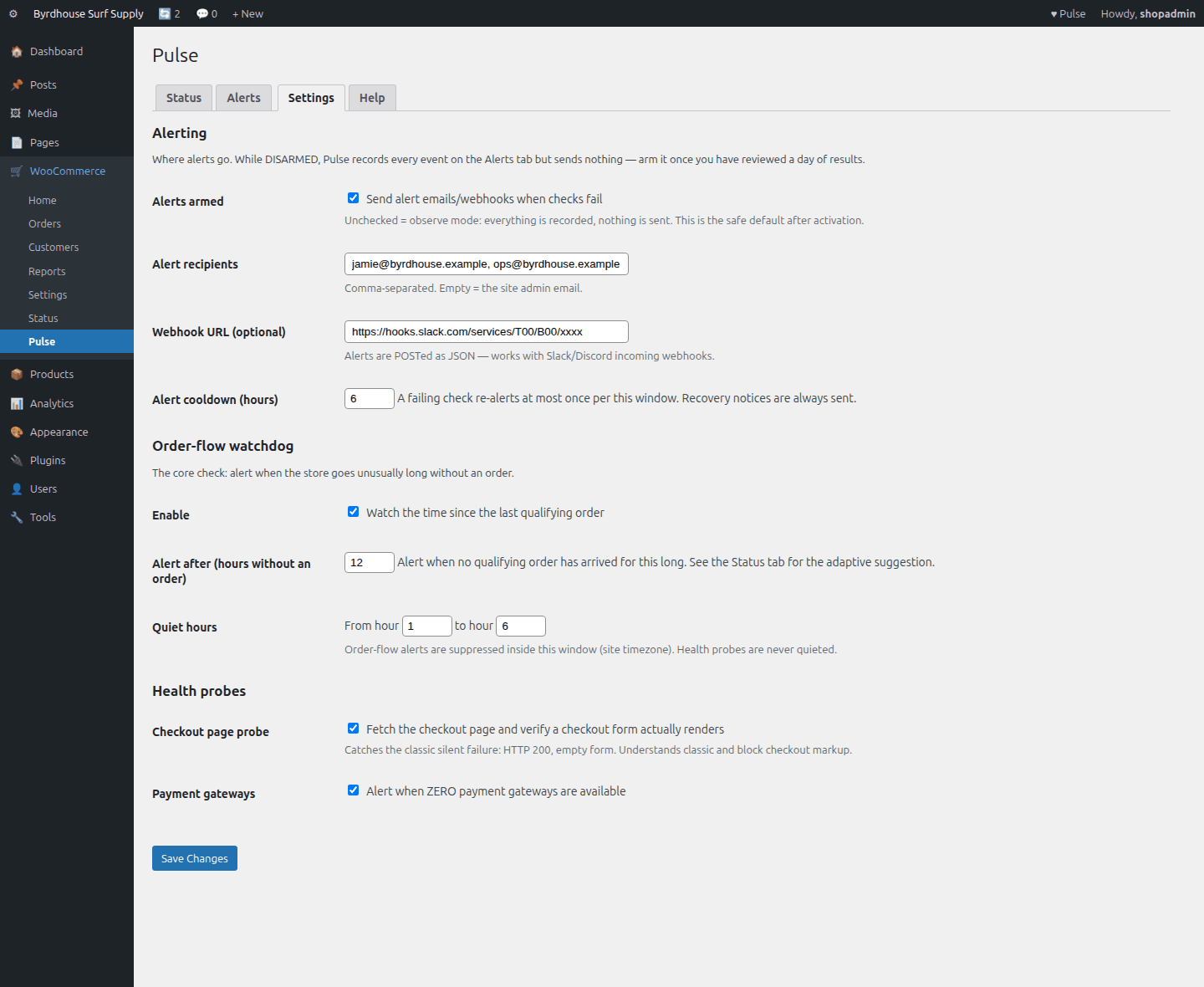
Rendered straight from the plugin's own admin UI in a local environment, what you install is what you see.
Inside wp-admin
Status
Vitals strip, per-check state, adaptive threshold suggestion, run-now.
Inside wp-admin
Alerts
Every event recorded, severity, notification state, acknowledge workflow.
Where it fits
Honest comparisons, category by category.
No named-competitor trash talk, just what each category of tool is good at, and where this plugin earns its keep.
vs. uptime monitors
A pinger answers “is the site up?” Pulse answers “is the store selling?”, the 200-but-empty-checkout case is the reason this plugin exists.
- Run both: the pinger is the smoke detector for total outage (Pulse dies with the site).
- Pulse covers the much larger space where the site hums along but nobody can pay.
- Pairs with any free uptime pinger, no overlap, no conflict.
vs. monitoring SaaS
SaaS watches from outside looking in ($24–$299/month, and your store credentials live on their servers). Pulse watches from inside looking around, one purchase, and no data leaves your site.
- SaaS keeps real structural advantages: external vantage point, multi-store dashboards, independent alert delivery.
- Pulse wins on gateway, queue, and mail awareness, signals that never leave WordPress.
- Order-flow baselines are computed from your primary data, not an API mirror of it.
vs. doing nothing
The default detection system is “a customer emails you, eventually.” The cost of an outage is your hourly revenue times the hours it takes to notice, and unmonitored, that's measured in days.
- Failures pick weekends and holidays; humans are bad at noticing absence, software is good at it.
- Honest caveats: Pulse detects, it doesn't prevent, and it needs a pinger beside it for total outages.
- Low-volume stores get less from anomaly detection; the probes still cover them.
Pricing
One price, everything included.
No tiers of crippled features, the single-site license is the whole plugin.
Pulse, single site
One year of updates and support. Keeps working if you don't renew.
- Order-flow watchdog
- Checkout page probe
- Gateway & failure alarms
- Cron & queue watchdog
- Observe mode by default
- Manual + help tab inside wp-admin
The Storm Kit
Pulse + IP Shield + Coupon Fence, save $38 vs. buying separately.
- All three paid plugins, one license
- Every WooCommerce plugin we ship next, included
- Same 60-day no-quibble guarantee
- Priority answers from the developers
How buying works today: secure online checkout is coming soon. Until it lands, click Buy and tell us which plugin you want, we deliver the plugin zip and an invoice by email within one business day, covered by the same 60-day guarantee.
60-day money-back guarantee
Full refund within 60 days of purchase. No questions, no forms, no hard feelings. If a plugin isn’t the right fit for your store, you shouldn’t pay for it.
The manual lives inside the plugin.
Every install ships a full Help tab in wp-admin, plus these guides in the package:
- Install
- Configuration
- Usage
- Checks
- Troubleshooting
- FAQ
- Changelog
- Version
- 1.0.0
- Requires
- WordPress 6.0+ · WooCommerce 7.0+ · PHP 7.4+
- Tested up to
- WooCommerce 8.2 · HPOS compatible
- License
- GPL-2.0-or-later · your data stays on your site
Security posture: we build defensive tools, so we hold ourselves to the same bar, no external calls, capability and nonce checks on every admin action, and a direct line for reports at security@lightningbyrd.com. Reports get a human answer within one business day.
FAQ
Straight answers.
Does this replace my uptime monitor?
No, they cover different failure classes and pair well. The pinger catches the site being fully down; Pulse catches the store being silently broken while the site looks fine.
Does the checkout probe place real orders or charge cards?
No. It fetches the checkout page and verifies real checkout markup renders. It never creates orders, carts, or charges.
What if WP-Cron itself dies, who watches the watcher?
The cron heartbeat is verified on every wp-admin page load. If cron is dead, your next admin visit detects the stale heartbeat and sends the alert from there.
Will it spam me when something breaks overnight?
No. Alerts fire on state transitions with a per-check cooldown (default 6 hours), and the order-flow check supports quiet hours. A broken store alerts once per window, not every 5 minutes.
How does the adaptive threshold work?
Nightly, Pulse computes order-gap statistics over your last 28 days (longest gap, 95th percentile) and shows a suggested threshold. It's a suggestion, never an override, and it declines to suggest on low order volume.
Can it post to Slack or Discord?
Yes. The webhook POSTs Slack-compatible JSON with a text field plus structured fields, it works with Slack, Discord, and anything that accepts an incoming webhook.
What does it cost in performance?
A cron task every 5 minutes running indexed order lookups plus two loopback requests, all off the visitor path. One small event table that self-prunes at 90 days.
HPOS? Multisite?
HPOS fully compatible, orders are read via wc_get_orders only. On multisite, activate per store.
What data leaves my site?
Only the alert emails and webhooks you configure. No telemetry, no accounts, no external services.
More from the flock
The rest of the suite.
Each plugin stands alone, together they cover detection, response, prevention, and upkeep.
 $49/yr
IP Shield
Fraud & abuse defense
Ban abusive customer IPs before they burn out your payment gateway, one-click bans from the order screen, automatic velocity bans, and a full audit trail.
Learn more → $49/yr
Coupon Fence
Fraud & abuse defense
A firewall for your coupon codes: stop brute-forcing, try-every-code auto-apply behavior, and first-order abuse, with leak-proof signed influencer links.
Learn more → Free
FreeFeatherweight
Performance & maintenance
The WooCommerce-aware database janitor. Scans and safely cleans what generic optimizers miss, Action Scheduler bloat, expired sessions, autoload weight. Free.
Download free →Pulse
Sleep better by tonight.
Install Pulse, watch it in observe mode by default against your real traffic, and arm it when you've seen the receipts.