
WooCommerce extension · social publishing
Pick a product. Your server does the rest.
Songbird composes a designed post image from your product, drafts the caption with a tagged link, and publishes to your Facebook Page and Instagram through your own Meta app. Your server talks directly to Meta: no middleman that can have an outage or block your IP, and no per-post metering, app credits or per-channel pricing. Every image is composed to Instagram's published size and ratio rules before it is sent, so the ratio-rejection failure simply cannot happen. The one-time own-app setup takes about 15 minutes, and it is the price of independence. One limit stated up front: Meta fetches media from a public URL, so a staging site cannot publish to Instagram, and the sandbox mode is how you rehearse there.
GPL-2.0 · WordPress 6.0+ · WooCommerce 7.0+ · PHP 7.4+ · Your server talks directly to Meta with credentials you own, no Lightningbyrd service in the middle · Requires an Instagram Business or Creator account (linked to a Facebook Page in the primary mode) and a one-time guided Meta app setup.

- No service in the middle
- Sandbox rehearsal by default
- Server-rendered creatives
- Delivery log with Meta's responses
- Copy-guard against staging accidents
- Triggers off by default
The problem
The middleman tax, and the silence.
Almost every tool that posts WooCommerce products to social media routes your content through the vendor's servers and the vendor's Meta app. That is why they can meter you per site, per channel, per post and per credit; why their outage becomes your outage; and why the reviews across that category tell the same story on repeat: connected fine, posted for a while, then quietly stopped, with nothing to show why. The second best-documented failure is Instagram silently rejecting images whose shape it does not accept, so the post that “went out” never existed.
Songbird is built against both failures at the architecture level. There is no middle: your server renders the creative, your server calls the Graph API with credentials you own, and every publish is written to a delivery log with Meta's returned post ID, or Meta's raw error, verbatim. And the creative cannot be the wrong shape, because Songbird composes it natively at Instagram's published sizes instead of hoping your product photo fits.
Starts safe
Sandbox rehearsal by default
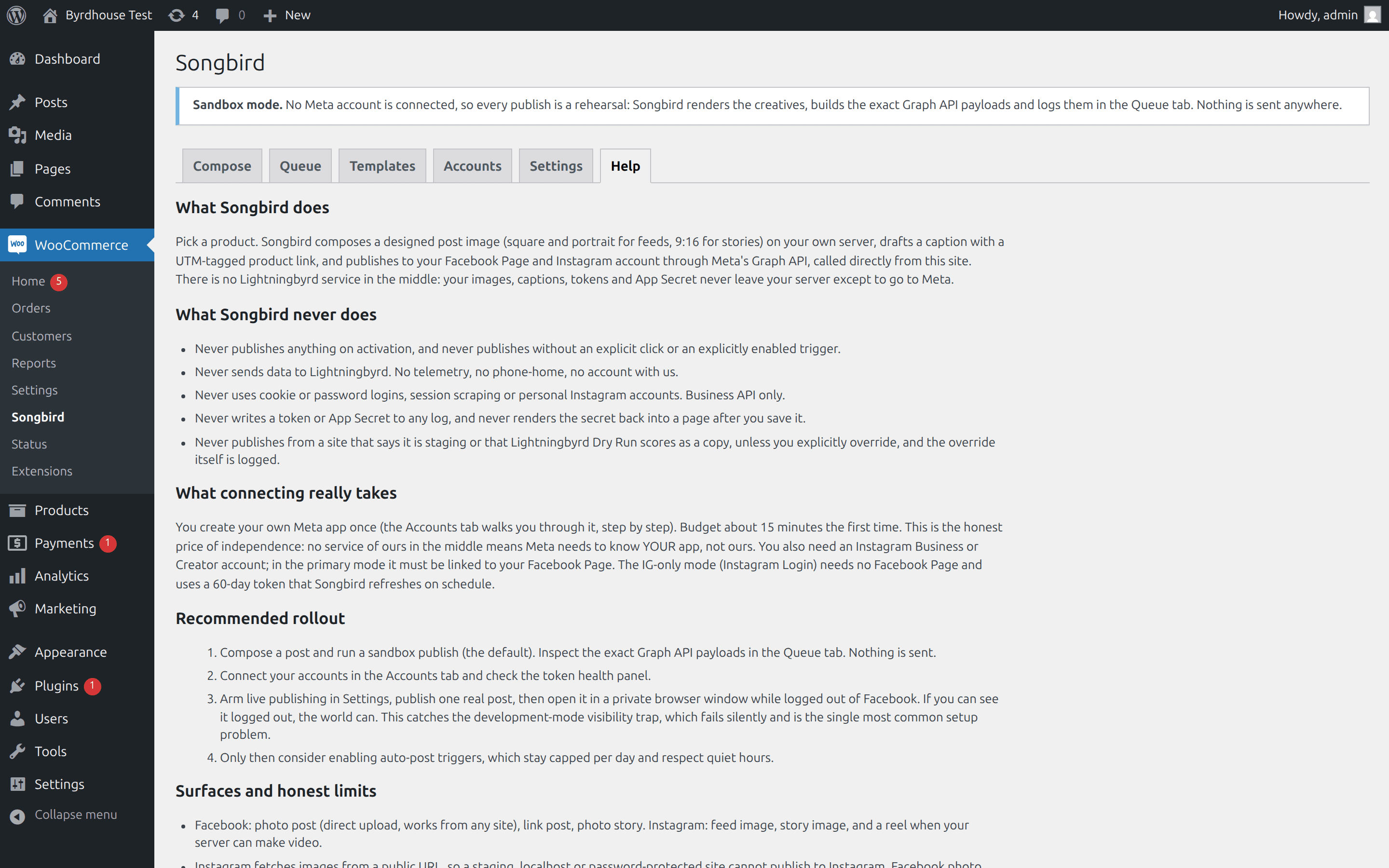
Activation publishes nothing and can publish nothing: no account is connected, live mode is unarmed, every trigger is off. Sandbox publishes log the exact Graph API payloads and send nothing, and the copy-guard refuses live publishing from a site that reports a non-production environment or that Lightningbyrd Dry Run scores as a copy, with a logged override for deliberate exceptions.
What it does
Songbird, feature by feature.
Designed, not resized
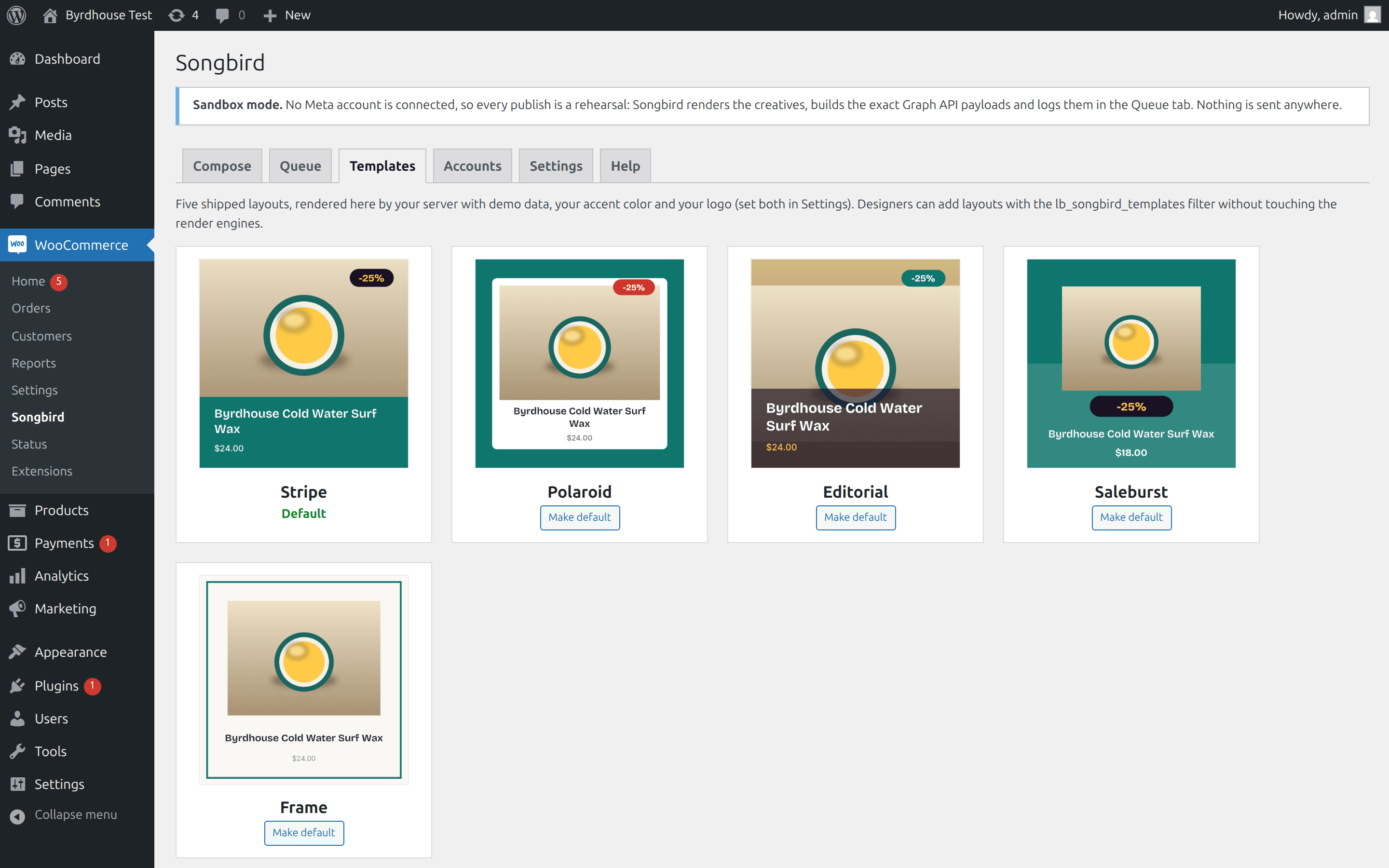
Five layouts composed from your product data: photo, title, price, sale badge, your logo, your accent color. Rendered as 1:1 and 4:5 feed images and 9:16 stories, on your server, by GD or Imagick. Emoji in titles are stripped from the image (no server engine can draw them) and Compose says so; captions keep them. CJK titles need a merchant-supplied font, as documented.
The preview IS the render
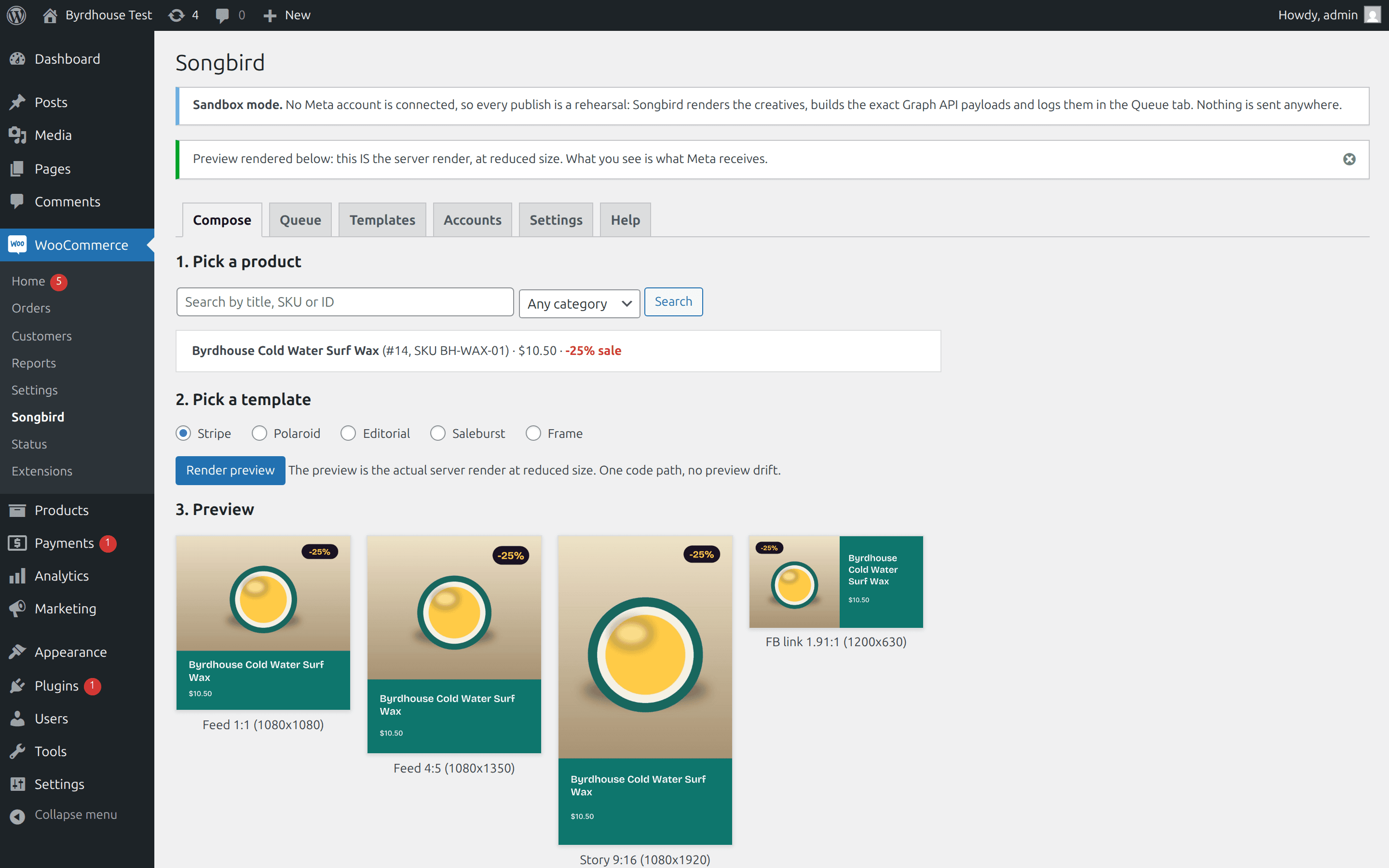
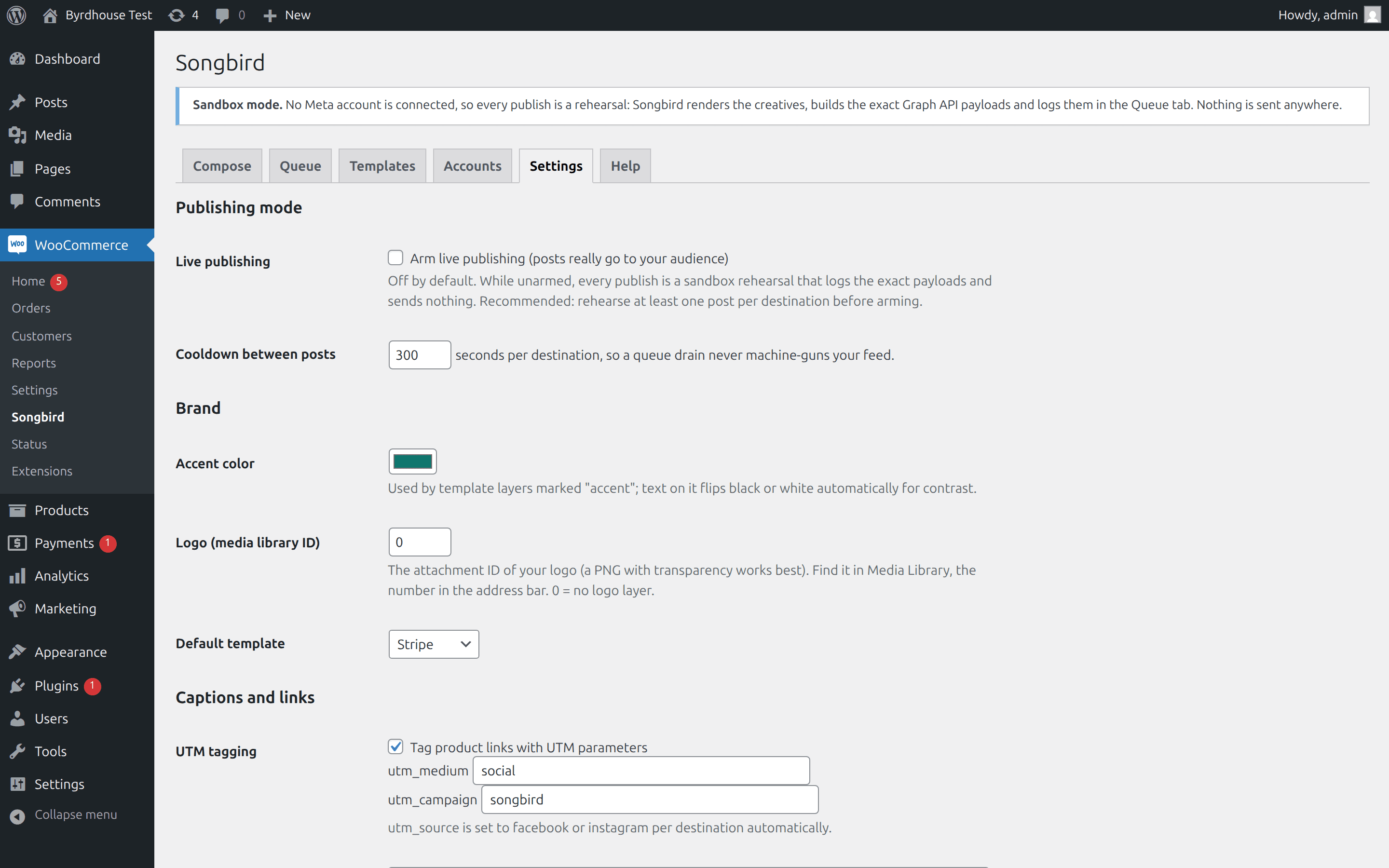
Search by title, SKU, ID or category, pick a template, click render. What appears is the actual JPEG your server just produced at reduced size: one code path, so preview drift is impossible. Four shapes at once, the sale badge appearing automatically when the product is on sale, and captions drafted with a UTM-tagged link, source set per network.
Your own Meta app
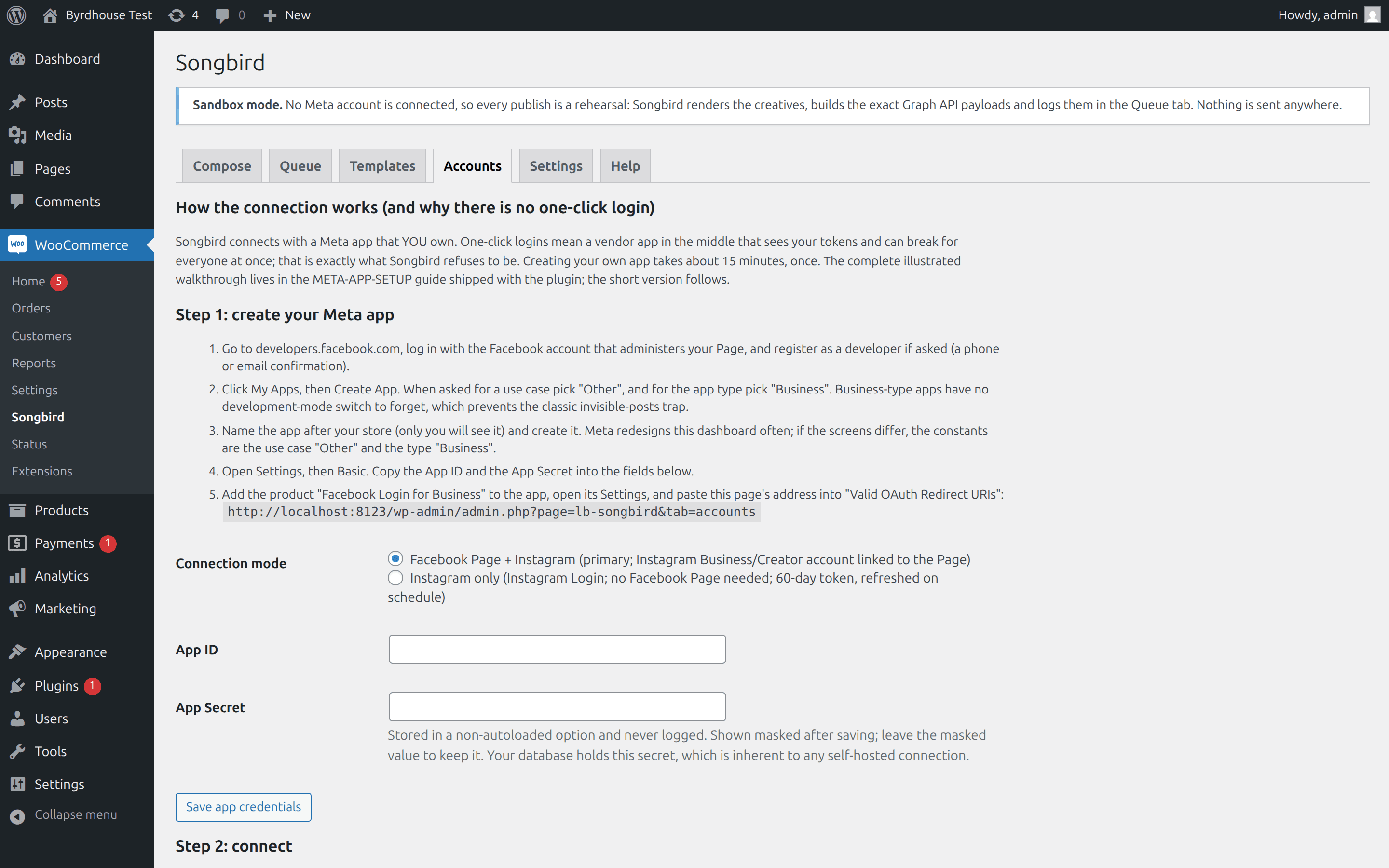
A guided, honest connection wizard: about 15 minutes, once, every click documented, including the development-mode trap that makes posts invisible to everyone but you. No App Review needed for publishing to your own Page and account. Your tokens stay in your database, masked and never logged.
Sandbox first, receipts always
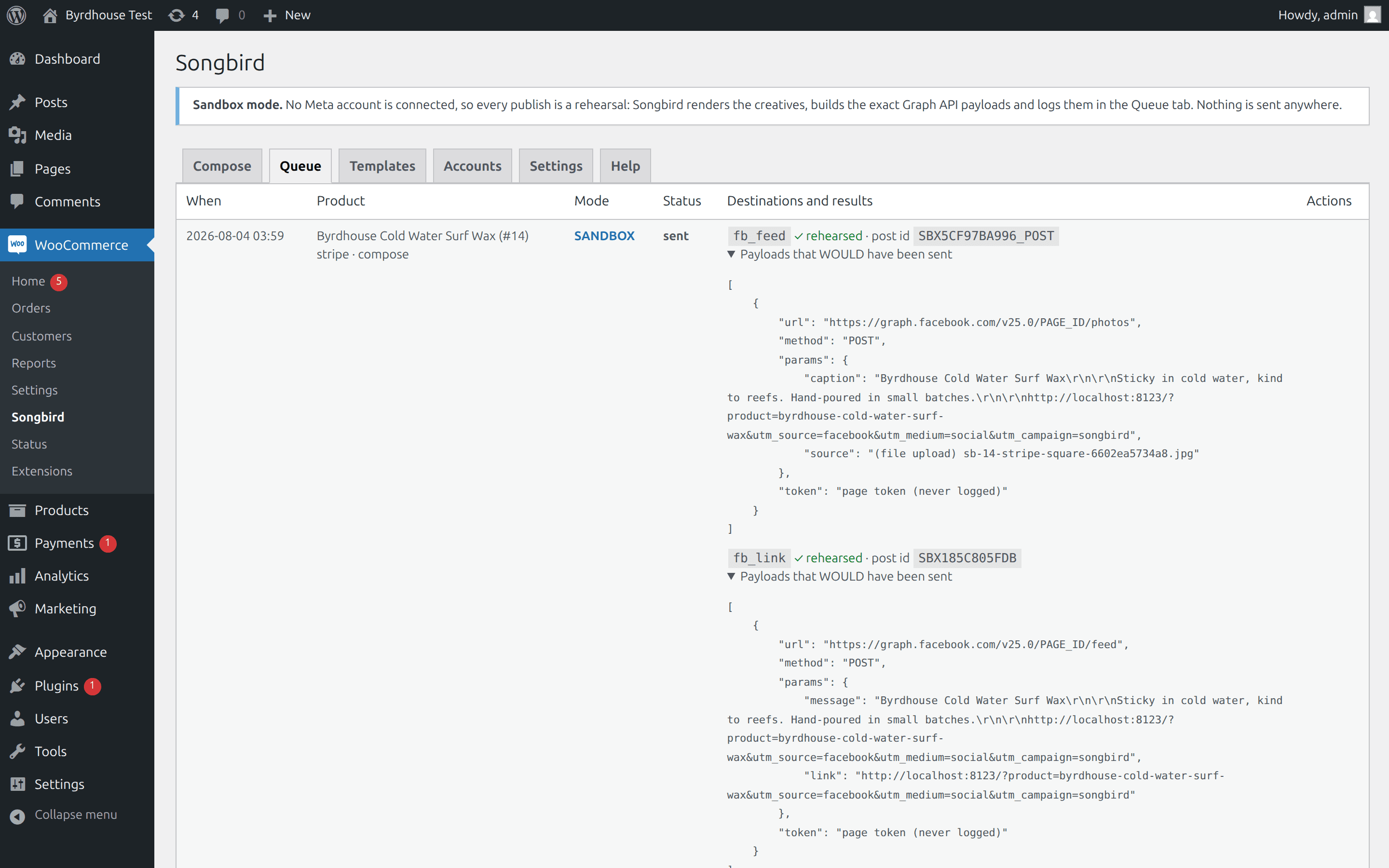
The default publish mode renders everything, builds the exact Graph API payloads, logs them, and sends nothing. Live deliveries store Meta's returned post ID and a link to the live post, and failures show Meta's raw error next to a plain-English fix. The queue never swallows an error, and alerts are state-based with cooldowns, never storms.
Guard rails everywhere
Preflight validates size, format, ratio and caption limits before any call. A local counter enforces Instagram's 100-posts-per-24h quota politely. The copy-guard refuses to publish from a site that looks like staging or a clone, unless you override, and the override is logged.
Triggers you control
Optional auto-posts on product publish, sale start and back-in-stock. All off on activation, capped per day, quiet-hours aware, and every one goes through the same preflight and queue as a manual post. Editing a product never re-posts it.
Exactly what it publishes
And, just as important, the conditions, stated plainly.
| Surface | Creative | How | Condition |
|---|---|---|---|
| Facebook photo post | 1080x1080 JPEG | Direct upload with caption | Works from any site, public or not |
| Facebook link post | Your product page's preview | Message + link post | Preview image comes from your product page |
| Facebook story | 1080x1920 JPEG | Two-step photo story | 10 MB photo cap |
| Instagram feed | 1080x1350 JPEG (4:5) | Container then publish | Site must be publicly reachable: Meta fetches the image by URL, so staging and localhost cannot publish to Instagram |
| Instagram story | 1080x1920 JPEG | Container then publish | Same public-URL rule; no clickable link stickers (the API exposes none, for anyone) |
| Instagram reel | Silent Ken Burns MP4, 9:16 | Container, poll, publish | Requires ffmpeg on your server; without it Songbird says so instead of showing a dead button |
See it in wp-admin
Real screens, no mockup gloss.
Rendered straight from the plugin's own admin UI in a local environment, what you install is what you see.
Inside wp-admin
Compose
Product picker, templates, and the four-shape preview that IS the server render. Captured, like every shot here, from a live WordPress install running the plugin.
Inside wp-admin
Queue
Sandbox rehearsals with the exact Graph API payloads; live entries carry post IDs and raw errors.
Where it fits
Honest comparisons, category by category.
No named-competitor trash talk, just what each category of tool is good at, and where this plugin earns its keep.
vs. middleman schedulers
Cloud dashboards and relay plugins connect in one click because their app sits in the middle, which is also why they can meter per post and why their outages and IP blocks become yours. Songbird trades a 15-minute guided setup for a connection nobody can meter or break wholesale.
- The relay is the meter: because every post passes through the vendor, every post can be counted. In Songbird, no counting mechanism exists.
- A composed canvas cannot have a wrong ratio, and the delivery log answers the category's signature review: “waited, waited, nothing posted.”
- If you need ten networks, team calendars and approval flows, use a middleman; that is genuinely their ground.
vs. the official Meta plugin
Complementary, not competing. Meta for WooCommerce is a pixel, catalog-sync and ads pipe; by its own description it does not publish organic posts at all. Songbird is the missing publishing half.
- Run both on the same Page and Instagram account without conflict; they publish through different APIs to different surfaces.
- Songbird will never touch pixels, catalog sync, Shops or dynamic ads; the official plugin owns that ground.
- Songbird's connection is its own and does not depend on the official plugin being installed, configured or healthy.
vs. posting by hand
The real incumbent is the owner, after closing, cropping a product photo in the Instagram app. Keep the phone for stories with stickers and in-the-moment content; native app features will always arrive there first. Songbird does the production line.
- Title, price and link are bound from WooCommerce, so the creative is correct the day the sale starts; no retyping tax.
- Every product link is UTM-tagged with the source set per network, so your analytics can finally see social traffic honestly.
- Did the Tuesday post actually go out? By hand, you scroll and look. The delivery log stores the post ID and a link, or the exact error.
Pricing
One price, everything included.
No tiers of crippled features, the single-site license is the whole plugin.
Songbird, single site
One year of updates and support. Keeps working if you don't renew.
- Designed, not resized
- The preview IS the render
- Your own Meta app
- Sandbox first, receipts always
- Sandbox rehearsal by default
- Manual + help tab inside wp-admin
The Storm Kit
Pulse, IP Shield, Coupon Fence, Preflight, Dry Run, Songbird, save $195 vs. buying separately.
- All 6 paid WooCommerce plugins, one license
- Every WooCommerce plugin we ship next, included
- Same 60-day no-quibble guarantee
- Priority answers from the developers
How buying works today: secure online checkout is coming soon. Until it lands, click Buy and tell us which plugin you want, we deliver the plugin zip and an invoice by email within one business day, covered by the same 60-day guarantee.
60-day money-back guarantee
Full refund within 60 days of purchase. No questions, no forms, no hard feelings. If a plugin isn’t the right fit for your store, you shouldn’t pay for it.
The manual lives inside the plugin.
Every install ships a full Help tab in wp-admin, plus these guides in the package:
- Install
- Meta app setup
- Configuration
- Usage
- Templates
- Publishing
- Troubleshooting
- FAQ
- Changelog
- Version
- 1.0.0
- Requires
- WordPress 6.0+ · WooCommerce 7.0+ · PHP 7.4+ · Instagram Business or Creator account
- Tested up to
- WordPress 6.7 · WooCommerce 8.2 · HPOS compatible
- License
- GPL-2.0-or-later · your data stays on your site
Security posture: we build defensive tools, so we hold ourselves to the same bar, no external calls, capability and nonce checks on every admin action, and a direct line for reports at security@lightningbyrd.com. Reports get a human answer within one business day.
FAQ
Straight answers.
Does my content pass through Lightningbyrd's servers?
No. Your server talks directly to Meta with credentials you own. Your images, captions and tokens never pass through our servers; there is no Lightningbyrd account, no telemetry, no phone-home. We cannot have an outage that stops your posting, and we cannot block your IP, because we are not in the path.
Why isn't there a one-click connection?
Because one-click means a vendor app in the middle that sees your tokens, meters your posts and breaks for everyone at once. You create your own Meta app instead, guided step by step; budget about 15 minutes, once. We sell that trade openly: setup is the price of independence.
Do I need Meta App Review or Business Verification?
Not for publishing to your own Page and account: Meta's Standard Access covers users with a role on the app, which is you on your own app. The setup guide also documents, honestly, one ambiguity in Meta's own docs on this point and the working practice the industry (and Songbird) follows.
What accounts do I need?
An Instagram Business or Creator account, linked to a Facebook Page in the primary mode. Personal Instagram accounts are not served by Meta's publishing API at all, and Songbird will never use cookie or password logins to pretend otherwise. An IG-only mode (no Facebook Page) exists via Instagram Login.
Can I run it on staging?
Sandbox mode, fully: render, rehearse, read payloads, send nothing. Live Instagram publishing, no: Meta fetches images from a public URL, so a staging, localhost or password-protected site cannot publish to Instagram. Facebook photo posts upload directly and work from anywhere. The copy-guard additionally refuses live publishing from any site that reports a non-production environment or that Lightningbyrd Dry Run scores as a copy, with a logged override for deliberate exceptions.
Can it post without me knowing?
No. Activation publishes nothing and can publish nothing: no account is connected, live mode is unarmed, every trigger is off. When you do enable triggers, they are capped per day, respect quiet hours, and go through the same preflight and visible queue as manual posts. Editing a product never re-posts it.
How many posts can I publish per day?
Instagram's documented API limit is 100 posts per account per 24 hours, which Songbird enforces locally and queues around. Facebook Pages have no comparable published per-post cap at store volumes, and a per-destination cooldown paces the queue so a drained backlog never bursts.
Will my connection last forever?
No tool can promise that. Page tokens have no scheduled expiry but die on password changes, role changes and security checkpoints; Instagram-Login tokens last 60 days and are refreshed automatically. Songbird health-checks daily, shows a countdown where one exists, and emails you before scheduled posting would fail silently. That is the honest maximum, and anyone promising “never reconnect” is misdescribing how Meta works.
What about video, carousels, and link stickers?
Video is tiered and honest. With ffmpeg on your server, Songbird renders a silent Ken Burns MP4 from the story creative (H.264, 9:16) and publishes it as a reel; add music inside Instagram, which is also the licensing-safe route. Without ffmpeg there is no server-side video, because no pure-PHP H.264 encoder exists, and Songbird shows you exactly that message instead of a broken button. Carousels are not in v1, stated rather than hidden, and clickable link stickers on API-published stories are not available to any tool, because the publishing API exposes no parameter for them.
More from the flock
The rest of the suite.
Each plugin stands alone, together they cover detection, response, prevention, and upkeep.
 $59/yr
Pulse
Store monitoring
Know the minute your store stops selling. Order-flow anomaly alerts, checkout and Store API health probes, gateway, cron, and mail watchdogs, inside WordPress, no external service.
Learn more → $49/yr
IP Shield
Fraud & abuse defense
Ban abusive customer IPs before they burn out your payment gateway, one-click bans from the order screen, automatic velocity bans, and a full audit trail.
Learn more → $49/yr
Coupon Fence
Fraud & abuse defense
A firewall for your coupon codes: stop brute-forcing, try-every-code auto-apply behavior, and first-order abuse, with leak-proof signed influencer links.
Learn more →Songbird
Sleep better by tonight.
Install Songbird, watch it in sandbox rehearsal by default against your real traffic, and arm it when you've seen the receipts.