
WordPress plugin · PHP upgrade readiness
Forty thousand deprecations. Three of them matter.
Your host has scheduled a PHP upgrade and your log is a wall of noise. Somewhere in it is the difference between “nothing will happen” and “the checkout page goes white”. Molt tells them apart, using evidence from your own running site. It records what your site actually emits, attributes every line to the plugin that emitted it, and separates the noise from the breakage.
GPL-2.0 · WordPress 6.0+ · PHP 7.4+ · Observe-only by default · Sampled · No telemetry, and no outbound request at all unless you turn one on.

- Observe-only default
- Never suppresses a fatal
- One row per problem, not per event
- Sampled by default
- Self-pruning ledger
- States its own coverage
The problem
The panic is a measurement problem.
A deprecation flood and a real breakage look identical in debug.log. Both are red text, both scroll forever, and neither says which plugin produced it or whether it matters. So a forced PHP bump turns into either a week of guesswork or a shrug and a prayer.
The standard advice makes it worse. The widely circulated workaround for a noisy upgrade is to switch deprecation reporting off entirely, which does not fix anything: it just removes the evidence. The other common route, a whole-site static scanner, reads every file of every plugin in one request, which is why that category is known for hanging, timing out and reporting things that are not true in both directions. Molt is built around runtime evidence first, with a targeted static scan as a deliberate, opt-in second step.
Starts safe
Observe-only default
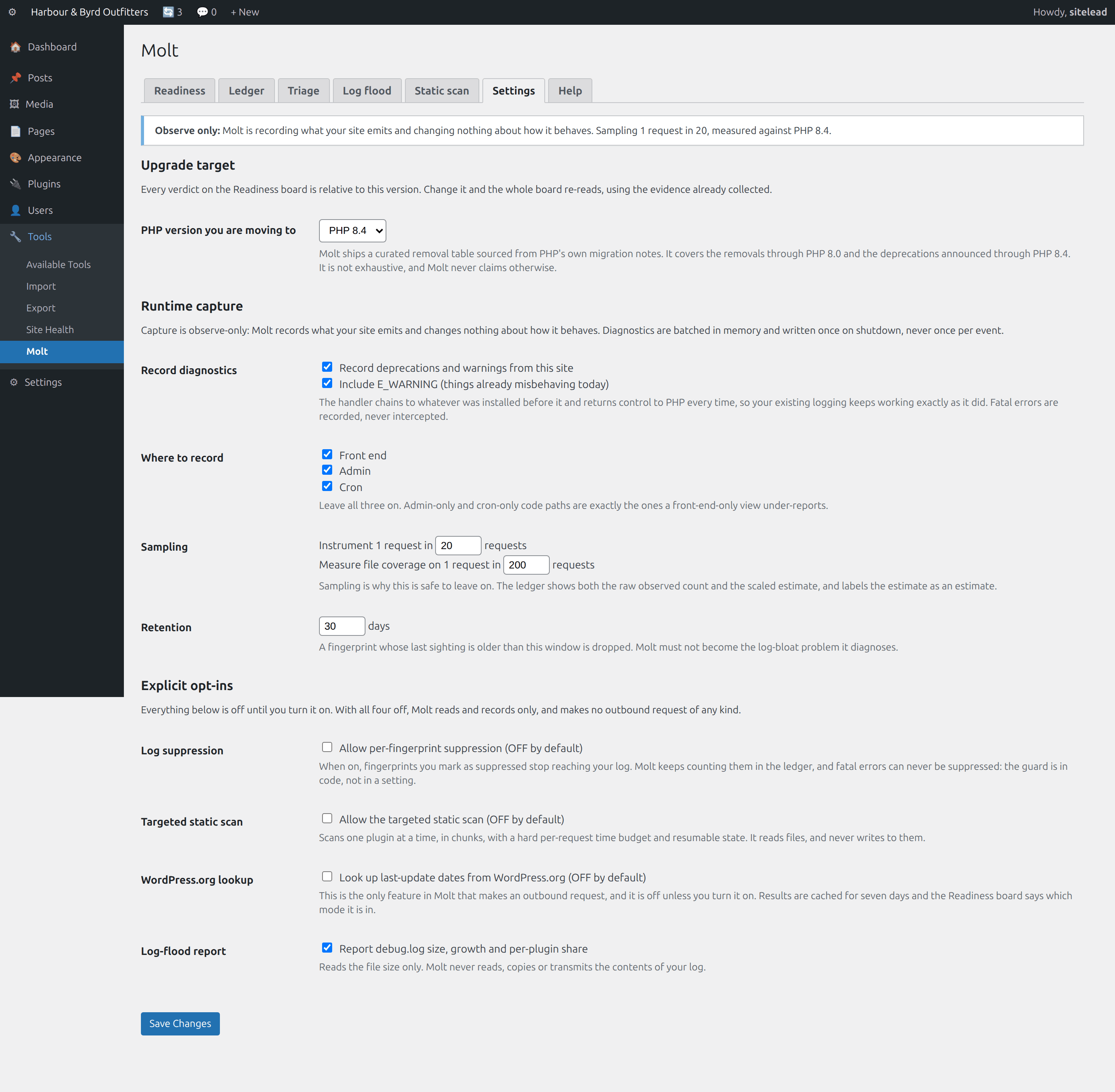
Capture is sampled and observe-only on activation, and all four network-touching opt-ins ship switched off. Suppression is off until you turn it on, applies per fingerprint, and can never apply to a fatal: that guard is in code, not in a setting.
What it does
Molt, feature by feature.
Runtime deprecation ledger
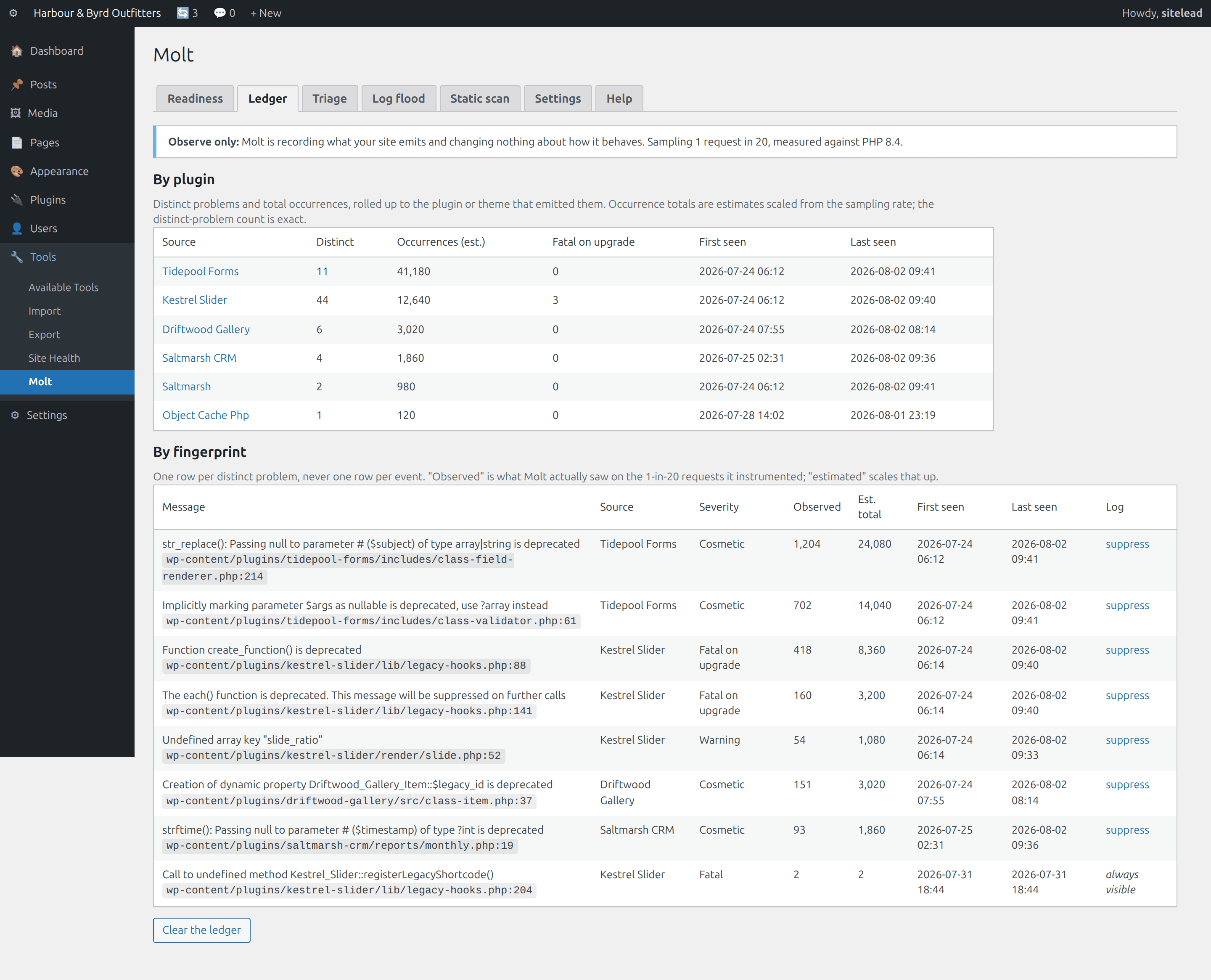
An error handler that captures deprecations and warnings, fingerprints them by normalised file, line and message, and stores one row per distinct problem with a count. Never a row per event. Batched in memory, flushed once on shutdown, sampled by default.
Attribution by plugin
Every emitting path resolves to the plugin, mu-plugin, theme or drop-in that owns it, and rolls up: this plugin, 11 distinct deprecations, 41,000 occurrences in seven days. This is the screen that does not exist anywhere else.
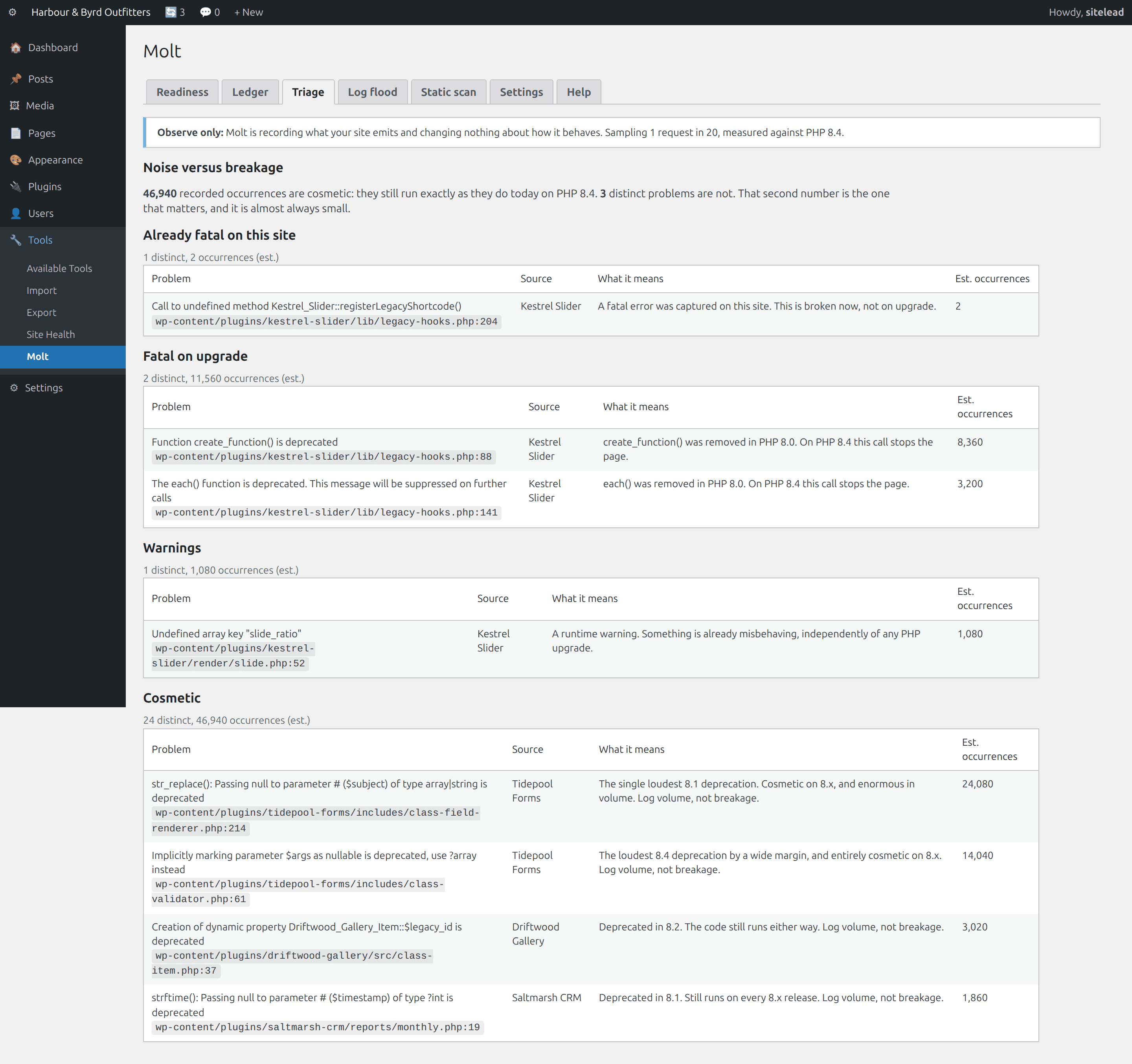
Severity triage
Cosmetic (still runs fine) separated from fatal-on-upgrade (the API is gone). For most deprecation floods the honest answer is that this is noise, and Molt says so in those words, with the number to back it up.
Readiness verdict per plugin
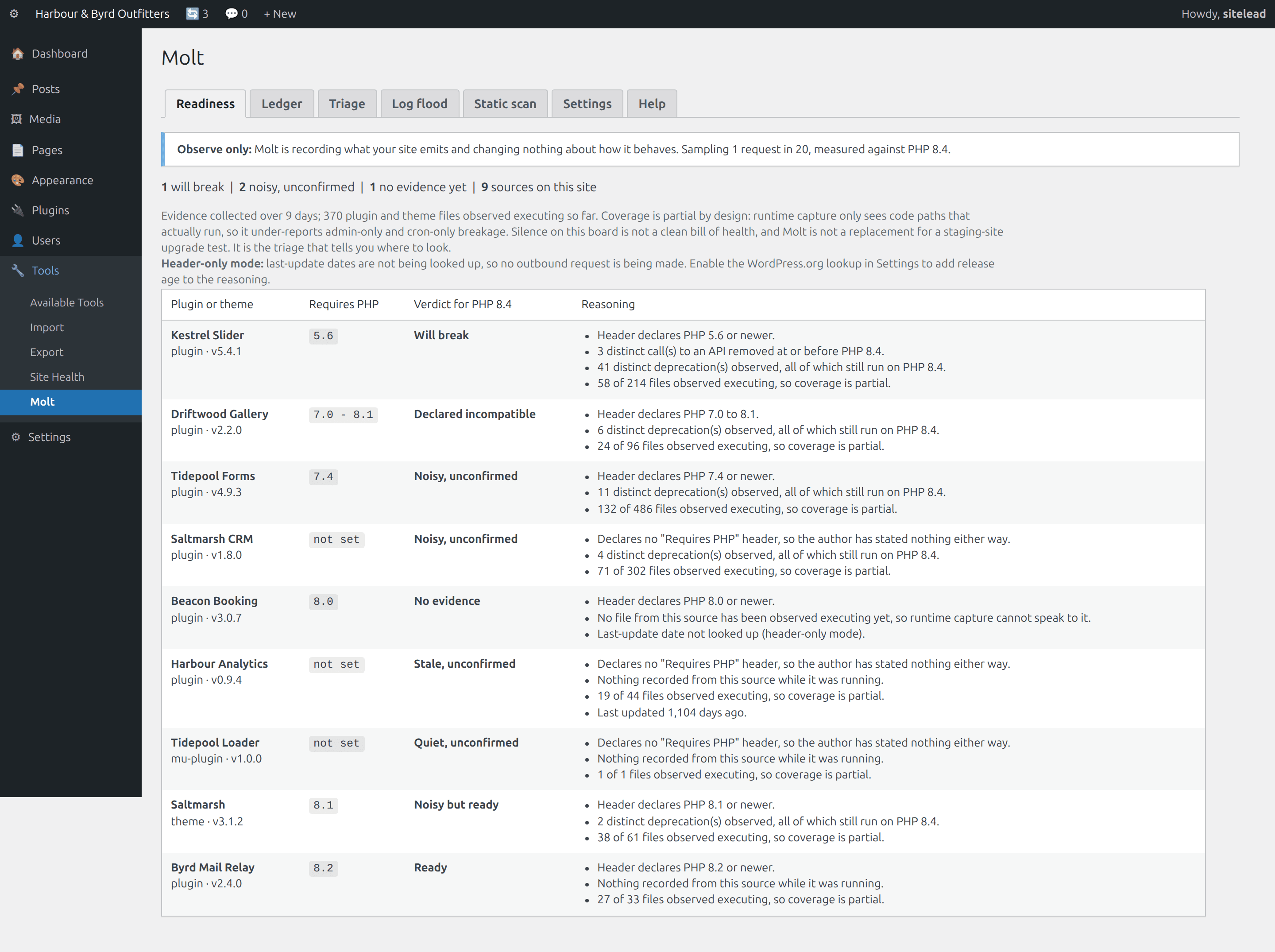
The declared Requires PHP header, the observed runtime evidence and the release age combined into one verdict per installed plugin, with the reasoning shown on the same row. The header needs no network call.
Targeted static scan
Opt-in, one plugin at a time, 40 files per request with a 10-second budget and resumable state. It stops when the budget runs out rather than when the request dies. No heavyweight analysis library bundled, and the docs list exactly what it checks.
Log-flood control
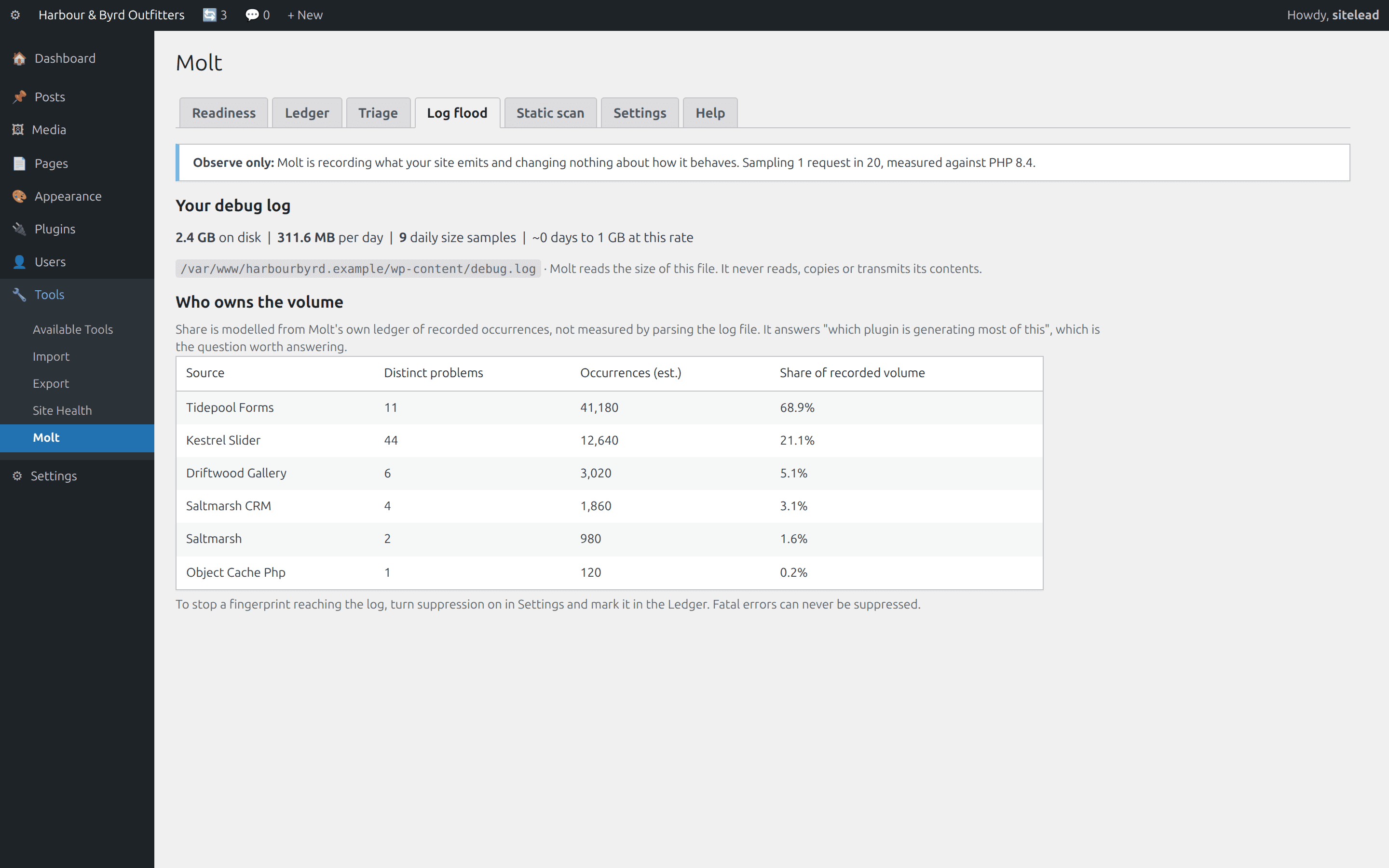
Log size, growth per day, and which plugin owns what share of the volume. Per-fingerprint suppression when you want the quiet, with fatals always visible. This is the useful-on-day-one screen; readiness is what keeps it installed.
Eight verdicts, and what each one is allowed to claim
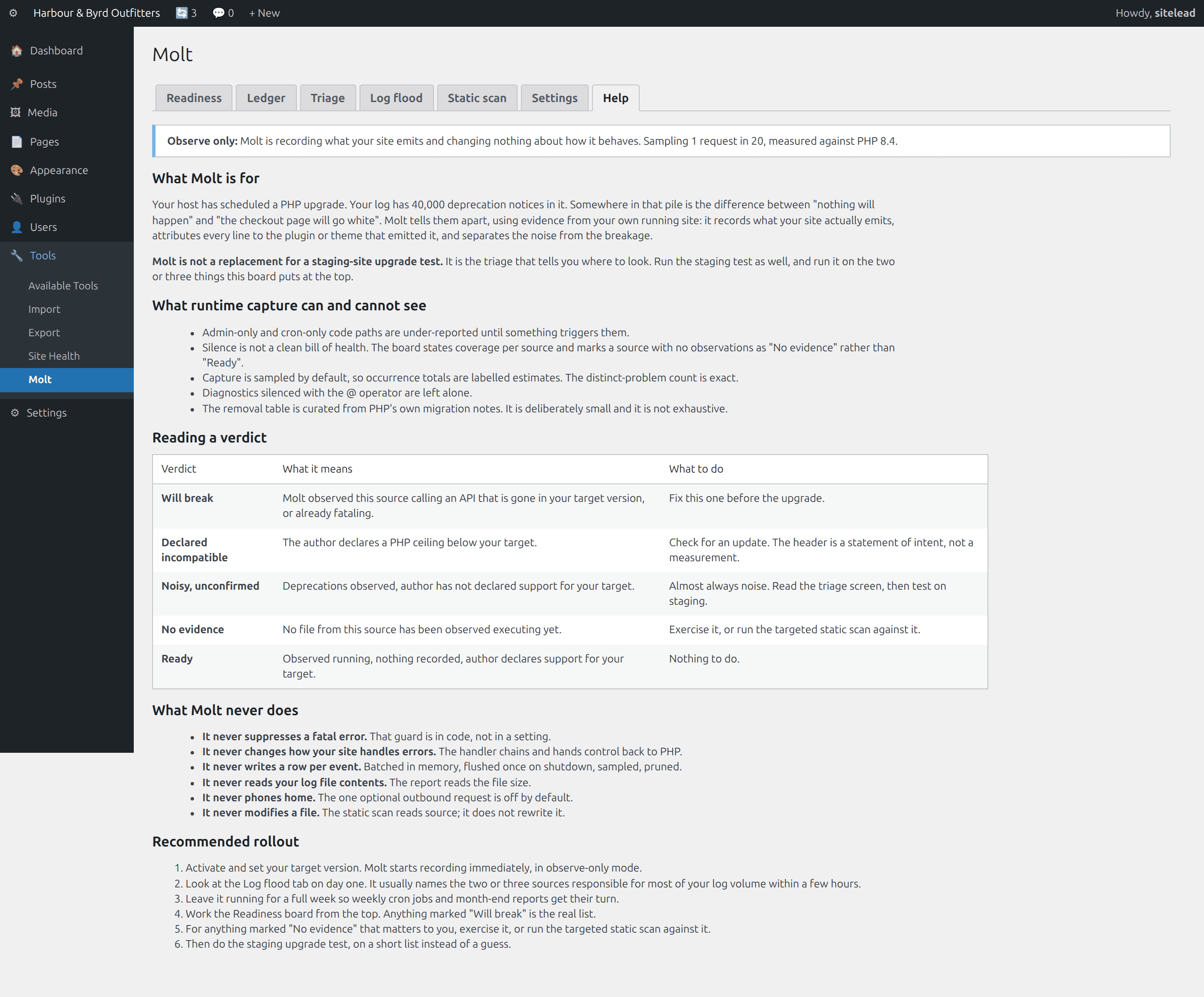
Note what is missing: there is no verdict that means “safe”. Runtime evidence cannot prove that.
| Verdict | Triggered by | What it does not claim |
|---|---|---|
| Will break | An observed call to an API removed at or before your target, or a captured fatal | That it found every one of them |
| Declared incompatible | The author declares a PHP ceiling below your target | That the ceiling is accurate; headers are intent, not measurement |
| Noisy, unconfirmed | Deprecations observed, author has not declared your target | That it will break. Almost always it will not |
| Noisy but ready | Deprecations observed, author declares your target | Anything beyond “this is log volume” |
| No evidence | No file from this source observed executing yet | That it is fine. Silence is not a result |
| Stale, unconfirmed | Quiet, undeclared, last release over two years old | That age causes breakage. Age is a risk signal |
| Quiet, unconfirmed | Observed running, nothing recorded, nothing declared | Coverage of code paths that have not run |
| Ready | Observed running, nothing recorded, author declares your target | That a staging test is unnecessary |
See it in wp-admin
Real screens, no mockup gloss.
Rendered straight from the plugin's own admin UI in a local environment, what you install is what you see.
Inside wp-admin
Readiness
One verdict per installed plugin and theme, sorted worst first, reasoning on the row.
Inside wp-admin
Ledger
Rolled up by plugin, then one row per fingerprint with counts and first and last seen.
Where it fits
Honest comparisons, category by category.
No named-competitor trash talk, just what each category of tool is good at, and where this plugin earns its keep.
vs. per-request developer tools
The best free developer tooling in this space already does per-request attribution beautifully, for a logged-in administrator, in development. It persists nothing. Molt's wedge is persistence, the per-plugin rollup over weeks of real traffic, and the PHP-version framing on top.
- Their per-request attribution is arguably better, because the full call stack is available at the moment of the event.
- A ledger keyed by fingerprint answers “how long has this been happening” and “did it stop after the update”.
- If you use one of those tools, keep using it; they answer different questions.
vs. log managers
Free log managers already identify a source and group distinct errors, and they do it well. What they do not do is tell you whether a given line will still run after your PHP upgrade, or roll a week of traffic up into a per-plugin verdict.
- Source identification and distinct-error grouping already exist in that category, so neither is the claim here.
- A log manager reads a file: rotate, truncate or clear it and the history is gone. Clearing your log does not clear Molt's evidence.
- Molt is not trying to be a nicer log viewer.
vs. whole-site static scanners
Scanning every file of every plugin in one request is what produces timeouts and false results in both directions. Molt inverts it: runtime evidence first, then an opt-in scan scoped to one plugin, chunked, with a hard time budget.
- A ruleset with no knowledge of whether a file executes flags legacy branches and vendored code the plugin never calls.
- It also misses what only becomes a problem at runtime, so the inaccuracy runs both ways.
- When the long request dies, the work is usually gone; Molt's scan is resumable by construction.
Pricing
One price, everything included.
No tiers of crippled features, the single-site license is the whole plugin.
Molt, single site
One year of updates and support. Keeps working if you don't renew.
- Runtime deprecation ledger
- Attribution by plugin
- Severity triage
- Readiness verdict per plugin
- Observe-only default
- Manual + help tab inside wp-admin
The Nest Kit
Ledger, Holdback, X-Ray, Molt, save $67 vs. buying separately.
- All 4 paid WordPress plugins, one license
- Every WordPress plugin we ship next, included
- Same 60-day no-quibble guarantee
- Priority answers from the developers
How buying works today: secure online checkout is coming soon. Until it lands, click Buy and tell us which plugin you want, we deliver the plugin zip and an invoice by email within one business day, covered by the same 60-day guarantee.
60-day money-back guarantee
Full refund within 60 days of purchase. No questions, no forms, no hard feelings. If a plugin isn’t the right fit for your store, you shouldn’t pay for it.
The manual lives inside the plugin.
Every install ships a full Help tab in wp-admin, plus these guides in the package:
- Install
- Configuration
- The upgrade playbook
- The verdict table
- How capture works
- Troubleshooting
- FAQ
- Changelog
- Version
- 1.0.0
- Requires
- WordPress 6.0+ · PHP 7.4+
- Tested up to
- WordPress 6.7 · no WooCommerce needed
- License
- GPL-2.0-or-later · your data stays on your site
Security posture: we build defensive tools, so we hold ourselves to the same bar, no external calls, capability and nonce checks on every admin action, and a direct line for reports at security@lightningbyrd.com. Reports get a human answer within one business day.
FAQ
Straight answers.
Does an error handler on every request slow my site down?
Molt instruments one request in twenty by default, and on an uninstrumented request the handler returns immediately. On an instrumented request it holds at most 200 distinct fingerprints in memory and issues one upsert per distinct fingerprint on shutdown, after the response has been sent. The write-volume rule is absolute: batched in memory, flushed once, one row per fingerprint, never one per event.
Can this hide a fatal error from me?
No. Suppression applies only to fingerprints you mark, only when you have turned suppression on, and never to a fatal error. The check is in code in two places, and the ledger refuses to set the flag on a fatal row even if something tried. Molt also chains to whatever error handler was installed before it and hands control back to PHP, so your existing logging keeps working exactly as it did.
What can runtime capture not see?
Code paths that have not run. Admin-only and cron-only breakage is under-reported until something triggers it, which is why the board marks a plugin with no observations as “No evidence” rather than “Ready”, and why every row states how many of that plugin's files have been observed executing. Silence is not a clean bill of health, and Molt never presents it as one.
Is this a replacement for testing the upgrade on staging?
No, and we will not claim it is. Molt is the triage that tells you where to look. Do the staging test, and do it on the two or three things the board puts at the top instead of on a guess.
Does it send anything anywhere?
No telemetry, no external service, no phone-home. With the shipped defaults Molt makes no outbound request at all. The single optional exception is the WordPress.org last-update lookup, which is off until you turn it on, is cached for seven days, degrades to header-only when unreachable, and is labelled on the board so you always know which mode you are in.
Why does my occurrence count say “estimated”?
Because it is. Capture is sampled, so Molt scales the observed count by the sampling rate and shows you both numbers. The distinct-problem count is exact; the occurrence total is an estimate and is labelled as one on every screen it appears on. Set sampling to 1-in-1 for a short, deliberate investigation if you want exact volumes.
How does the static scan avoid the timeouts the category is known for?
By not doing the thing that causes them. It scans one selected plugin, 40 files at a time, with a 10-second per-request budget and resumable state stored server-side, so it stops on the budget rather than on the request dying. It also checks a deliberately small, documented set of removed and deprecated symbols using real parsed tokens, rather than bundling a general-purpose analysis library.
Will Molt itself bloat my database?
It would be a poor look if it did. Two tables, one row per distinct fingerprint and one row per observed file, both pruned on a retention window that defaults to 30 days, plus a hard cap on coverage rows. Its own options are not autoloaded. Molt must not become the log-bloat problem it diagnoses.
My log says 40,000 deprecations. Should I panic?
Usually not. The great majority of 8.x deprecations are scheduled for removal in the next major version, not in 8.4 or 8.5, which means the code runs identically before and after your upgrade. That is exactly what the triage screen is for: it will tell you plainly that the flood is noise, and it will tell you just as plainly when it is not.
More from the flock
The rest of the suite.
Each plugin stands alone, together they cover detection, response, prevention, and upkeep.
 $59/yr
Pulse
Store monitoring
Know the minute your store stops selling. Order-flow anomaly alerts, checkout and Store API health probes, gateway, cron, and mail watchdogs, inside WordPress, no external service.
Learn more → $49/yr
IP Shield
Fraud & abuse defense
Ban abusive customer IPs before they burn out your payment gateway, one-click bans from the order screen, automatic velocity bans, and a full audit trail.
Learn more → $49/yr
Coupon Fence
Fraud & abuse defense
A firewall for your coupon codes: stop brute-forcing, try-every-code auto-apply behavior, and first-order abuse, with leak-proof signed influencer links.
Learn more →Molt
Sleep better by tonight.
Install Molt, watch it in observe-only default against your real traffic, and arm it when you've seen the receipts.