
WordPress plugin · bandwidth accounting
Your host bills you in bytes. Nothing in WordPress counts them.
Your analytics plugin measures page views and deliberately discards the bots. Your crawler plugin counts requests from inside PHP, so it cannot see a cached hit or a single image. Meanwhile your web server has been writing the exact size of every response it sent, to a file nobody reads. Ledger reads it.
GPL-2.0 · WordPress 6.0+ · PHP 7.4+ · WooCommerce not required · Read only: never blocks, throttles or modifies traffic · No accounts, no API keys, no telemetry · Works when your host exposes the access log inside your account.

- Read only, always
- Cron only, never on a page load
- Streams the file, never holds it
- Offset + inode checkpoint
- Daily rollups, never a row per hit
- Ships unarmed
The problem
One question, and nothing on wordpress.org answers it.
“Which visitors, human and non-human, consumed how many bytes of my hosting plan last month, and what did that cost me?” Self-hosted analytics measures page views and excludes bots on purpose, which is right for measuring an audience and wrong for measuring a bill the crawlers are not excluded from. A page view also has no size. Crawler plugins count from inside WordPress, so a full-page cache hit is invisible (PHP never executes on one) and static files are invisible entirely.
The tools that do read logs are hosted services, priced from around $99.99 per month at the low end, and they need your logs shipped off your server. The field itself has been sitting there the whole time: nginx's predefined combined format includes $body_bytes_sent, Apache's includes %b. That is the response body size, in bytes, for every single response, on disk on almost every WordPress site in the world.
Starts safe
Ships unarmed
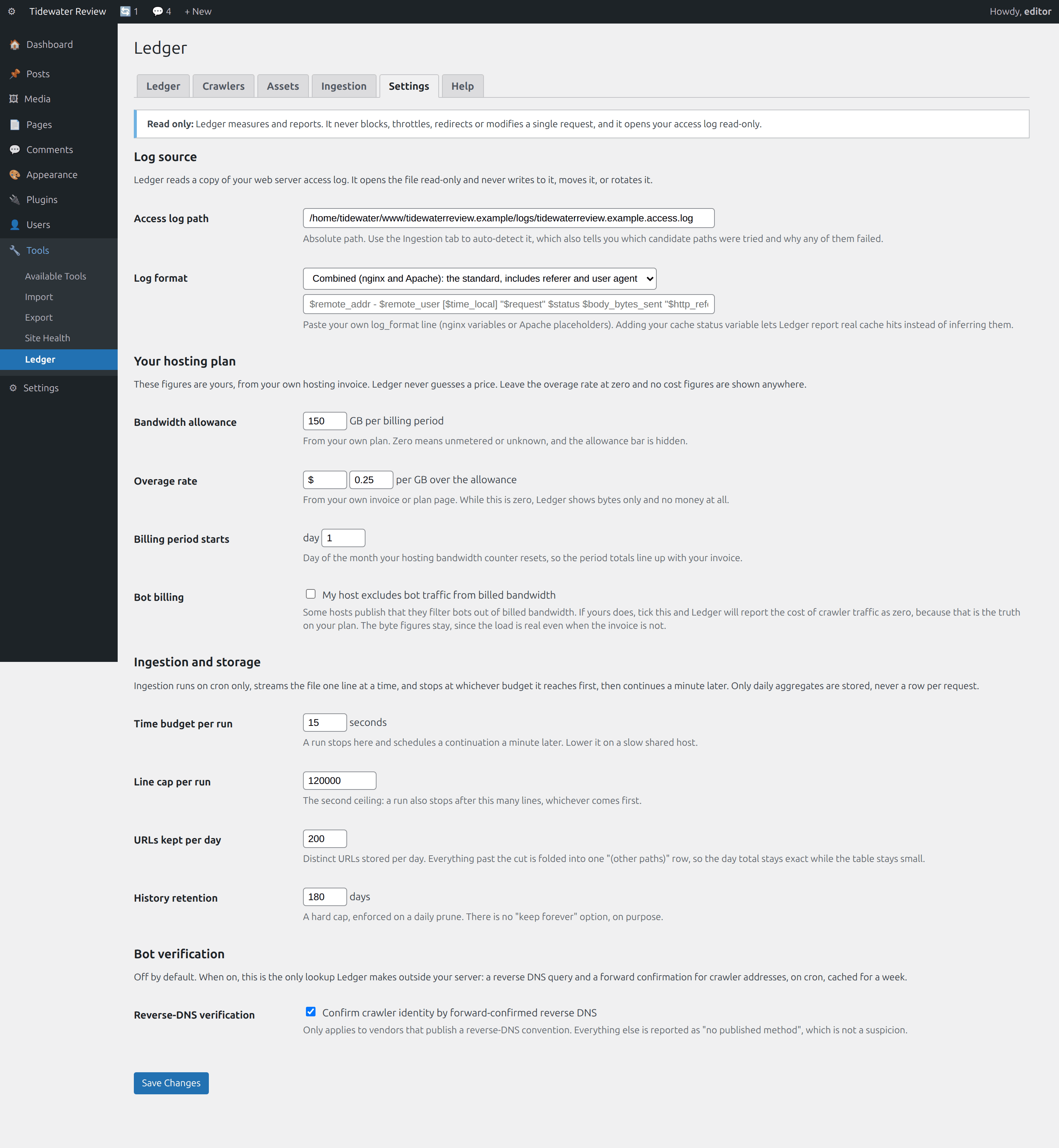
Nothing is read until an administrator confirms a log path, and saving settings can never arm or disarm by side effect. The log is opened read-only: Ledger has no code path that touches a live request, so it cannot block, throttle, redirect or modify traffic.
What it does
Ledger, feature by feature.
Finds and streams the log
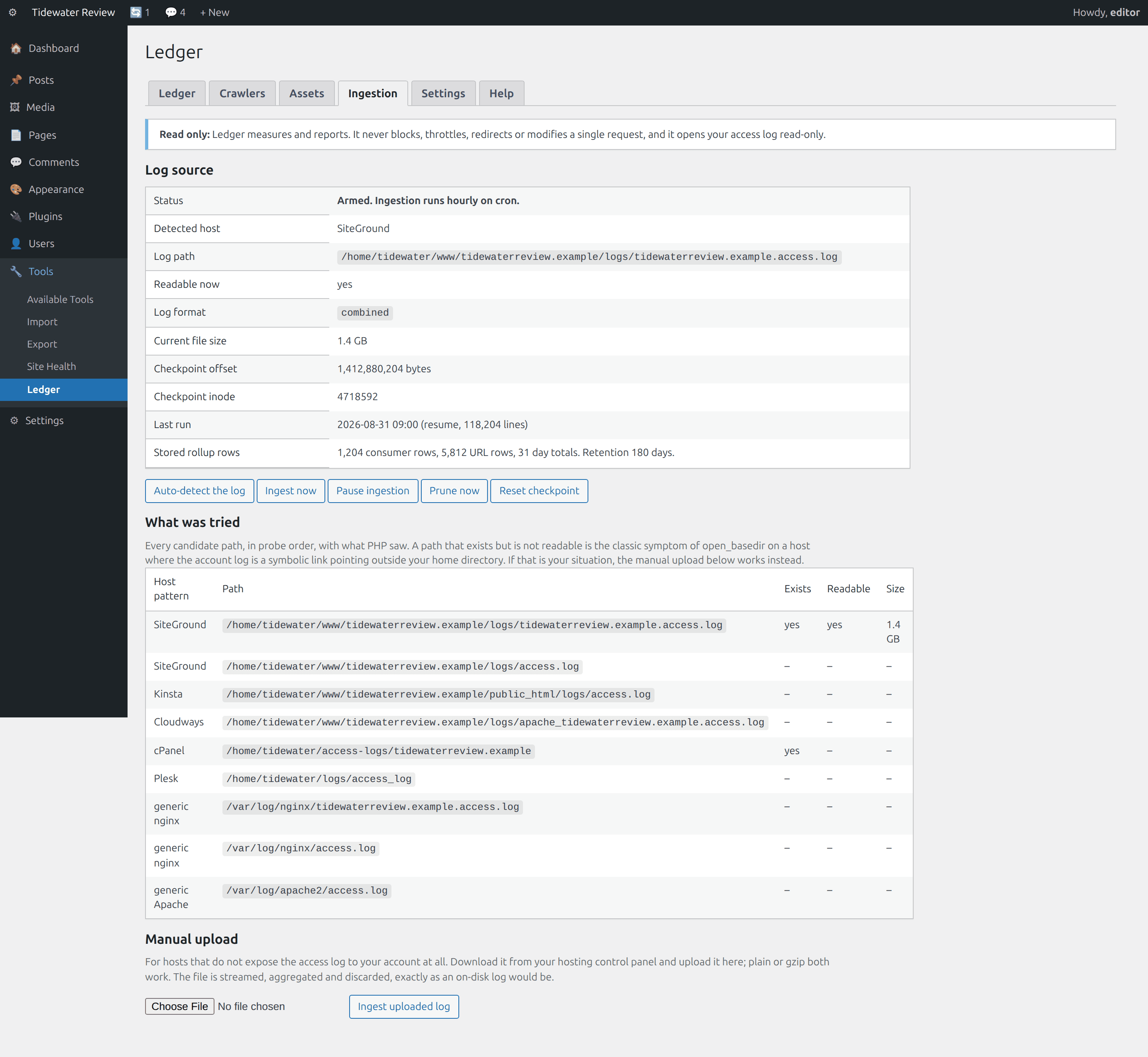
Probes the paths hosts actually document (SiteGround, Kinsta, Cloudways, cPanel, Plesk, generic nginx and Apache) and shows you the whole probe table, including the near misses. Manual path entry and manual upload as fallbacks. nginx and Apache combined out of the box, or paste your own format string.
Bytes by consumer
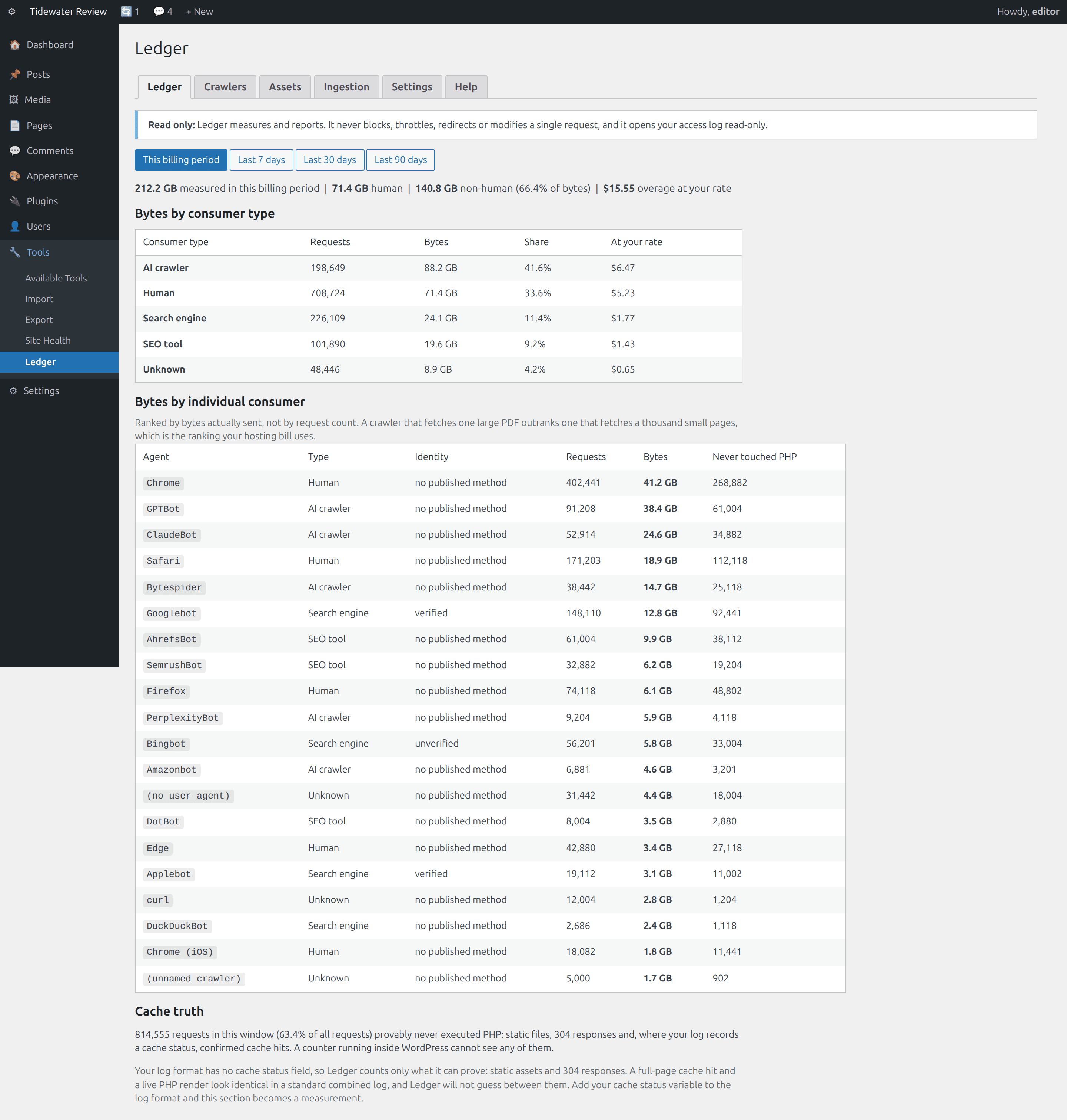
Every user agent bucketed into AI crawler, SEO tool, Search engine, Human or Unknown, ranked by summed bytes rather than request count. Optional forward-confirmed reverse DNS, so a spoofed name shows as unverified rather than being taken at its word.
Bytes by asset
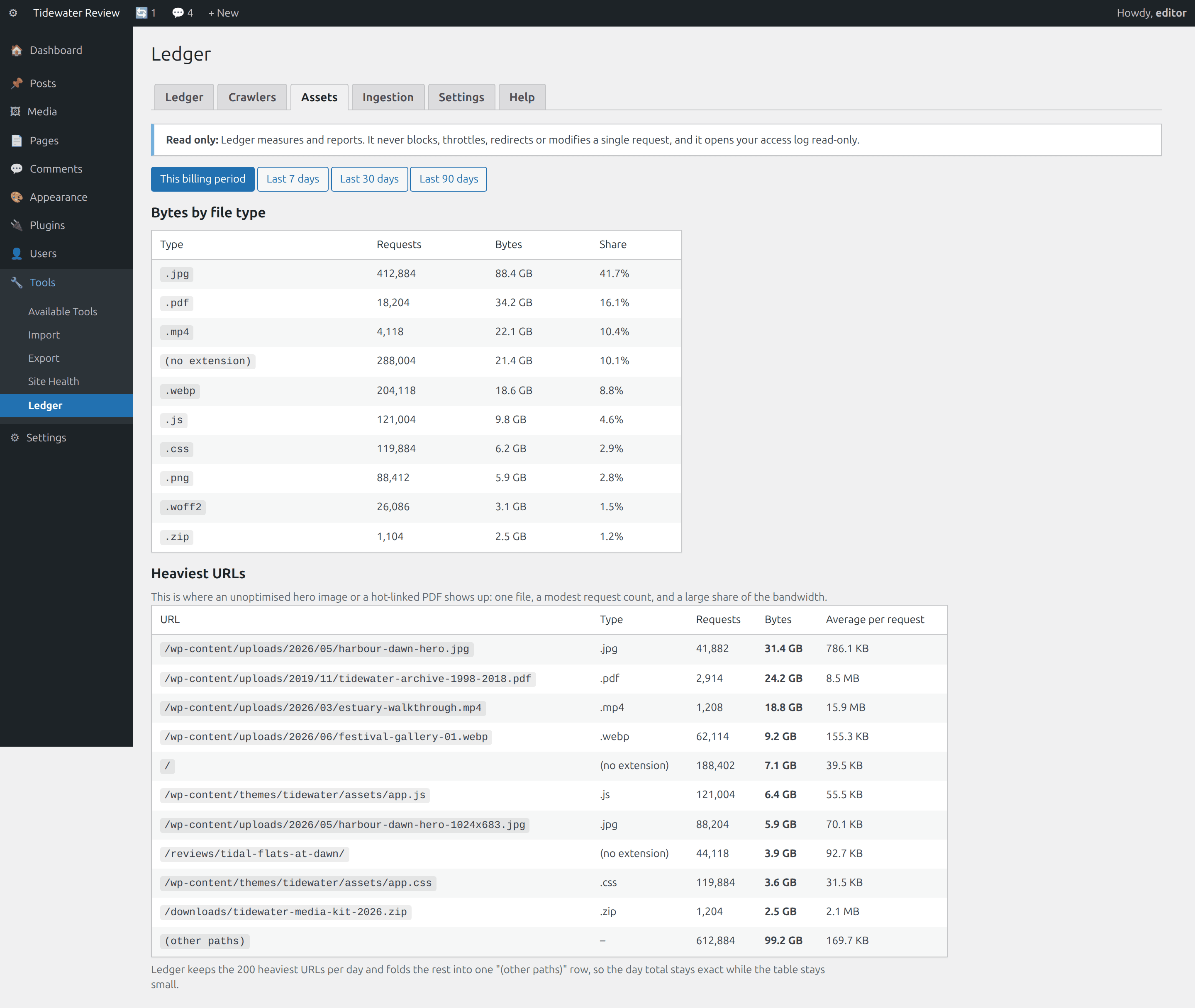
Bytes by file type, then the heaviest individual URLs with an average-per-request column. This is what surfaces the unoptimised hero image and the PDF someone is hot-linking, usually the cheapest bandwidth win on the site.
Cost at your rate
Enter your own plan allowance and overage rate once, from your own invoice, and the same tables are priced in your currency. Ledger never guesses a hosting price. Leave the rate at zero and no money appears anywhere in the plugin.
Cache truth
Counts the requests that provably never executed PHP: static assets, 304s, and confirmed cache hits where your log format records a status. Those are exactly the requests an in-PHP counter cannot see. Where it cannot prove a cache hit, it says so instead of guessing.
Rollups, never a row per hit
Daily aggregates in three small tables, a cap on URLs kept per day with the overflow folded into one row that preserves the exact day total, and a hard retention cut. There is no keep-forever option, on purpose.
Built not to become the problem it measures
Every rule below exists because of a documented failure in this corner of the ecosystem.
| Rule | How it works | Why |
|---|---|---|
| Cron only | Ingestion runs from a cron event or an explicit admin click. No hook on the front end or on an admin render. | A visitor must never be able to trigger a log read. |
| Never hold the file | Streams one line at a time, gzip-aware for compressed rotations. Memory scales with distinct agents and URLs, not with file size. | A well-regarded log viewer exhausted 1 GB of memory on a 20 MB file by parsing it whole. Its author diagnosed it publicly. |
| Two budgets | A wall-clock budget and a line budget, checked every 500 lines. Whichever hits first: save the offset, stop, schedule a continuation 60 seconds out. | A first pass over years of backlog should be a chain of short polite runs, not one long risky one. |
| Offset and inode | The checkpoint stores both. Rotation is detected by inode change, never by size or mtime. | An offset alone silently reads nothing forever after a rotation. |
| Sweep the rotation | On rotation, looks for the rotated copy across logrotate's numeric and dated suffixes, plain and gzip, and reads the tail it had not seen. | The bytes between the old offset and the end of the old file are real. If no copy is readable, it logs the gap rather than hiding it. |
| Rollups only | Daily aggregates in three tables, a per-day URL cardinality cap whose overflow row preserves the exact day total, and a hard retention cut of 7 to 400 days. | Public support threads document per-event tables large enough that a managed host identified one as the reason a site was unresponsive. |
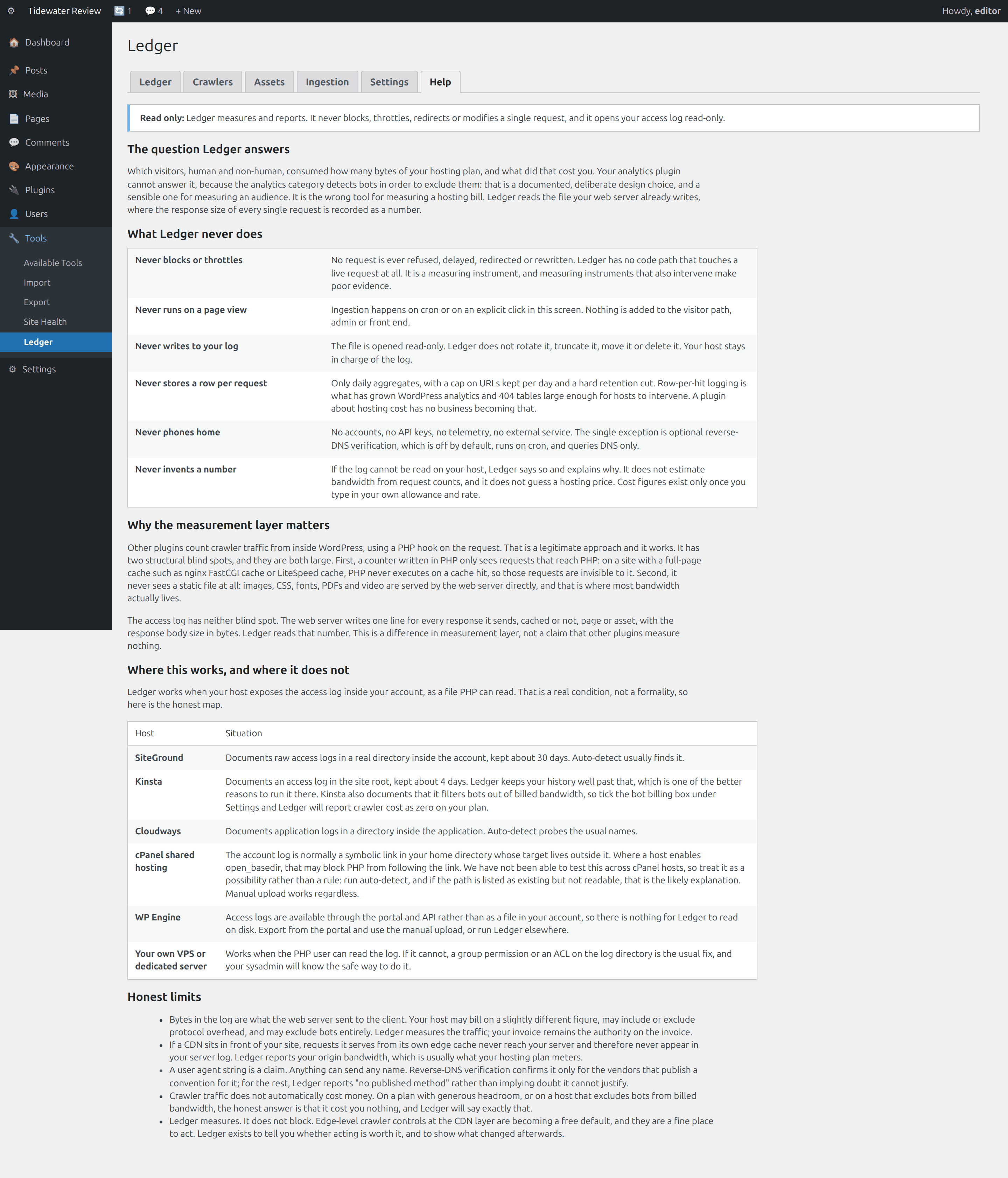
| Read only | The log is opened read-only. No code path touches a live request. Ledger cannot block, throttle, redirect or modify traffic. | A measuring instrument that also intervenes makes poor evidence. |
| Ships unarmed | Nothing is read until an administrator confirms a log path. Saving settings can never arm or disarm by side effect. | House rule across the suite: activation must never surprise you. |
See it in wp-admin
Real screens, no mockup gloss.
Rendered straight from the plugin's own admin UI in a local environment, what you install is what you see.
Inside wp-admin
The ledger
Bytes by consumer type, then every agent individually, with an identity verdict and a never-touched-PHP count.
Inside wp-admin
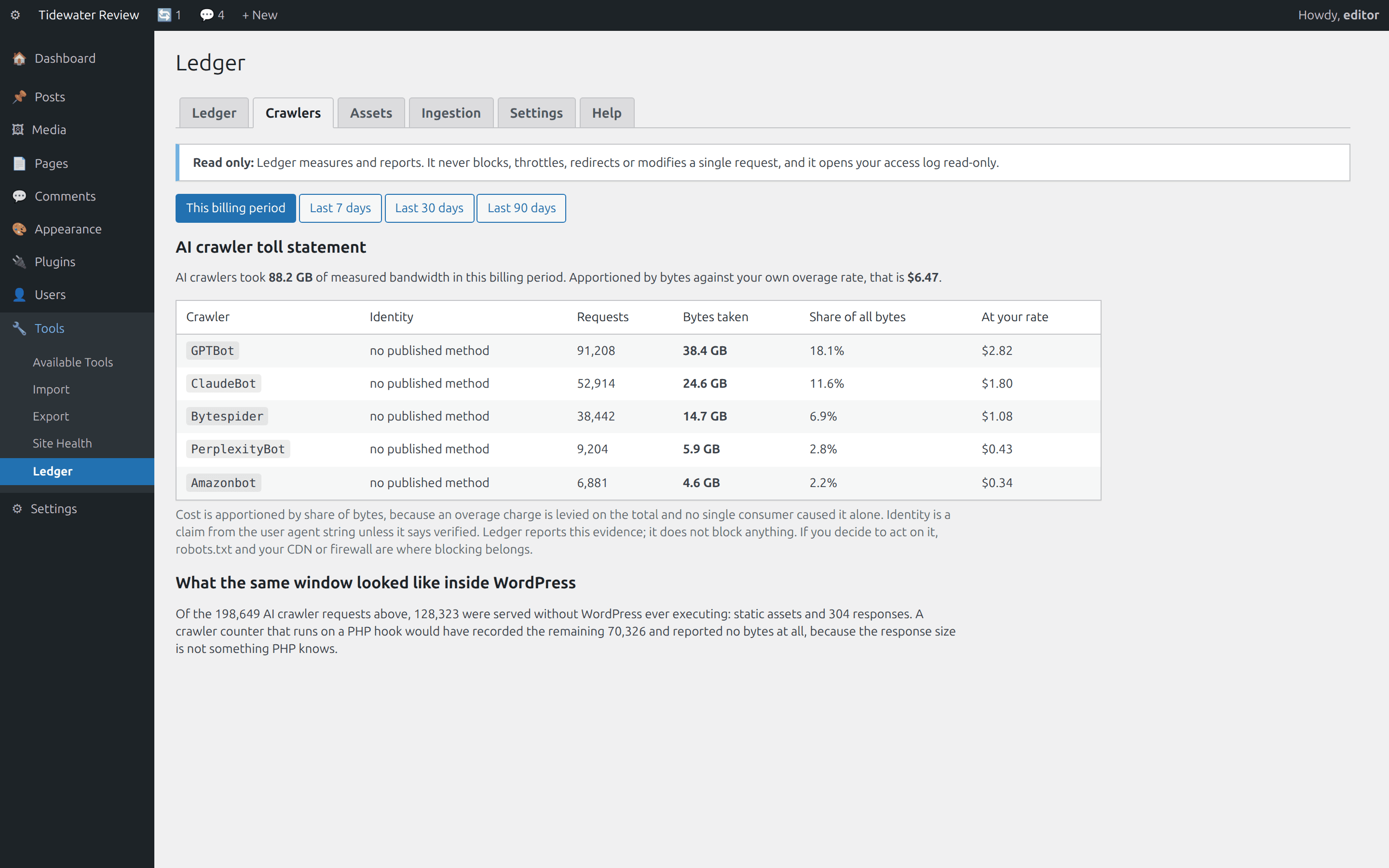
The toll statement
The AI bucket alone, in measured bytes, apportioned at the overage rate you entered.
Where it fits
Honest comparisons, category by category.
No named-competitor trash talk, just what each category of tool is good at, and where this plugin earns its keep.
vs. self-hosted analytics
Complementary, and you should keep yours. Analytics measures human page views and excludes bots on purpose, which is right for measuring an audience. Ledger measures every response the server sent, in bytes, to everyone.
- The category documents its bot exclusion in its own words; that is correct for an audience and wrong for a bill.
- A page view is a count, not a quantity, so nowhere in that pipeline is a response size learned.
- The numbers will not match and should not. Run both.
vs. crawler counters and blockers
Different measurement layer, and it cuts both ways. An in-WordPress counter is blind to cache hits and to every static file. Ledger is blind to nothing the server sent, but depends on your host exposing the log, and it cannot block anything.
- “Nobody else measures bytes” is not the claim: at least one plugin already records response sizes at the application layer.
- A PHP hook never runs on a full-page cache hit, and never sees an image, font, PDF or video at all.
- If blocking is what you want, use a blocker or your CDN edge, then use Ledger to see what it saved.
vs. hosted log analysis
Those platforms are more capable and correctly priced for a fleet, from around $99.99 per month at the low end, and they need your logs shipped off your server. Ledger reads the file in place, answers one question, and stops.
- Arbitrary queries, multi-site correlation and alerting are theirs; Ledger has four fixed reports.
- Access logs carry every IP, URL and referer. Ledger stores no IP addresses and makes no outbound request except the optional reverse-DNS lookup you can leave off.
- No agent, forwarder or edge worker to install, which matters on managed hosting where you often cannot.
Pricing
One price, everything included.
No tiers of crippled features, the single-site license is the whole plugin.
Ledger, single site
One year of updates and support. Keeps working if you don't renew.
- Finds and streams the log
- Bytes by consumer
- Bytes by asset
- Cost at your rate
- Ships unarmed
- Manual + help tab inside wp-admin
The Nest Kit
Ledger, Holdback, X-Ray, Molt, save $67 vs. buying separately.
- All 4 paid WordPress plugins, one license
- Every WordPress plugin we ship next, included
- Same 60-day no-quibble guarantee
- Priority answers from the developers
How buying works today: secure online checkout is coming soon. Until it lands, click Buy and tell us which plugin you want, we deliver the plugin zip and an invoice by email within one business day, covered by the same 60-day guarantee.
60-day money-back guarantee
Full refund within 60 days of purchase. No questions, no forms, no hard feelings. If a plugin isn’t the right fit for your store, you shouldn’t pay for it.
The manual lives inside the plugin.
Every install ships a full Help tab in wp-admin, plus these guides in the package:
- Install
- Configuration
- Usage
- Ingestion
- Log sources by host
- Troubleshooting
- FAQ
- Changelog
- Version
- 1.0.0
- Requires
- WordPress 6.0+ · PHP 7.4+ · WooCommerce not required
- Tested up to
- WordPress 6.7 · no WooCommerce needed
- License
- GPL-2.0-or-later · your data stays on your site
Security posture: we build defensive tools, so we hold ourselves to the same bar, no external calls, capability and nonce checks on every admin action, and a direct line for reports at security@lightningbyrd.com. Reports get a human answer within one business day.
FAQ
Straight answers.
Will this work on my host?
It works when your host exposes the access log inside your account as a file PHP can read. SiteGround, Kinsta and Cloudways all document exactly that, as does any VPS where the PHP user can read the log. WP Engine serves access logs through its portal and API rather than as a file, so there is nothing on disk to read; export and use the manual upload. On cPanel shared hosting the account log is normally a symbolic link pointing outside your home directory, and where a host enables open_basedir that may block the read. Auto-detect answers the question for your host in about thirty seconds and shows you every path it tried.
Does it really measure bytes, or estimate them?
Measures. Both standard combined formats record the response body size as a number: $body_bytes_sent in nginx, %b in Apache. Ledger reads that field. It does not multiply request counts by an average page size, and where it cannot read a log at all it says so rather than producing a figure.
How is this different from a crawler-tracking plugin?
Measurement layer, and we are not claiming to be the only plugin measuring bytes. Plugins in that category count from inside WordPress on a PHP hook, and some now record response sizes measured the same way. That works, and it has two blind spots: a PHP hook cannot see a full-page cache hit, because PHP never executes on one, and it never sees a static file at all. Reading the server's log has neither blind spot. It also depends on your host in a way an in-WordPress counter does not, and it cannot block.
Can it block the crawlers it finds?
No, and that is deliberate. Ledger has no code path that touches a live request. Blocking is already commodity: robots.txt for the well-behaved, and crawler controls at the CDN edge, which are increasingly a free default and a better place for it anyway. What none of those can tell you is what the traffic cost or what blocking it saved.
Do AI crawlers actually cost me money?
Sometimes, and Ledger will tell you honestly when they did not. If you were inside your bandwidth allowance all month, the overage is zero and so is every attributed figure. Some hosts publish that they exclude bot traffic from billed bandwidth; tick that box and Ledger reports crawler cost as zero, because on your plan that is the truth. The byte figures stay either way, because server load is real whether or not it reaches an invoice.
Where do the cost figures come from?
From you. Ledger ships with the overage rate at zero and shows no money anywhere until you enter your own plan allowance and rate from your own invoice. It never guesses a hosting price. Costs are then apportioned by share of bytes, because an overage charge is levied on the total and no single consumer caused it alone.
Will it slow my site down or bloat my database?
Neither, structurally. Ingestion runs from cron or an explicit click, never on a page load, so there is no code on the visitor path. Each run streams the file with a wall-clock budget and a line budget, then saves its offset and continues later; a 4 GB log and a 4 MB log use the same memory, because the file is never held. Storage is daily rollups with a per-day URL cap and a hard retention cut, and the Ingestion tab shows the live row counts so you can hold it to that.
What happens when my host rotates the log?
Ledger detects rotation by inode change, not by size or timestamp, then looks for the rotated copy across logrotate's numeric and dated suffixes, plain and gzip, and reads the tail it had not yet seen. If no rotated copy is readable, it records that the tail was not counted rather than pretending otherwise. Short host retention is an argument for the plugin: Kinsta documents about four days, SiteGround about thirty, and Ledger keeps compact rollups for up to 400.
Does it phone home or store IP addresses?
No to both. No telemetry, no external service, no account, no API key. The only outbound capability is optional forward-confirmed reverse DNS for crawler identity, which is off by default, runs on cron, queries DNS only and caches for a week. IP addresses are used transiently for that check and never written to any table. Request lines, referers and query strings are not stored either; only the normalised path.
More from the flock
The rest of the suite.
Each plugin stands alone, together they cover detection, response, prevention, and upkeep.
 $59/yr
Pulse
Store monitoring
Know the minute your store stops selling. Order-flow anomaly alerts, checkout and Store API health probes, gateway, cron, and mail watchdogs, inside WordPress, no external service.
Learn more → $49/yr
IP Shield
Fraud & abuse defense
Ban abusive customer IPs before they burn out your payment gateway, one-click bans from the order screen, automatic velocity bans, and a full audit trail.
Learn more → $49/yr
Coupon Fence
Fraud & abuse defense
A firewall for your coupon codes: stop brute-forcing, try-every-code auto-apply behavior, and first-order abuse, with leak-proof signed influencer links.
Learn more →Ledger
Sleep better by tonight.
Install Ledger, watch it in ships unarmed against your real traffic, and arm it when you've seen the receipts.