
WordPress plugin · media cleanup with a safety net
It is not possible to prove a file is unused.
So Holdback stops pretending. It finds unused media, moves it to a private quarantine instead of deleting it, and then watches live traffic. The instant anything asks for a quarantined file, Holdback serves it with a 200, restores it permanently, and tells you what it got wrong.
GPL-2.0 · WordPress 6.0+ · PHP 7.4+ · Report-only until a self-test proves interception works on your server · No outbound requests in the scan · No database tables.

- Nothing deleted during cleanup
- Pre-flight self-test
- Coverage report
- Confidence tiers, not a verdict
- Checksummed restore manifests
- No outbound requests
The problem
The category's problem, in the category's own words.
Detection of unused media is a probabilistic problem. Every incumbent ships it as a deterministic verdict, and then makes you carry the entire cost of being wrong. That is not our inference: the market leader's own FAQ explains that its cleanup will not run automatically because that “would be way too dangerous”, and its product page tells you to back up first, because “the trash makes mistakes recoverable, but a backup makes them irrelevant.” Read together, that is a candid admission.
The same shape recurs across the category, and the category has a tombstone: one popular unused-image plugin was closed by wordpress.org in January 2023 for security issues, after a review history documenting the deletion of in-use images. Nobody changed the architecture of failure. They all still ask a human to eyeball a list and press delete. The unserved product is not better detection. It is detection whose failure mode is harmless.
Starts safe
Report-only until the self-test passes
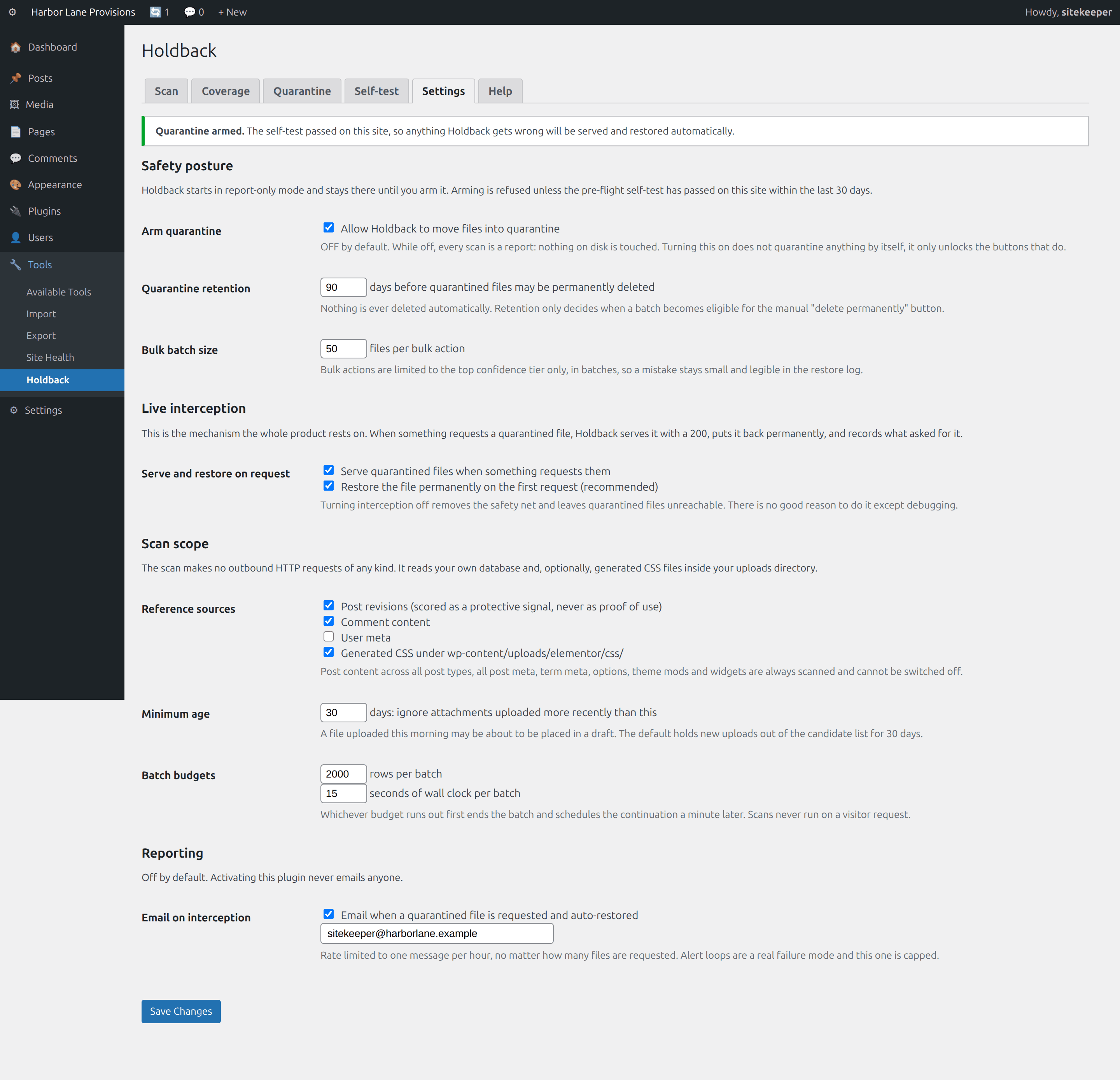
Holdback quarantines one disposable file of its own and requests it over loopback before it will touch your media. If interception did not work here, it refuses to quarantine and stays in report-only mode. Cleanup then moves files rather than deleting them, and permanent deletion is manual, one item at a time, behind a retention window.
What it does
Holdback, feature by feature.
A reference index, not per-file guessing
One batched pass maps every attachment ID and uploads URL referenced anywhere: post content across all post types including wp_block, wp_template, wp_template_part and wp_navigation, all postmeta, termmeta, usermeta, options including theme mods and widgets, comments, the custom_css post, and Elementor's generated stylesheets in uploads.
Quarantine with live interception
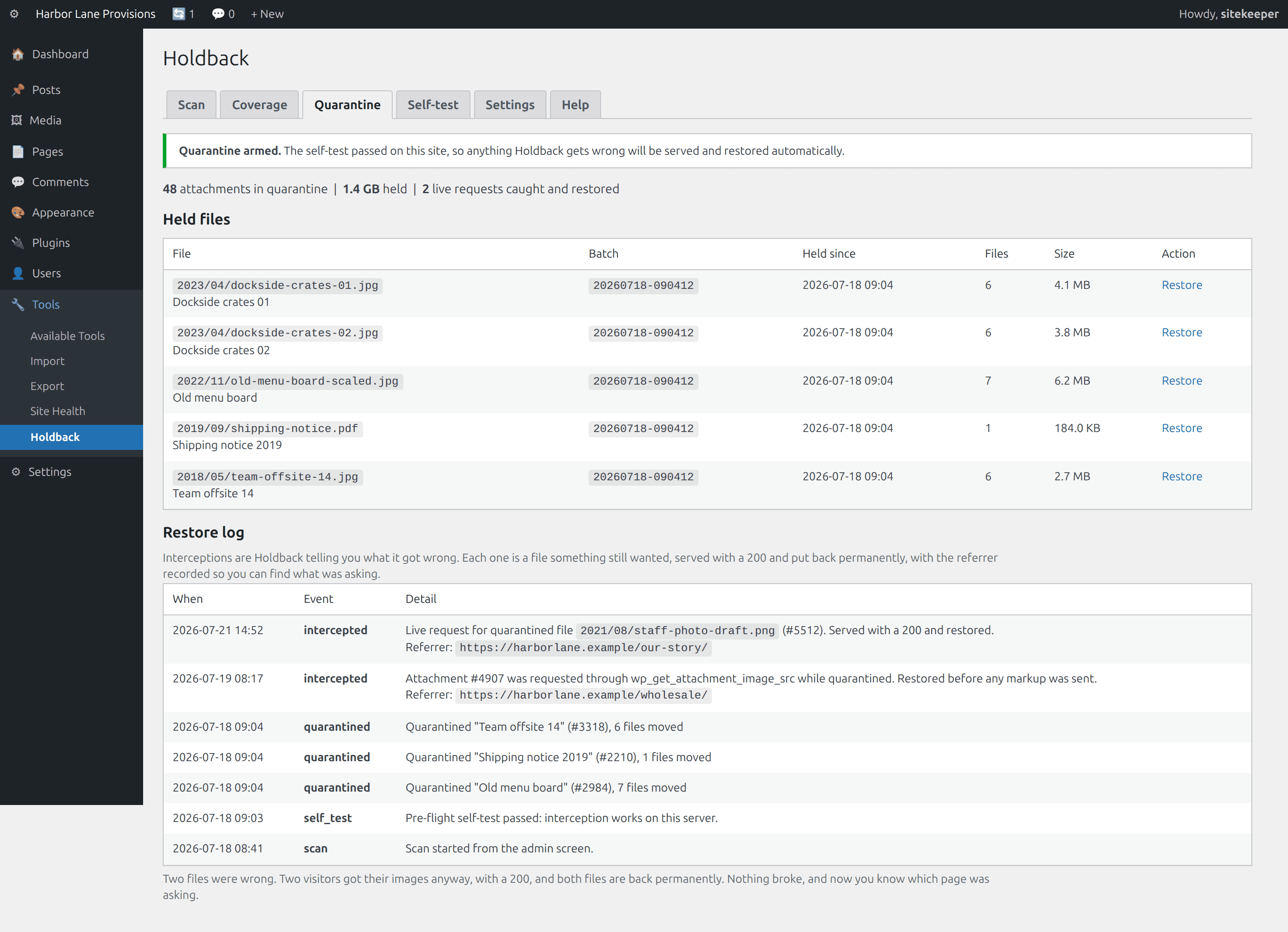
Candidates move to a private directory. WordPress routes a request for a missing file to PHP, so a request for a quarantined file falls through to Holdback: it serves the bytes with a 200 and the right content type, restores the file permanently, and logs the referrer. A false positive becomes a log line instead of a broken image.
A pre-flight self-test that can say no
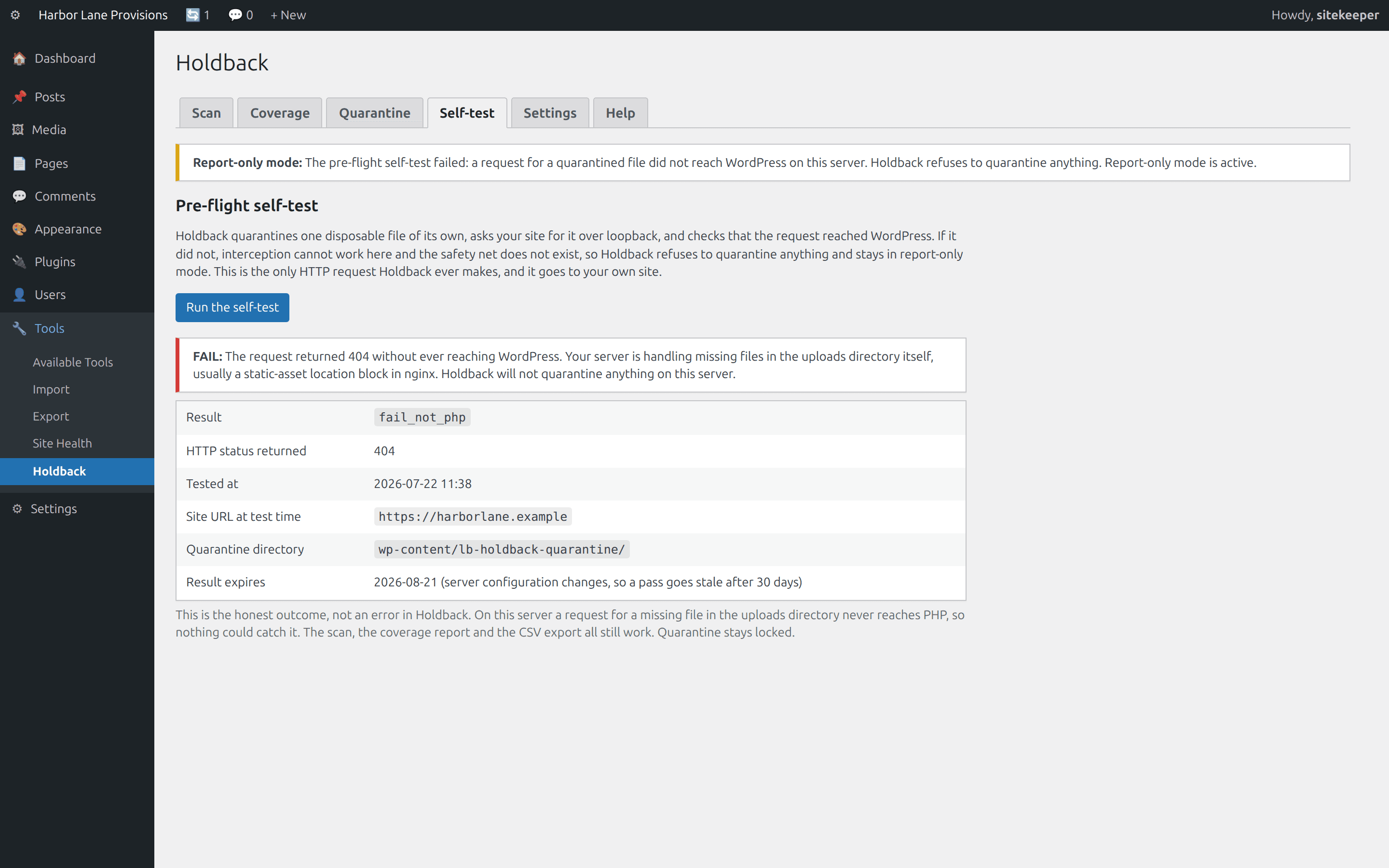
Before touching your media, Holdback quarantines one disposable file of its own and requests it over loopback. If interception did not work, because of a CDN, a media offload, or a static-asset location block that never reaches PHP, Holdback refuses to quarantine and stays in report-only mode with a plain explanation.
A coverage report: what we did not look at
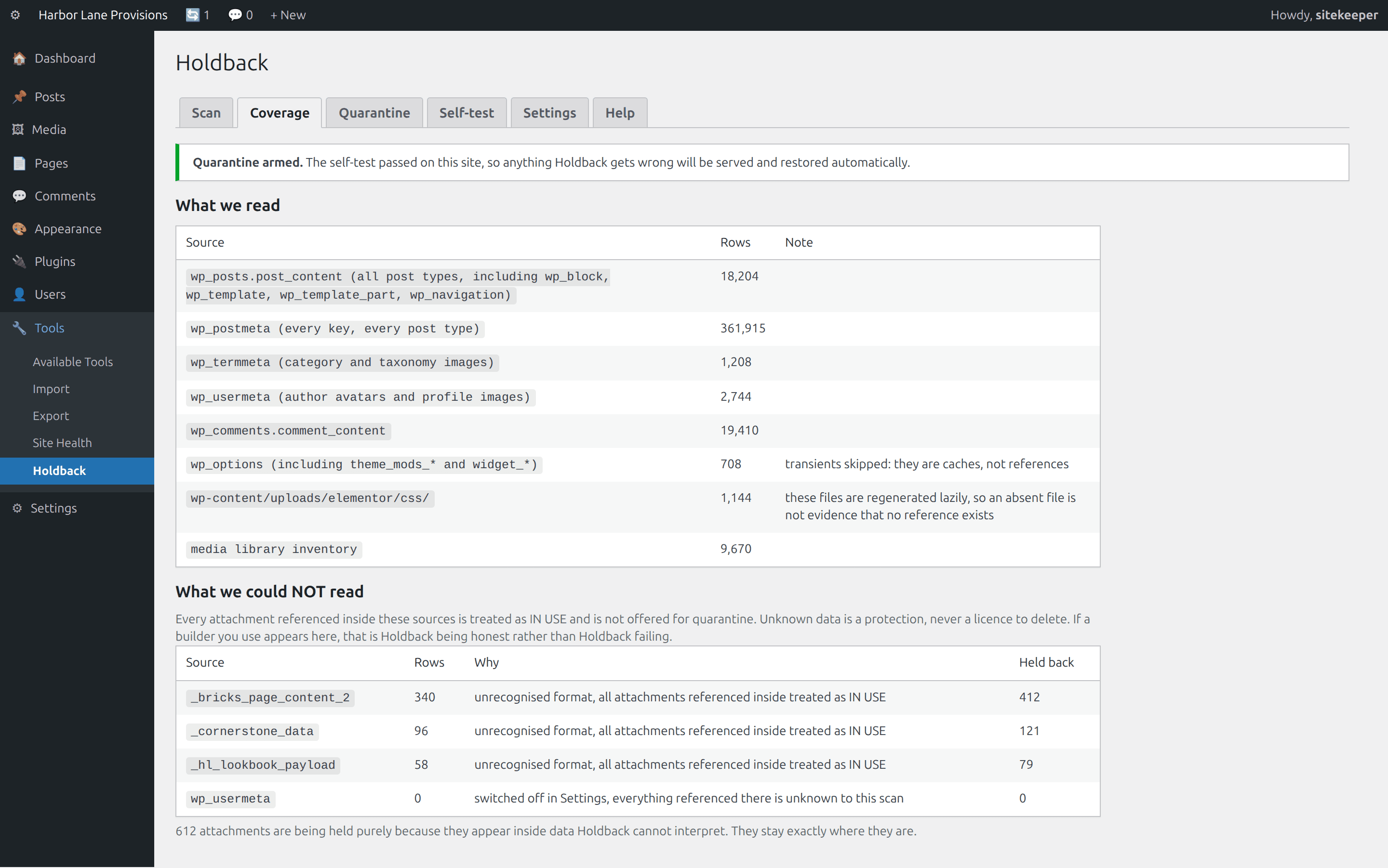
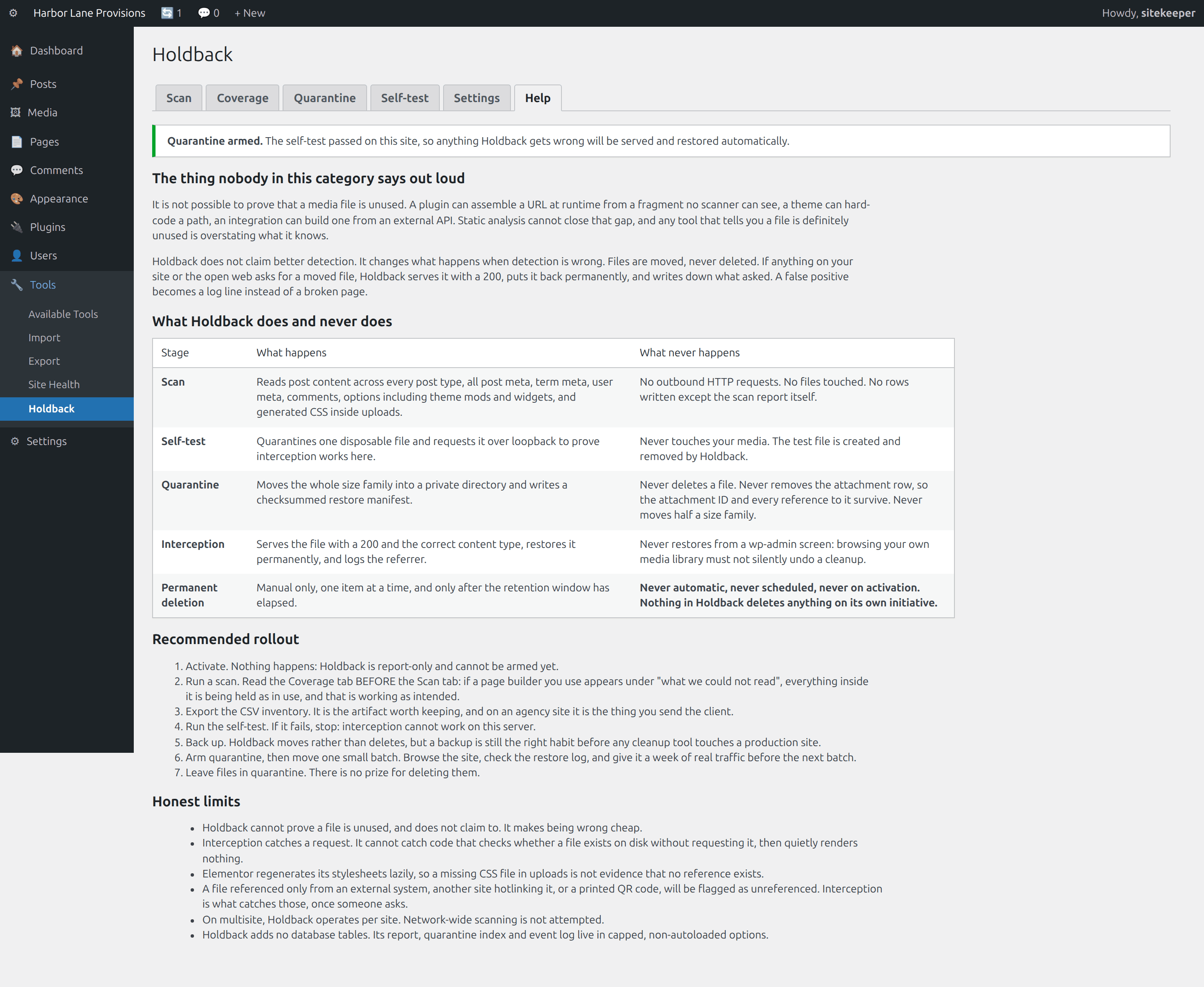
Every scan ends with an inventory of sources read and sources it could not interpret, named and counted, with everything referenced inside them treated as in use. Unknown data is a protection, never a licence to delete.
Confidence tiers, not a binary
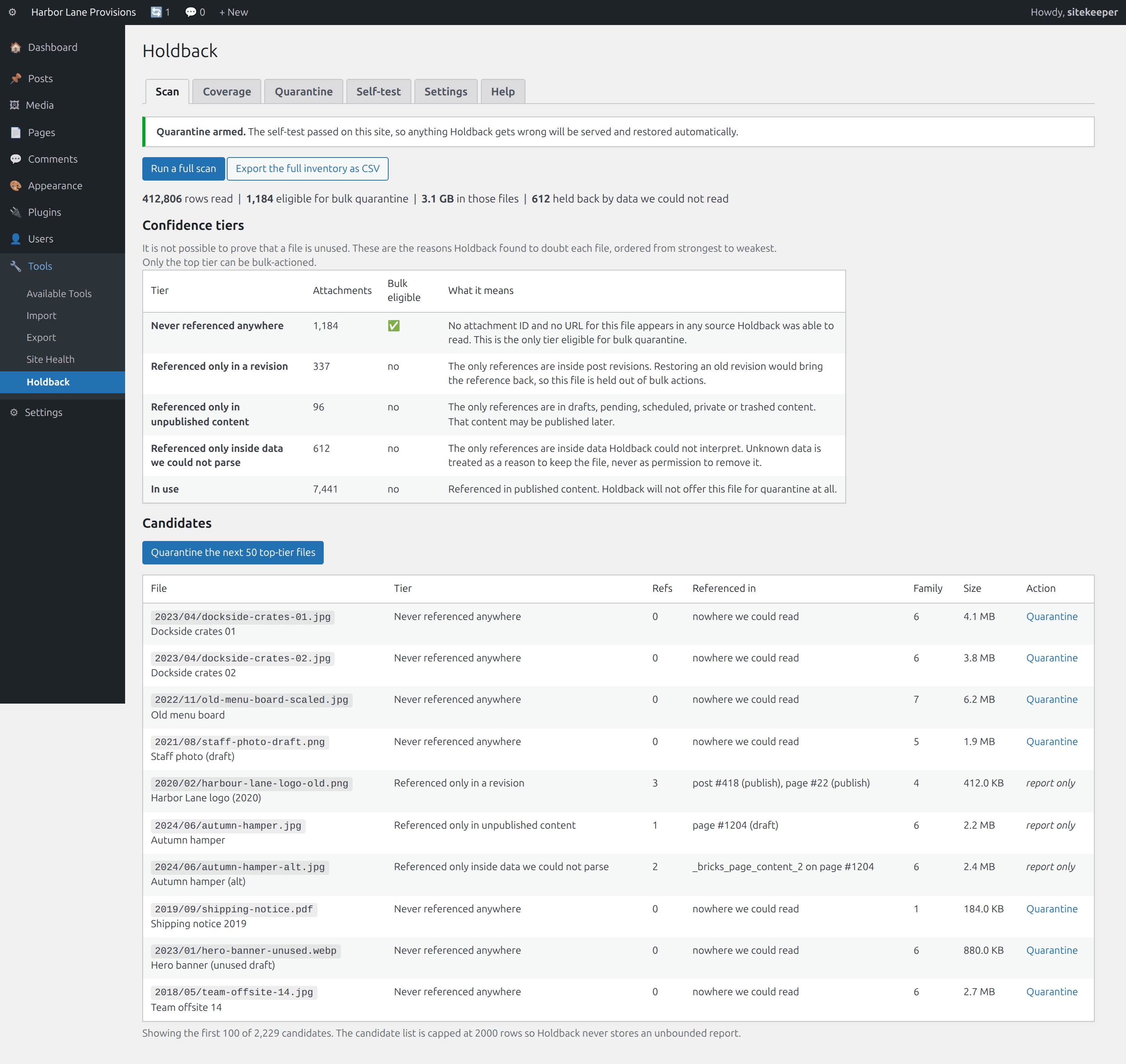
Never referenced anywhere, only in a revision, only in unpublished content, only inside data we could not parse, in use. Only the top tier is bulk-eligible, and that is enforced in code. When signals conflict, the most protective one wins.
Reversible by design
A checksummed manifest captures the attachment post row, every meta key, every file in the size family with its path, byte length, SHA-1 and permission bits. One click restores a batch byte-identically with IDs intact. Plus a CSV export of the full inventory with reference counts and locations.
What the two approaches actually do
Category-level comparison. No vendor is named here; the full write-ups link their sources.
| Typical unused-media cleaner | Holdback | |
|---|---|---|
| The claim | This file is unused | We found no reference, and here is exactly where we looked |
| Cleanup action | Delete, usually via an internal trash | Move, with a checksummed restore manifest |
| When it is wrong | A broken image, found by a visitor or nobody | A 200, the file served, restored permanently, referrer logged |
| Verdict shape | Binary used / unused | Five confidence tiers, only the top one bulk-eligible |
| Data it cannot parse | Usually silent, which becomes false positives | Listed in a coverage report; everything inside is held as in use |
| Proof the mechanism works here | None offered | A self-test that must pass before anything moves |
| Block-theme post types | Rarely scanned | wp_template, wp_template_part, wp_navigation, wp_block |
| Generated sizes | Often handled per file | The whole family is one unit, moved and restored together |
| Outbound requests during a scan | Varies by product | None at all |
| Attachment ID after cleanup | Typically gone with the post row | Unchanged; the row never leaves |
| Database tables added | Varies | None |
See it in wp-admin
Real screens, no mockup gloss.
Rendered straight from the plugin's own admin UI in a local environment, what you install is what you see.
Inside wp-admin
Scan
Five confidence tiers with counts, then the candidate list. Only the top tier can be bulk-actioned.
Inside wp-admin
Coverage
What we read, and what we could not. The held-back column is the honesty made visible.
Where it fits
Honest comparisons, category by category.
No named-competitor trash talk, just what each category of tool is good at, and where this plugin earns its keep.
vs. generic media cleaners
The category is good at enumerating and searching. What it has never solved is what happens on the entries where the shortlist is wrong. Holdback moves instead of deleting, watches traffic, and puts files back automatically.
- Holdback does not claim better detection; it claims that being wrong costs nothing, and proves the mechanism on your server first.
- The unattached filter is not a usage signal, and Holdback never uses attachment status as one.
- Running both is fine; nothing here conflicts.
vs. cleaning up by hand
Holdback is not smarter than a careful developer with a full afternoon. It is that developer's process written down and applied consistently, plus the one step nobody can do by hand: watching live traffic for the moment a decision turns out to be wrong.
- A per-file LIKE query misses the srcset intermediates, and a plain URL search misses Elementor's escaped forward slashes entirely.
- On a block-theme site the header logo lives in wp_template_part, which a query scoped to posts and pages never sees.
- Moving rather than deleting is already the careful developer's instinct; the missing piece is the watcher.
vs. external crawlers
A crawler sees your rendered public pages, so it can tell you an image 404s. It cannot tell you an image exists in your library and nothing references it, because it never sees the library.
- Crawling only reaches what is publicly linked, which vendors in that category document about their own cloud engines.
- Media cleanup asks the inverse question: which library file appears on no page, in no draft, in no template part, in no option.
- Different blind spots, so the two compose well.
Pricing
One price, everything included.
No tiers of crippled features, the single-site license is the whole plugin.
Holdback, single site
One year of updates and support. Keeps working if you don't renew.
- A reference index, not per-file guessing
- Quarantine with live interception
- A pre-flight self-test that can say no
- A coverage report: what we did not look at
- Report-only until the self-test passes
- Manual + help tab inside wp-admin
The Nest Kit
Ledger, Holdback, X-Ray, Molt, save $67 vs. buying separately.
- All 4 paid WordPress plugins, one license
- Every WordPress plugin we ship next, included
- Same 60-day no-quibble guarantee
- Priority answers from the developers
How buying works today: secure online checkout is coming soon. Until it lands, click Buy and tell us which plugin you want, we deliver the plugin zip and an invoice by email within one business day, covered by the same 60-day guarantee.
60-day money-back guarantee
Full refund within 60 days of purchase. No questions, no forms, no hard feelings. If a plugin isn’t the right fit for your store, you shouldn’t pay for it.
The manual lives inside the plugin.
Every install ships a full Help tab in wp-admin, plus these guides in the package:
- Install
- Configuration
- Usage
- Interception & the self-test
- How references are found
- Troubleshooting
- FAQ
- Changelog
- Version
- 1.0.0
- Requires
- WordPress 6.0+ · PHP 7.4+
- Tested up to
- WordPress 6.7 · no WooCommerce needed
- License
- GPL-2.0-or-later · your data stays on your site
Security posture: we build defensive tools, so we hold ourselves to the same bar, no external calls, capability and nonce checks on every admin action, and a direct line for reports at security@lightningbyrd.com. Reports get a human answer within one business day.
FAQ
Straight answers.
Can this delete my in-use images?
Not during cleanup. Cleanup moves files, it does not delete them, and anything that asks for a moved file gets it back automatically. Permanent deletion exists, but it is manual, one item at a time, gated behind a retention window, and never scheduled or automatic.
Does it find every unused image?
No, and no tool can. It is not possible to prove a file is unused: a plugin can build a URL at runtime from a fragment no scanner can see. We do not claim better detection than anyone else. We claim that being wrong costs nothing, and we prove that claim on your server before moving a single file.
So do I still need a backup?
Take one. Every move is reversible from a checksummed manifest and uninstalling restores everything, so you should not need it. Backups are still the right habit before any cleanup tool touches a production site, and anyone who tells you otherwise is selling confidence rather than software.
How does serving a deleted file even work?
WordPress's own rewrite rules only route a request to PHP when the file does not exist: RewriteCond %{REQUEST_FILENAME} !-f on Apache, try_files $uri $uri/ /index.php?$args on nginx. A quarantined file is a missing file, so the request falls through to WordPress and Holdback catches it there, sends a 200 with the correct content type, and restores the file.
What if my server does not do that?
Then interception cannot work, and Holdback refuses to quarantine anything. The self-test detects it and names the cause: a CDN or media offload answering instead of WordPress, a static-asset location block answering before PHP, or a blocked loopback request. Report-only mode still gives you the scan, the coverage report and the CSV export.
Does it make external requests? My host bans plugins that do.
The scan makes none. Not one. It reads your database and, optionally, CSS files inside your own uploads directory. The only HTTP request Holdback ever makes is the self-test's loopback request to your own site, on a button click. No telemetry, no API keys, no external services.
Does it work with Elementor, Divi, ACF and block themes?
Partly, and the coverage report tells you which parts. Elementor's JSON is parsed including the escaped forward slashes that defeat a naive URL search, and its generated stylesheets in uploads are read. Divi's URL-in-shortcode pattern is handled by URL to ID resolution. ACF stores a bare attachment ID in postmeta regardless of return format, and bare integers are matched. Formats we do not model structurally are still searched, and anything found inside them is scored as in use.
Why can I only bulk-action the top tier?
Because the other tiers exist for a reason. A file referenced only in a revision comes back the moment somebody restores that revision. A file referenced only in a draft is about to be published. Those can still be quarantined one at a time by someone who has read why they were scored down. They cannot be swept up fifty at a time.
Is “unattached” the same as unused?
No, and that confusion is the root of most of this category's problems. WordPress's unattached filter tracks which post was open in the editor when a file was uploaded. An image inserted from the media library, or used in a header, footer, widget or theme option, is unattached and fully in use. Holdback never uses attachment status as a signal.
More from the flock
The rest of the suite.
Each plugin stands alone, together they cover detection, response, prevention, and upkeep.
 $59/yr
Pulse
Store monitoring
Know the minute your store stops selling. Order-flow anomaly alerts, checkout and Store API health probes, gateway, cron, and mail watchdogs, inside WordPress, no external service.
Learn more → $49/yr
IP Shield
Fraud & abuse defense
Ban abusive customer IPs before they burn out your payment gateway, one-click bans from the order screen, automatic velocity bans, and a full audit trail.
Learn more → $49/yr
Coupon Fence
Fraud & abuse defense
A firewall for your coupon codes: stop brute-forcing, try-every-code auto-apply behavior, and first-order abuse, with leak-proof signed influencer links.
Learn more →Holdback
Sleep better by tonight.
Install Holdback, watch it in report-only until the self-test passes against your real traffic, and arm it when you've seen the receipts.