
WooCommerce extension · staging safety
WooCommerce has no idea it has been cloned.
Your copy came up with the real customer table, live gateway credentials, live mail credentials and every automation still armed. Dry Run works out that this store is a copy, shows you exactly how it decided, and stops the copy reaching a real customer or a real card.
GPL-2.0 · WordPress 6.0+ · PHP 7.4+ · WooCommerce 7.0+ · HPOS and block checkout declared · No external service, no API key, no telemetry · Activation enforces nothing.

- Detects, then waits to be armed
- Never arms on production
- Every signal shown
- Every override logged
- Blocked mail kept and previewable
- Zero outbound requests
The problem
The platform documents this gap itself.
WooCommerce's own documentation on testing orders states that “there is currently no visual difference or special status for test orders in WooCommerce.” The same page recommends a generic email-disabling plugin, and then adds, in the same paragraph, that “this plugin may not prevent emails sent via an SMTP provider, however.” SMTP plugins are extremely common on WooCommerce stores, so that caveat covers a large share of the installed base, and there is no test-order status to fall back on.
The failure this causes is on the record. In a public WordPress.org support thread, an operator describes taking a copy of production for testing, someone changing stock values on it, and back-in-stock emails going out to real customers in error. Offered a manual switch as the fix, they wrote: “That's fine, but it requires someone to remember to do it each time we pull from production.” Remembering is the failure mode. Dry Run removes the remembering.
Starts safe
Activation enforces nothing
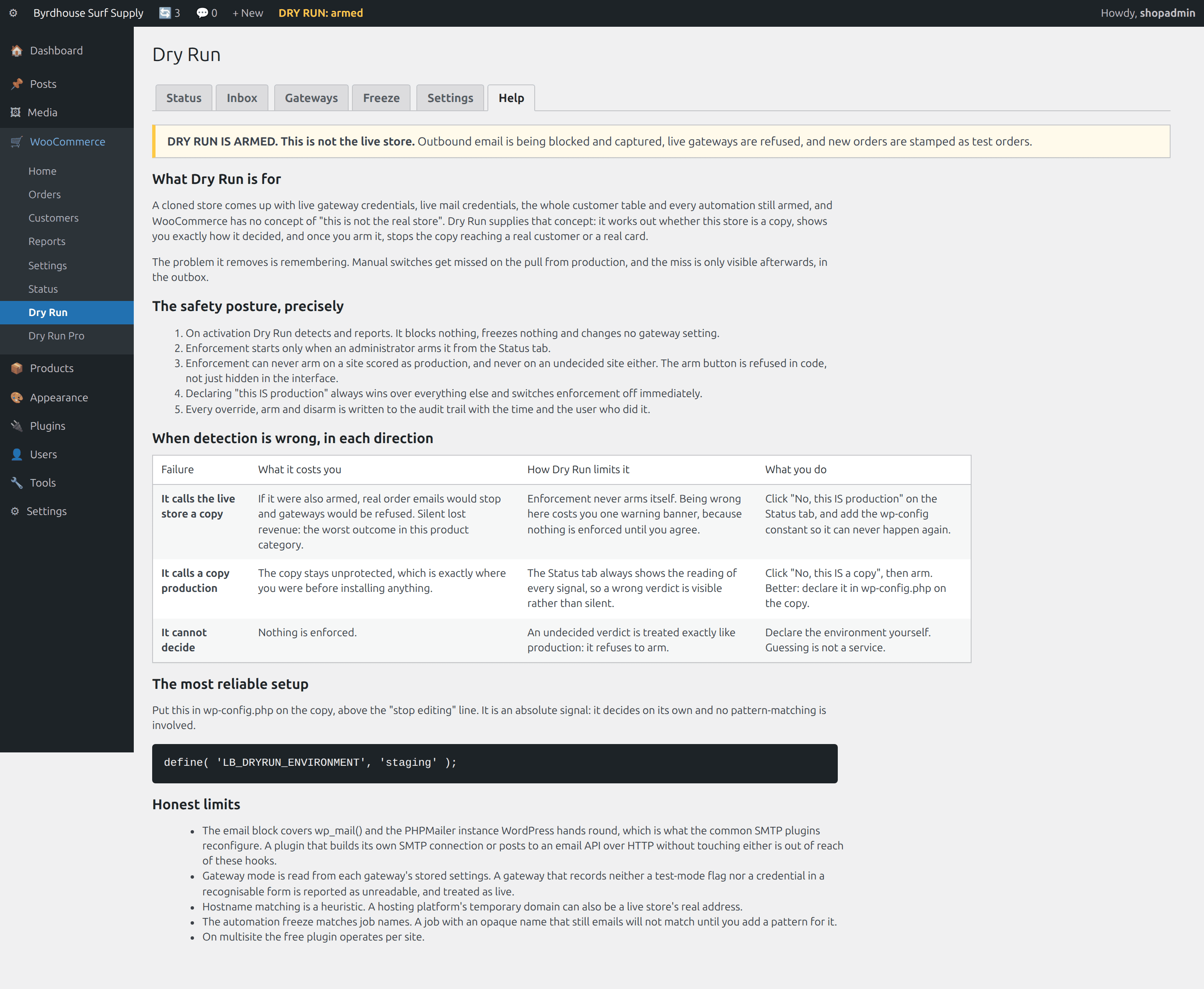
Activation detects and reports: nothing blocked, no gateway touched, no order stamped, nobody emailed. Enforcement starts only when an administrator arms it, can never arm on a site scored as production or on one the detector cannot decide about, and every override, arm and disarm is written to an audit trail that survives deletion.
What it does
Dry Run, feature by feature.
Detection you can audit
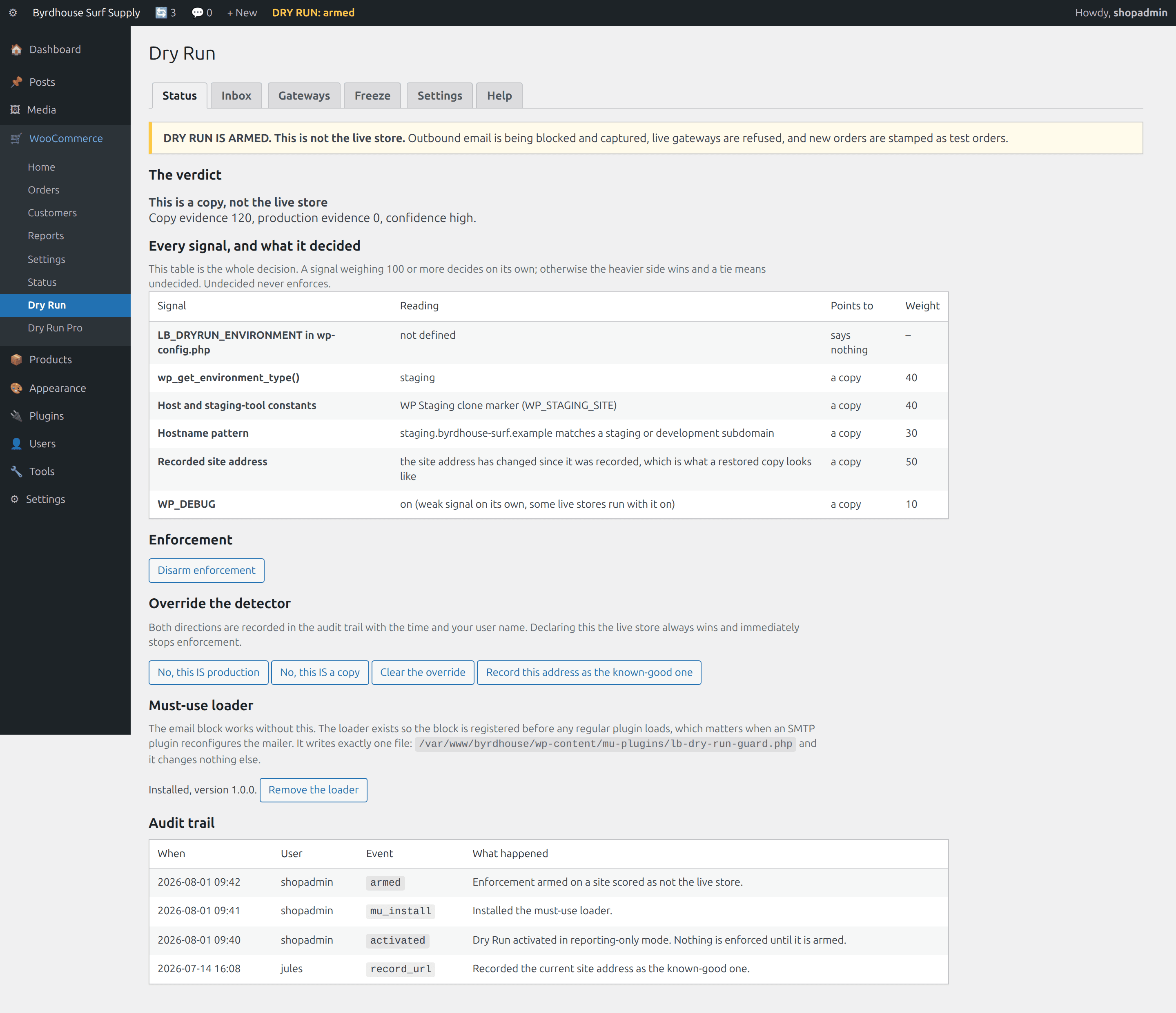
Several independent signals: the WordPress environment type, host and staging-tool constants, the hostname, a site address that changed since a recorded known-good one, and WP_DEBUG. Every signal is listed with its reading, its direction and its weight. The verdict is never a black box.
An email block that holds
Hooks pre_wp_mail and phpmailer_init. The second one is the SMTP case: replacing wp_mail alone does not stop a plugin that already reconfigured the mailer. An optional must-use loader registers the hooks before any regular plugin loads.
A captured inbox
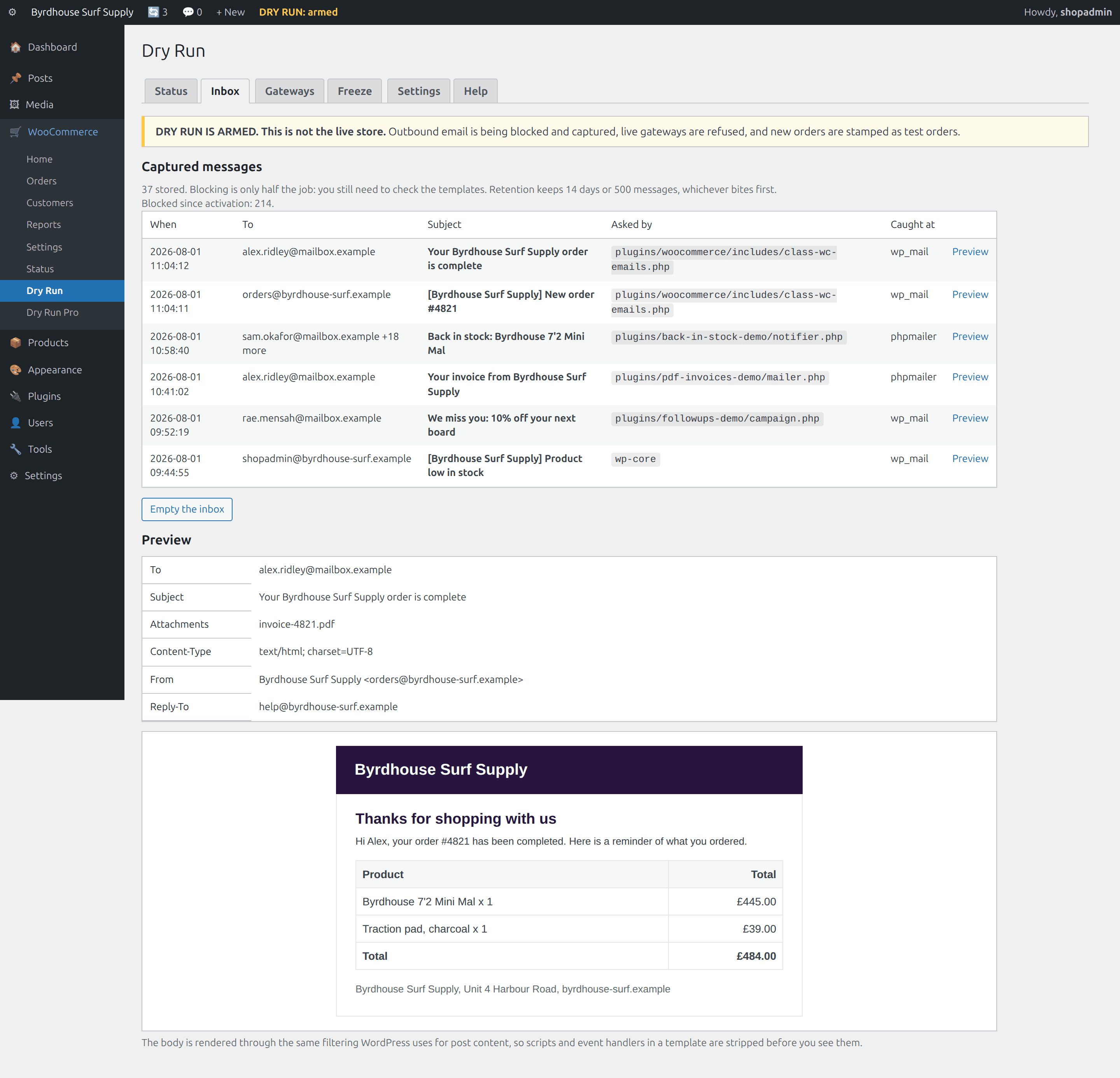
Blocking is only half the job, because you still have to check the templates. Every blocked message is stored with its recipients, subject, headers and rendered HTML body, and previewable in wp-admin. Capped by age, by count and by body size.
Gateway lockdown
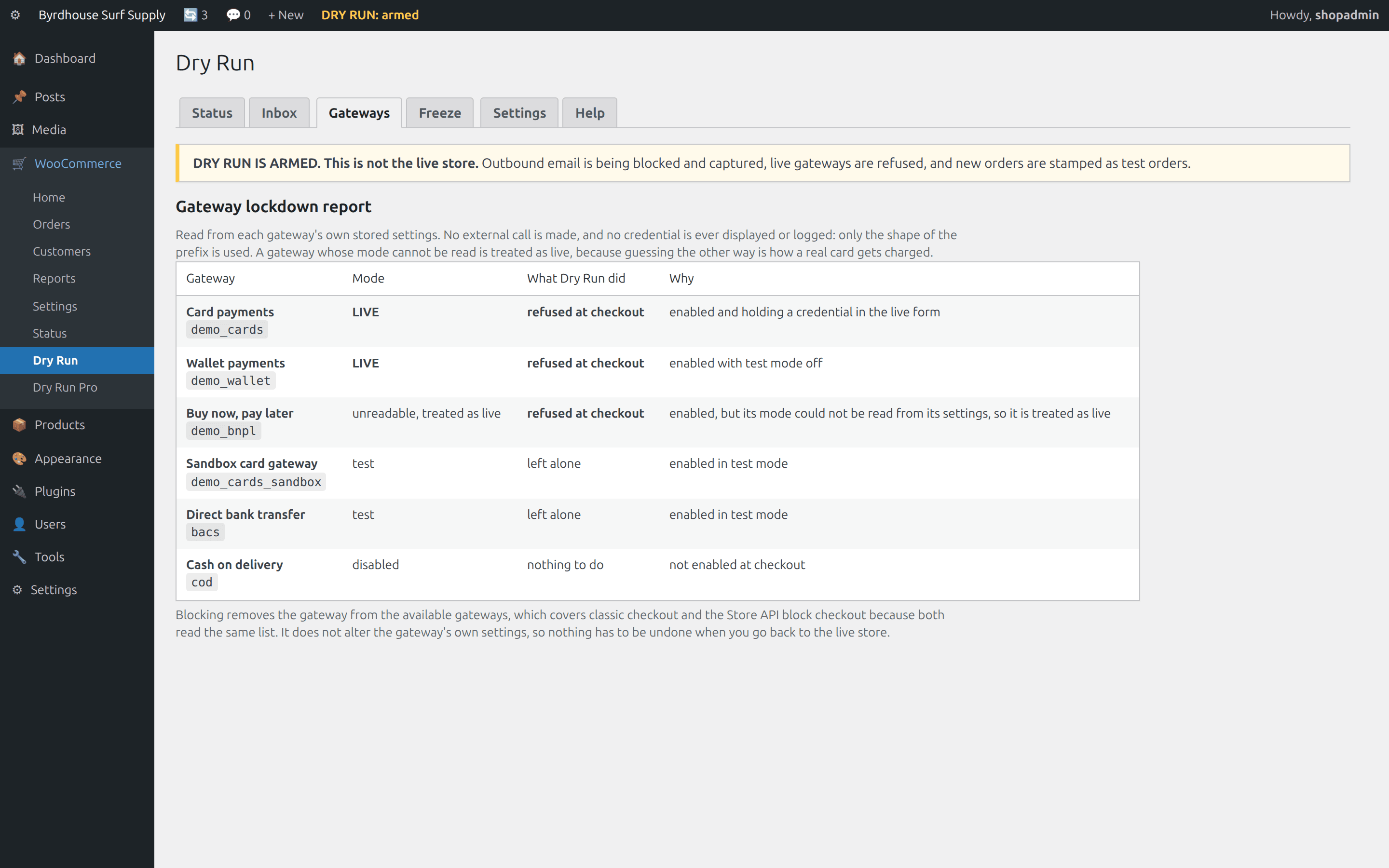
Every gateway classified from its own stored settings, with a loud report of which one and what was done. Live and unreadable gateways are removed from checkout, covering classic and Store API block checkout. No gateway setting is ever edited.
Banner and order stamping
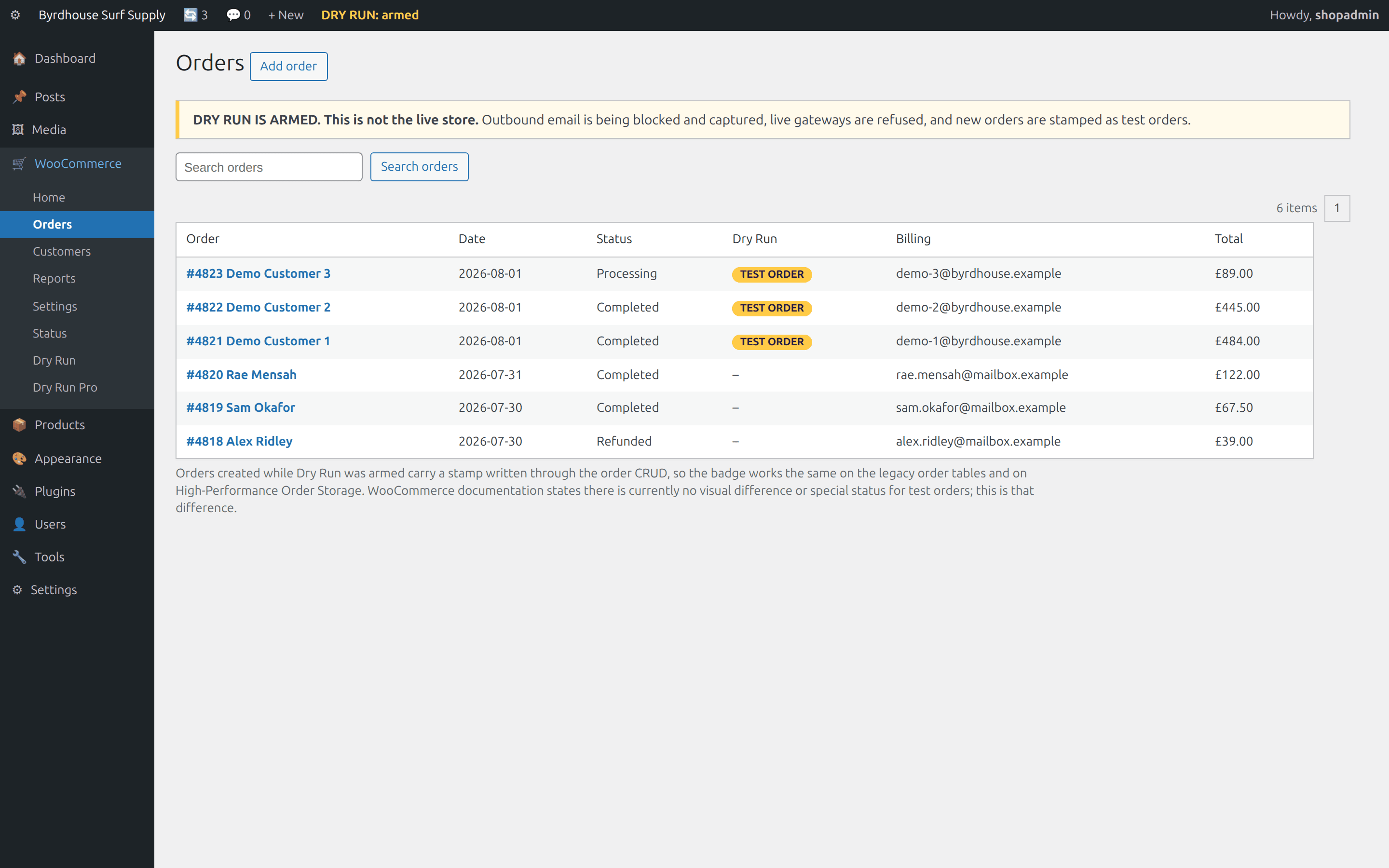
A non-dismissible admin banner naming the environment, and a TEST ORDER badge on every order created while armed. The stamp is written through the order CRUD, so the legacy tables and High-Performance Order Storage both work.
Automation freeze
Scheduled jobs that email, webhook deliveries, subscription renewals and stock notices are paused. Inventory work, order editing and imports keep running. Every frozen item is listed with a count, and the freeze is reversible.
Specification, with the condition each part depends on
Every environment-dependent claim carries its condition in the same row, because a safety tool that overstates its reach is worse than none.
| Area | What it actually does | The condition it depends on |
|---|---|---|
| Detection signals | wp-config declaration (decides alone), recorded site-address fingerprint, WordPress environment type, host and staging-tool constants, hostname patterns, WP_DEBUG | The fingerprint signal needs an address to have been recorded, which activation does. Host constants only exist where that platform defines them. |
| Email interception | pre_wp_mail at priority 1, phpmailer_init at PHP_INT_MIN, optional must-use loader | Covers senders that use wp_mail or WordPress's PHPMailer instance. A plugin with its own SMTP client or HTTP email API call is out of reach of these hooks. |
| Capture storage | One custom table via dbDelta with a stored schema version, indexed on created_at | Pruned daily and on inbox view, by age and by count, at most 500 rows per pass, with each body clipped on the way in. |
| Gateway lockdown | Filters the available payment gateways, so classic checkout and the Store API are both covered | Mode is read from each gateway's own stored settings. A gateway with no readable test-mode flag or credential is reported unreadable and treated as live. |
| Order stamping | Meta written through the order CRUD, read through wc_get_orders | Only orders created while armed. Nothing is stamped retroactively. |
| Automation freeze | Action Scheduler jobs, WP-Cron events, WooCommerce webhook deliveries | Matches on hook name. A job whose name says nothing about what it does needs a pattern adding. |
| Integration freeze (Pro) | pre_http_request, two modes, shipped host list plus your own | Covers calls made through the WordPress HTTP API. An integration that opens its own connection is not reachable. |
| Network | No outbound HTTP request of any kind, in either plugin | No condition. There is no API key, no licence check and no update ping. |
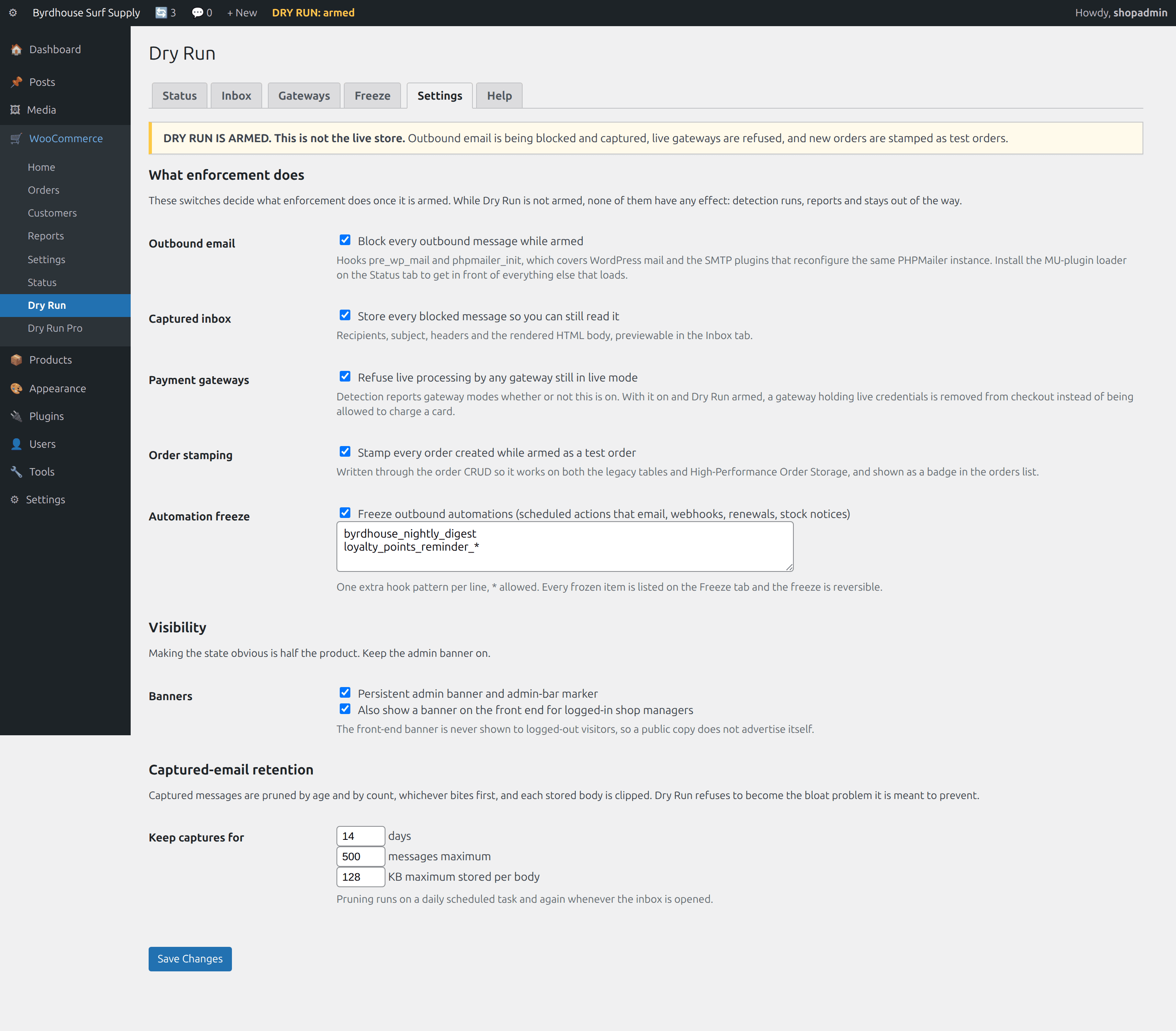
| Storage footprint | One non-autoloaded settings option per plugin, capped non-autoloaded audit and frozen-item options, one capped table | Retention limits are operator-configurable within documented ranges. |
See it in wp-admin
Real screens, no mockup gloss.
Rendered straight from the plugin's own admin UI in a local environment, what you install is what you see.
Inside wp-admin
Status
The verdict, and every signal that produced it with its reading and weight.
Inside wp-admin
Inbox
Blocked messages with a preview open: recipients, headers, rendered body.
Where it fits
Honest comparisons, category by category.
No named-competitor trash talk, just what each category of tool is good at, and where this plugin earns its keep.
vs. generic email disablers
The category is a switch, and a good one. Its documented weakness is the SMTP path, and its structural weakness is that somebody has to flip it every single time. Dry Run is a verdict plus a switch, and the verdict is the product.
- WordPress builds one PHPMailer instance and fires phpmailer_init, which is exactly what SMTP plugins use; a block that only replaces wp_mail does not necessarily survive that.
- Dry Run keeps the messages, so the safe copy is where you do email QA.
- A sender that opens its own socket is out of reach of any filter-based block, and we say so.
vs. staging and cloning tools
They make the copy, and they are good at it. They do not make the copy safe to operate a store on: the clone still has live credentials, real customers and every job queued.
- Nothing in the cloning step changes gateway keys, mail credentials, queued jobs, webhooks or due renewals.
- Dry Run reads the site's own signals, so it works on a copy made any way at all, including a database restore.
- Use both. Dry Run does not create copies and never will.
vs. the manual clone checklist
Your checklist is correct. That is the problem: it has to be run by a person before anything else happens, and the window before step three is when the damage occurs.
- An import, a stock edit or a bulk status change inside that window does real damage from a machine nobody is watching.
- Four of the checklist's items get automated, and the wp-config constant makes the verdict decide on its own.
- The items that need judgment, like scrubbing customer data, honestly stay yours.
Pricing
Free plugin. Optional Pro add-on.
The free plugin is on WordPress.org and carries the core promise in full. Pro is a separate add-on, and what sits on each side is listed below in full.
Dry Run
The whole safety promise is the free tier: detection, the hard block, the captured inbox, gateway lockdown, order stamping and the automation freeze. There is exactly one upgrade mention in it, a single row at the bottom of the Help tab.
- Environment detection with every signal and weight shown
- Email block at pre_wp_mail and phpmailer_init
- Captured inbox with full HTML preview
- Gateway live-mode lockdown and report
- Order stamping and orders-list badge
- Automation freeze, listed and reversible
Dry Run Pro
Professional workflow on top, as a separate add-on. Every Pro rule can only loosen what happens on a copy: the guard that refuses to arm on a production verdict lives in the free plugin, and Pro has no route past it.
- Recipient allowlist and redirect to one QA inbox
- Named environment profiles, pinnable from wp-config
- Integration freeze for shipping, accounting, ERP and CRM
- Bulk test-order creation and safe purge
- Promote-to-production checklist
- Multisite network view and WP-CLI
The free plugin is the whole safety promise and it stays free. Pro is a separate add-on for professional workflow, and the free plugin keeps working exactly the same without it.
The Storm Kit
Pulse, IP Shield, Coupon Fence, Preflight, Dry Run, save $116 vs. buying separately.
- All 5 paid WooCommerce plugins, one license
- Every WooCommerce plugin we ship next, included
- Same 60-day no-quibble guarantee
- Priority answers from the developers
How buying works today: secure online checkout is coming soon. Until it lands, click Buy and tell us which plugin you want, we deliver the plugin zip and an invoice by email within one business day, covered by the same 60-day guarantee.
60-day money-back guarantee
Full refund within 60 days of purchase. No questions, no forms, no hard feelings. If a plugin isn’t the right fit for your store, you shouldn’t pay for it.
The manual lives inside the plugin.
Every install ships a full Help tab in wp-admin, plus these guides in the package:
- Install
- Configuration
- Usage
- Environment detection
- The email block
- Troubleshooting
- FAQ
- Changelog
- Version
- 1.0.0
- Requires
- WordPress 6.0+ · WooCommerce 7.0+ · PHP 7.4+
- Tested up to
- WordPress 6.7 · WooCommerce 8.2 · HPOS compatible
- License
- GPL-2.0-or-later · your data stays on your site
Security posture: we build defensive tools, so we hold ourselves to the same bar, no external calls, capability and nonce checks on every admin action, and a direct line for reports at security@lightningbyrd.com. Reports get a human answer within one business day.
FAQ
Straight answers.
Could this stop my live store emailing customers?
Activation enforces nothing, and enforcement cannot arm on a site scored as production even if you click the button: the handler re-checks the verdict and refuses, then records the refusal. The worst case of a wrong verdict on your live store is one warning banner.
I use an SMTP plugin. Does the block actually work?
That is the case this was built for. Replacing wp_mail() alone does not stop a plugin that has already reconfigured WordPress's PHPMailer instance, which is exactly what SMTP plugins do. Dry Run also hooks phpmailer_init and strips the mailer there, and the optional must-use loader makes sure those hooks are registered before any regular plugin loads.
What about a plugin that sends through its own API client?
Out of reach of these hooks, and we say so rather than implying coverage we do not have. No filter-based block reaches a sender that never touches wp_mail() or WordPress's PHPMailer. Pro's integration freeze catches senders that use the WordPress HTTP API; one that opens its own socket is still out of reach.
What if it gets the verdict wrong?
Both directions are documented in the Help tab and in the docs. Wrong towards “copy” on a live store costs one banner, because nothing is enforced until you agree. Wrong towards “production” on a copy leaves you exactly where you were before installing anything. In both cases the signal table shows you which row to argue with, and one logged click fixes it.
Does it work with High-Performance Order Storage and block checkout?
Yes to both, and both compatibilities are declared. Order stamps are written through the order CRUD and read through wc_get_orders(). Gateway lockdown filters the available payment gateways, which is the same list the Store API reads.
Why is a gateway with an unreadable mode treated as live?
Because the other default is the one that charges a real card. If Dry Run cannot read a gateway's mode from its own settings, it says so plainly on the Gateways tab and refuses it, rather than assuming the reassuring answer.
Will the captured inbox bloat my database?
It is capped by age and by count, whichever bites first, and each body is clipped on the way in. Defaults are 14 days, 500 messages and 128 KB per body, pruned daily and again whenever you open the tab. A plugin about a store hurting itself must not become a storage problem of its own.
Does it phone home, or need an account?
No. Neither plugin makes an outbound HTTP request of any kind. There is no API key, no licence check, no update ping and no telemetry. Pro is a downloadable plugin, not a service.
Is the free tier crippled to sell Pro?
No. The whole safety promise is free: detection, the hard block, the captured inbox, gateway lockdown, order stamping and the automation freeze. Pro adds professional workflow: allowlists, profiles, integration freeze, test-order lifecycle, promotion checklist, multisite and WP-CLI. There is exactly one upgrade mention in the free plugin, a single row at the bottom of the Help tab.
More from the flock
The rest of the suite.
Each plugin stands alone, together they cover detection, response, prevention, and upkeep.
 $59/yr
Pulse
Store monitoring
Know the minute your store stops selling. Order-flow anomaly alerts, checkout and Store API health probes, gateway, cron, and mail watchdogs, inside WordPress, no external service.
Learn more → $49/yr
IP Shield
Fraud & abuse defense
Ban abusive customer IPs before they burn out your payment gateway, one-click bans from the order screen, automatic velocity bans, and a full audit trail.
Learn more → $49/yr
Coupon Fence
Fraud & abuse defense
A firewall for your coupon codes: stop brute-forcing, try-every-code auto-apply behavior, and first-order abuse, with leak-proof signed influencer links.
Learn more →Dry Run
Sleep better by tonight.
Install Dry Run, watch it in activation enforces nothing against your real traffic, and arm it when you've seen the receipts.